Mikko Suomalainen
Well-known member
Hi
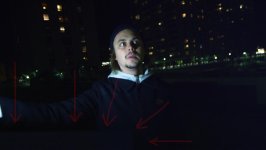
I've had my R1 MX since last december, and now first time I have a problem with it. A friend filmed some test shots in dark conditions, and when viewing the shots on computer, they show a "dead" grey bar on left bottom, but only on a few frames.
I haven't had any problems filming in daylight, but I haven't filmed in this dark conditions yet.
The material was filmed handheld on CF-cards, 4K 16:9, and I think ISO 1600.
I attached a picture, where you can see the grey bar.
Has anyone had same kind of problems, or do you have idea what it might be?
-Mikko
I've had my R1 MX since last december, and now first time I have a problem with it. A friend filmed some test shots in dark conditions, and when viewing the shots on computer, they show a "dead" grey bar on left bottom, but only on a few frames.
I haven't had any problems filming in daylight, but I haven't filmed in this dark conditions yet.
The material was filmed handheld on CF-cards, 4K 16:9, and I think ISO 1600.
I attached a picture, where you can see the grey bar.
Has anyone had same kind of problems, or do you have idea what it might be?
-Mikko