Welcome to our community

Be a part of something great, join today!

  • Hey all, just changed over the backend after 15 years I figured time to give it a bit of an update, its probably gonna be a bit weird for most of you and i am sure there is a few bugs to work out but it should kinda work the same as before... hopefully :)

Blue r3d's in Premiere

Tyler Malay

Well-known member
Joined
Jan 8, 2014
Messages
45
Reaction score
0
Points
0
Location
Hood River, OR
I'm seeing a pretty heavy blue cast on my r3d clips in premiere 7.2.2 and speedgrade both on footage I shot yesterday as well as months ago.

The footage looks just fine in RCX and through finder.

I tried saving the RMD from RCX and loading it via the source settings window but it was still blue.

Any ideas?
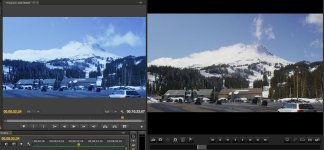
 

Attachments

  • PREMIEREvsRCX.jpg
    PREMIEREvsRCX.jpg
    89.5 KB · Views: 0
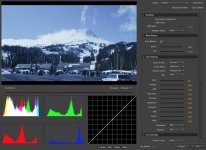
Here's a screenshot of the source settings in Premiere. If I use the WB slider and go to 9400 this is what I get to. But if I use the WB eye dropper it still says 9400, although looks a little closer to what it should.

Also, I was in a rush to get this project delivered and read on the Adobe forums that reverting back to 7.2.1 had fixed the issue for some. I gave that a try and it worked, the blue tint was gone and I was able to finish the project. At this point, I though I'd update back to 7.2.2 and see if the problem was just a glitch or something. Unfortunately that wasn't the case and it came back.
 

Attachments

  • SOURCESETTINGS.jpg
    SOURCESETTINGS.jpg
    90.5 KB · Views: 0
I'm having the same issue with footage shot this past winter. Looks fine in RCX but really blue cast in Premiere. Maybe the June 18th update will address this?
Thanks for posting the 7.2.1 fix.. I would hope the new update will address this as it would suck to revert to an old version.
 
So, I just had to reopen a project from awhile ago and none of the clips were blue! I thought that I might have been seeing a render file so I created a new project and imported the individual clips. Again, no blue. I checked the firmware version of the camera that the clips were shot in and it was 5.1.29. After some testing, I found that all my clips shot on RED firmware version 5.1.29 worked fine in premiere 7.2.2 and anything shot in RED firmware version 5.1.38 appear blue. The newest RED firmware, 5.1.51 appears normal as well.

Can you check some of your clips Mark and see if you're experiencing the same thing?
 
So, I just had to reopen a project from awhile ago and none of the clips were blue! I thought that I might have been seeing a render file so I created a new project and imported the individual clips. Again, no blue. I checked the firmware version of the camera that the clips were shot in and it was 5.1.29. After some testing, I found that all my clips shot on RED firmware version 5.1.29 worked fine in premiere 7.2.2 and anything shot in RED firmware version 5.1.38 appear blue. The newest RED firmware, 5.1.51 appears normal as well.

Can you check some of your clips Mark and see if you're experiencing the same thing?

Yup, that's it! Nice work figuring that out.
My clips that have a blue cast were recorded with a 5.1.38 firmware. Some of the "good" clips I checked used 5.1.35, 5.1.47, & 4.0.18..
If I encounter any other blue clips with a different firmware, I'll be sure to post it.
 
Nice, at least we've narrowed it down to clips shot with that firmware version.

I submitted a support ticket this morning so hopefully they can provide a solution or some insight into whats causing the blue with 5.1.38. If not and it's more of an adobe issue, cross your fingers adobe addresses it in the next update.

Mark, what are you doing in the mean time to work through it?
 
Hey Tyler-
Yes, hopefully this gets addressed by Adobe or RED. In the meantime, I'm color correcting the WB in the footage via the Source Settings and then doing a quick CC to get a decent render. If/when they fix it, those clips will need to be re-colored. They should stand out with a 9400k WB :)
I think it's better then ProRes'ing everything. If tomorrow's update doesn't address it, then I might revert back to 7.2.1..
 
Good plan, that'll at least get the color fairly close.

I just got a reply from support and they said: "We have been able to replicate this issue as well and have made Adobe aware. Hopefully they will have an update for it very soon. It's odd, because they had this issue previously, fixed it, then it came back with their latest update. So, now we are waiting for them to fix it again. They have our SDK for it so hopefully it won't be too long before the next update."
 
Nice, glad to hear! I've downloaded the CC 2014 but haven't started using it as I'm in the middle of some projects and it seems like there are still bugs. How has your experience been with the new version?
 
Back
Top