Welcome to our community

Be a part of something great, join today!

  • Hey all, just changed over the backend after 15 years I figured time to give it a bit of an update, its probably gonna be a bit weird for most of you and i am sure there is a few bugs to work out but it should kinda work the same as before... hopefully :)

Blu Ray and HD tvs make films look bad

Miles Kelly

Member
Joined
Jul 3, 2008
Messages
12
Reaction score
0
Points
0
I was watching "Dark Knight" on a friend's high end HD TV and BluRay player and noticed (as I have noticed before on some Vizio hd tvs) that something about the set up makes films look like video. Super high end video with amazing picture, but still video. It feels to me like something about the movement of the actors and camera pans is incredibly off. Why does this happen? Is the player or television using different frame rates? Is it something to do with "Motionflow" technology or whatever it's called?

I haven't seen it on all hd setups, but some have this effect and it really bothers me. It takes a lot of Cinematic Effect away from the films I've seen like that.

Thanks for any info.
-Miles
 
Yes, Motion interpolation.
Every every 120hz LCD LCD has this mode but you can turn it off in the setup of the display.

hmm....Some viewers acually prefers this...

Vizio:
http://www.vizio.com/technologyxvt.aspx

Samsung:
Auto motion plus 120hz

Sony:
Motion Flow

Philips:
Natural Motion

Turn it on for sports programming and off for film based sources....
 
It's the motionflow crap.

2- I wouldn't assume that the refresh rate tells you about how a display handles motion. That single number doesn't capture what is going on.

All the new display technologies have different motion characteristics to them. And the same refresh rate on different displays will not look the same. Even comparing to LCDs to LCDs, because there are different LCD technologies.
 
I wouldn't assume that the refresh rate tells you about how a display handles motion. That single number doesn't capture what is going on.

The same effect occurs in TK when shots are sped up but not field-blended back to 24/25fps - it creates a similar temporal motion cadence to video and, visually, a video effect (this btw may not be visible in NTSC due to 3:2 pulldown but here in PAL land is very apparent)

This effect is very prevalent on 100hz or high rate TV sets where frame interpolation is employed.

The motionflow tech creates an effect where the actors eyes seem to drift relatively from the mouth in close up or trails at night off high contrast edges.
 
Also, many HDTVs are not properly tuned. Scratch that. Most HDTVs are not properly tuned. Even the most basic settings, like sharpness, contrast, color, etc. are all way, way off a "suitable" setting at their default factory settings, IMHO.

Tune your HDTV well and you can view theatrical material quite satisfactorily.
 
A more serious problem is the aggressive processing done to recent Bluray releases.
Over the top DNR combined with excessive sharpening destroys the experience.

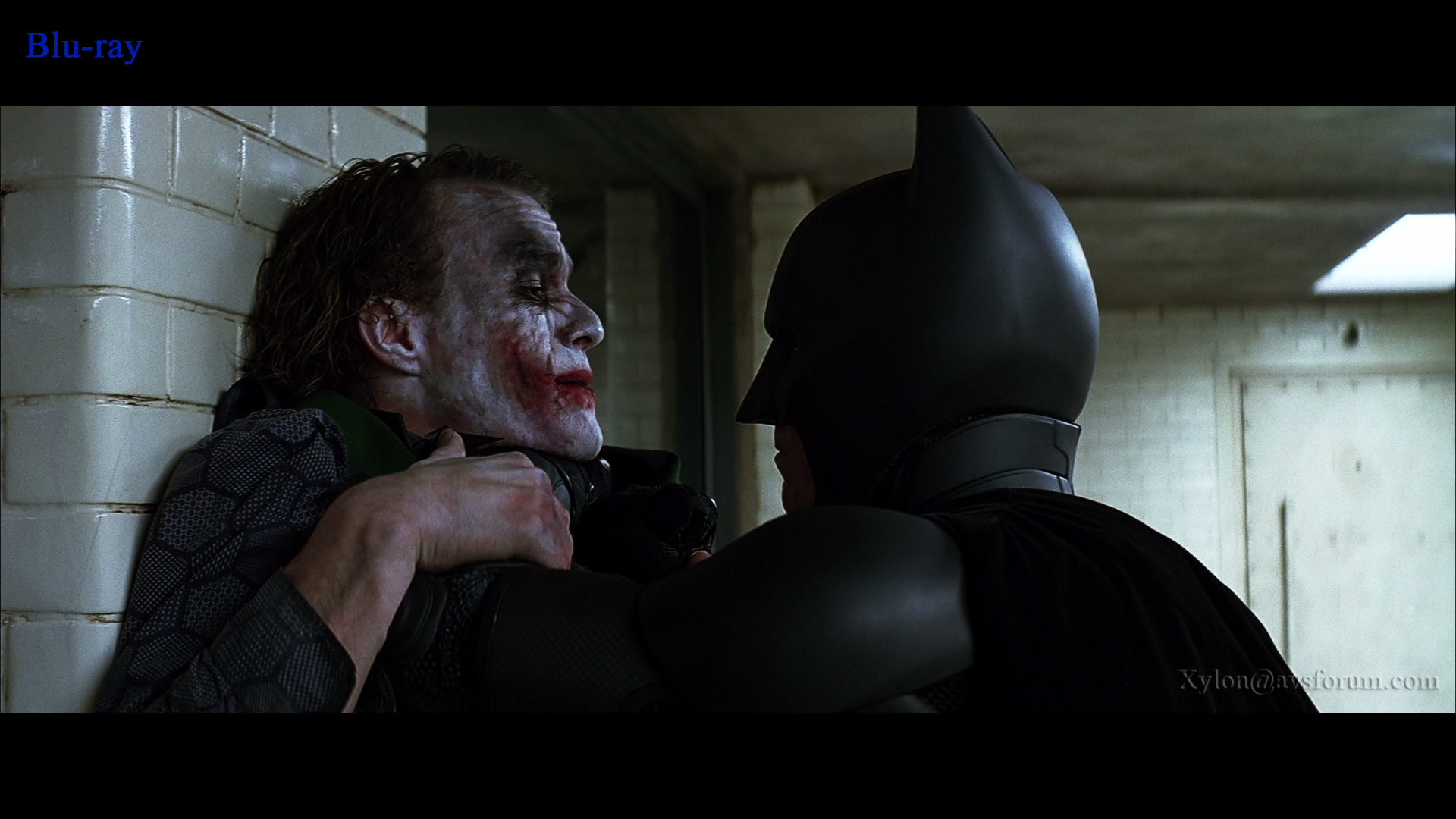
Especially The Dark Knight looks very artificial with watercolor skin details and pronounced edge ringing:

3f76879d.png

02760382.png


Too bad, because compared to the motion interpolation it's baked in forever...
 
At least on some TVs you can turn the motion flow processing off. However, there are some where it's permanently on. Oh dear.

The edge sharpening is a shame. There is no reason for it to be so aggressive. It looks to be around 3-4 pixels wide, which is way too much. I can understand a small amount of sharpening, or the use of a downsample filter from the 4k scan that has a touch of sharpness about it, but what I see there, and on other Blu-Ray movies is just too much.

Graeme
 
The most cinematic image you are going to get in home theater (besides having your own 35mm projector of course) is a Pioneer Kuro playing a Blu-ray at 24p with a 72hz refresh rate...this matches the cadence of real 24fps film projection. There is no 3:2 pull down judder, which is another huge and overlooked aspect of watching movies on standard 60hz monitors. I own a Panasonic Plasma that has a 48hz option, which looks amazing IMO, but some can't get over the "flicker" introduces particularly in the highlights of the picture. The Pioneer doesn't introduce as much of a flicker of course. However, 35mm definitely exhibits a similar flicker in the highlights, so I'm not sure why so many people are bothered by it if the ultimate goal is to recreate the theater experience.

Of course, as Anders shows above, some studios are ruining potentially amazing Blu-Ray releases by over processing them with DNR, and over sharpening. It's a real disaster with a lot of releases unfortunately. Check out www.avsforum.com to see some solid reviews before you buy.
 
HDTV sucks.

Plasma Flat panels are only solution.

"The fact is, plasmas have a slight edge when it comes to a truly cinematic picture.
If you are a cinephile who likes to watch a lot of different film sources such as Blu-ray
discs or DVDs, plasma is your best bet - especially if you have some control over ambient light.
The technology's deeper blacks, sharper contrast and absence of motion blur make it ideal for
almost any application. Just watch out for image glare on untreated plasma displays, and make
sure your plasma can stand up to the amount of uncontrollable light in your room."


LINK>>>
 
To add, do the new 120hz LCD's provide a 5:5 mode in 120hz for Blu-Ray 24p WITHOUT motion flow? That would seem like an optimum viewing experience for these LCDs.
 
A more serious problem is the aggressive processing done to recent Bluray releases.

Yeah, what's up with that? I was walking through an electronics store and saw the last Pirates of the Caribbean on a Bluray and it looked awful. It looked like bad F-900. I couldn't believe it. Do consumers really think oversharpened looks good?
 
I got a 1080P Sony Bravia recently, the cheaper 60 Hz one but it allows the 24P "True Cinema" option -- I'm guessing that basically it shows 24P at 48 Hz rather than at 60 Hz with a pulldown. Looks nice.

I hate the "motionflow" 120 Hz look - makes everything look like betacam photography...
 
I'm currently in the process of working out which HDTV to buy, and I had been told that the 100hz processing would enhance my enjoyment of sports. Having seen a sample I was inclined to agree...

I watch a lot of football (soccer) and here in the UK it tends to be shot on HDCAM at 50I and for HD and SD transmission.

If you opt for a 100hz screen can you change refresh rate? Put it this way: I'm watching Sky Sports so I'm on 100hz, then I go watch a Blu-Ray DVD that is 24p...can I change the rate on the TV to suit what I'm watching?

Side question: anyone know what a game on a PS3 outputs in terms of framerate...does "framerate" even apply to this?
 
The most cinematic image you are going to get in home theater (besides having your own 35mm projector of course) is a Pioneer Kuro playing a Blu-ray at 24p with a 72hz refresh rate...this matches the cadence of real 24fps film projection.
Or a 1080p JVC high contrast D-ILA projector with (external) CMS (HD750/RS20/RS2...).
 
A more serious problem is the aggressive processing done to recent Bluray releases.
Over the top DNR combined with excessive sharpening destroys the experience.
Some is on recent transfers, some on older ones. Current newly done releases give us examples for both, the best you can do these days and really awful overprocessed stuff that looks nothing like the original film it came from (such as 'Patton' or 'Longest Day'). And then there are the old transfers that were not redone and simply look their age. They are outdated 'HD light' with various amounts of problems.
 
Yeah, what's up with that? I was walking through an electronics store and saw the last Pirates of the Caribbean on a Bluray and it looked awful. It looked like bad F-900. I couldn't believe it. Do consumers really think oversharpened looks good?
Don't judge image quality in stores. The displays are almost never properly calibrated and the bright environment does not help at all. 'Pirates' looks quite decent.
 
I have a Sony SXRD 1080P projector that can display 24P content at the even multiple of 96Hz winthout the Motionflow crap, and it looks great.

The SXRD (and JVC's LCoS) panels are very "cinematic" looking... much more so than LCD or DLP, as far as I am concerned.
 
I don't get the excessive edge "enhancements" on many releases. It seems to be getting worse with many new Blu-Ray titles, too. The Dark Knight and Baraka are just two of many recent casualties. I swear that studios are specifically tayloring the compression so the image looks best on a 32-42" 1366x768 LCD panel. One thing that does help in most cases is to go into the settings on the TV and TURN OFF all additional processing. I've also noticed some real inconsistencies in image quality and edge detail between different Blu-Ray players. In some cases the differences are shocking. Personally, I think the Sony BDP-S350, S550 and Panasonic DMP-BD50 and 55 produce the best looking images. Lots of people using the PS3 for Blu-Ray and the image quality on PS3 BD playback is dreadful.... Which kinda matches the terribly crippled audio too. Just sayin... But Anders' examples of TDK posted above are not entirely player specific. The edge halo in the first image around batman's head is inexcusable, IMO.
 
Back
Top