Welcome to our community

Be a part of something great, join today!

  • Hey all, just changed over the backend after 15 years I figured time to give it a bit of an update, its probably gonna be a bit weird for most of you and i am sure there is a few bugs to work out but it should kinda work the same as before... hopefully :)

Blackmagic UntraStudios 4K thunderbolt 2 problems

Paul Cronin

Well-known member
Joined
Nov 1, 2008
Messages
664
Reaction score
0
Points
0
Location
Rhode Island
Hi,

I have a Mac Pro 2014 with BM Ultra studios 4K TB2 hooked up using SDI to Flanders CM171. The problem I have is I can not get the HDMI to work at the same time and in PP CC 2017 the audio from the HDMI works but no picture.

Also out of the MP there is a thunderbolt 2 daisy chained to two LG34" which is working fine.

In PP CC I have proper audio hardware setup, and playback is great with Bose hooked up to TV on HDMI. But video on the HDMI is not working in PP and it does in DR. In PP this has worked in the past with BM mini monitor.

The Flanders works in both software well.

Running out the door but will be back in the office tomorrow.

Happy to give more details on my setup. Thank you for any help.
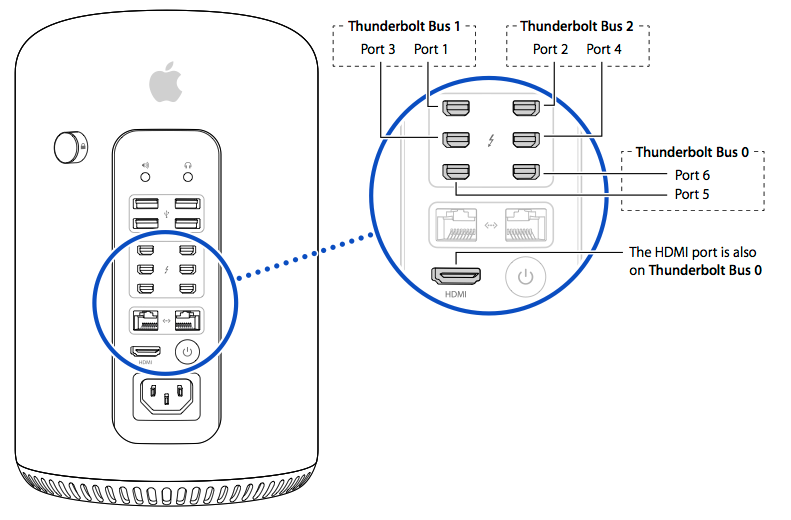
 
First off, distribute your TB devices over separate busses.

display_ports.png


Now, sounds like you may have upgraded Premiere. If that's the case, uninstall the BM driver, reboot, re-install, reboot again, then launch premiere. Now, if you're going to your Flanders ok, but not to your telly via HMDI, it may be the format. Try 50i/60i or 24psf if your SDI is getting a progressive signal.

Fully write down your chain from source to destination to help better explain your setup.

Lastly, check that Premiere is set to the BM for video output.
 
Simon,

Great information, I am on the road filming and will be back on the weekend, so I do not have the gear with me. But I can answer a few of your questions.

1. I do distribute over the three separate TB busses. (great still, better then the one I have taped on the trashcan)

2. The BM driver might be wrong, I need to check that one. PP is not on the latest upgrade since it has some known problems, and in the middle of a big edit. So I will check the BM driver list to make sure my PP version matches the BM version.

3. I did try changing the 29.97p to 60i and it did not work.

4. Yes, PP is set for BM on playback and audio.

I will write down the source to destination chain when home and after trying the driver option.

Thank you Simon, for the response more over the weekend.
 
I have a Mac Pro 2014 with BM Ultra studios 4K TB2 hooked up using SDI to Flanders CM171. The problem I have is I can not get the HDMI to work at the same time and in PP CC 2017 the audio from the HDMI works but no picture.
I am also using a late-model Mac Pro with a Blackmagic Ultrastudio 4K, and I'm doing OK with the HD-SDI output and an HDMI output. What I have seen happen on occasion is that some monitors will choke on the HDMI due to the HDCP copy-protection scheme. You can work around this by using an HDMI splitter that slices out the HDCP -- details are all over the net for these. I have also gotten more stabilization from Blackmagic's Teranex-Mini, and I'm using that for HD-SDI -> HDMI conversion.
 
Simon and Marc,

Thanks for your help. Back at it today and as soon as I changed BM setting in Deck Top Video to 1080i 59.94 it works well now on SDI and HDMI in PP CC.

But the funny thing is, I then switched back to 1080p 29.97 in BM setting while PP CC was opened and and it also worked. Hum

Then back to DR and TV goes to Unsupported Signal. This is fine since I do not want the TV on while grading. I don't want the light and it is not very accurate anyway. So I am good for now.

Thanks for your help.
 
Back
Top