Welcome to our community

Be a part of something great, join today!

  • Hey all, just changed over the backend after 15 years I figured time to give it a bit of an update, its probably gonna be a bit weird for most of you and i am sure there is a few bugs to work out but it should kinda work the same as before... hopefully :)

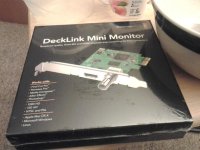
BlackMagic Decklink Mini Monitor Arrived

Rajas Paranjpe

Active member
Joined
Jun 4, 2013
Messages
39
Reaction score
0
Points
0
Wat's up guys?

Just though I should share some great news with my very first thread on this site.
BlackMagic Decklink Mini Monitor has arrived at my brother's place in USA and would be shipping back to India at my personal Color Grading Suite soon.
icon_cool.gif
icon_cool.gif
icon_cool.gif

This is the most affordable monitoring card I have ever came across for Davinci Resolve.
Reviews coming up soon. Watch this space for more updates.

Thanks & Best,
Rajas Paranjpe,
DI Colorist,
Mumbai, India


​
attachment.php
 

Attachments

  • decklink mini monitor.jpg
    decklink mini monitor.jpg
    89.1 KB · Views: 0
Hello guys,
Finally the card came to my studio.:emote_happyhappy:

Here are my first impressions ->
The card is very small, comes without fan and works fantastic. Remember, you need to install Blackmagic Desktop Video for the card to be recognized else Resolve will keep on crashing.

::Questions::
1. In my Full copy of Resolve 9, the GUI playback and Output monitor playback has very noticeable delay. Can anybody confirm if they are having same issue with this card or other deck link card as well?
2. When I click on BlackMagic Live key utility, it says "The Installed Decklink Card doesn't support LiveKey"
3. Any one else is using ASUS PA238q for monitoring the video? I would like to know what settings are you using for calibration.

Any information would be highly appreciated.
 
1 - A lot depends on this, I have often seen delays on less than enterprise class systems.

2 - LiveKey requires a card with an input as well. Your card is unsupported. It is not really a bad thing, how often do you plan on live keying in a colorist suite?

3 - You shouldn't use the ASUS PA238q for color grading unless you get it fully calibrated, and understand a lot about color spaces. The SDI output on your card going to a broadcast monitor is the preferred method of use.
 
Thanks a lot Michael.
I am starting a new budget studio since I got tired of paying hefty rental to color suites.
I chose ASUS on reading post on Nofilmschool and also it is the only budget monitor I can afford today.
Also saving money to get a proper broadcast monitor and tangent elements.

Michael do you have any resources where I can read about calibrating the ASUS. It says that it comes factory calibrated but I know I have to re-calibrate according to studio lighting, etc.
 
BlackMagic Decklink Mini Monitor 5.1 output via HDMI

BlackMagic Decklink Mini Monitor 5.1 output via HDMI

Hello,
I am not able to get 5.1 channel output from Decklink Mini Monitor via HDMI. I can get only 2channel output from Resolve 9.
Anybody using this card or other decklink model for 5.1 audio output via HDMI?

I have connected the HDMI to a Yamaha amp.

Please let me know.
Its very urgent.
 
Thanks Stefan.
 
Hello,
I am not able to get 5.1 channel output from Decklink Mini Monitor via HDMI. I can get only 2channel output from Resolve 9.
Anybody using this card or other decklink model for 5.1 audio output via HDMI?

I have connected the HDMI to a Yamaha amp.

Please let me know.
Its very urgent.

Does Resolve even supports 5.1? I though it's only stereo.
 
Hello guys,

1. In my Full copy of Resolve 9, the GUI playback and Output monitor playback has very noticeable delay. Can anybody confirm if they are having same issue with this card or other deck link card as well?

That's normal. There is always a second or two delay between GUI and video display.
 
Back
Top