Welcome to our community

Be a part of something great, join today!

  • Hey all, just changed over the backend after 15 years I figured time to give it a bit of an update, its probably gonna be a bit weird for most of you and i am sure there is a few bugs to work out but it should kinda work the same as before... hopefully :)

best performance settings for redcineX-pro 31

joey richey

Well-known member
Joined
May 28, 2014
Messages
71
Reaction score
0
Points
0
Location
charlotte NC USA
hi everyone!

I'm a new user and attempting to dial in the best preferences for my redcineX usage. any advice would be great, as I'm not sure what to do inside my preferences to speed up playback/usage. i just installed the newest 31 build.

my system is a nMp 3GHZ 8 core with 32GB ram and dual firepro D700's.

thanks in advance for any recommendations!

joey.
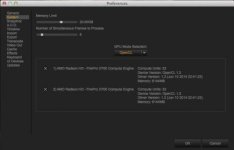
 

Attachments

  • Screen Shot 2014-08-19 at 8.32.30 PM.jpg
    Screen Shot 2014-08-19 at 8.32.30 PM.jpg
    10.5 KB · Views: 0
Similar question - my CPU (well actually 12 hyper cores) are pegged during export - how can I tell if it is also using GPU? Seems with dual 6G GPU the CPU should not be pegged unless code can't do or it is more efficient to use CPU and GPU are not being used.
Can anyone say or tell how to monitor the usage if GPU versus CPU for export (R3D to prores422HG transcode full debayer).
iStat Menus says the GPU are not being used during full export (where all cpu are 90%+ utilized.

And should the max memory / frames be changed from default? 4G and 12 respectively
System is new mac pro:
Processor 3.5 GHz 6-Core Intel Xeon E5

Memory 32 GB 1867 MHz DDR3 ECC

Graphics AMD FirePro D700 6144 MB (dual cards)

Thanks
Mike
 
Hi Mike,

Thats sounds correct -- the CPU should be pegged. That means it is utilizing all cores for decompression. Remember debayer + effects on GPU, decompression on CPU. Unless you have a ROCKET. :)

David
 
Back
Top