Welcome to our community

Be a part of something great, join today!

  • Hey all, just changed over the backend after 15 years I figured time to give it a bit of an update, its probably gonna be a bit weird for most of you and i am sure there is a few bugs to work out but it should kinda work the same as before... hopefully :)

Best Monitor for Focus?

Christopher Barrett

Well-known member
Joined
Sep 30, 2010
Messages
1,518
Reaction score
0
Points
0
Location
Chicago
Website
christopherbarrett.net
We just finished shooting a little short over the last week and one thing I struggled with was pulling focus. I had my Red 5.6 and my Dp1 on camera. I can't judge focus at all on the little 5.6 and would like something a little sharper than the Dp1.

Whatta you guys like? Should I try and get my hands on a Red Pro 7" or stick to something in the 8" range? Any screens out there have higher resolution than others in this size range? Will the Bomb make this easier for me? I'd like to stick to T/2.8 cuz the Cookes are gorgeous there but missing focus pisses me off to high hell!

Gracias,
CB
 
Hi Christopher,

Are you in the field, or in a studio/indoor environment? In the studio even a $200 24" DVI/HDMI monitor is great for focussing. I find it's an easy thing to use everywhere except outside on battery. I keep it on a VESA mount on a light stand and bring it everywhere I go.
 
Chris:

I agree with Jim. I use an LG that is 1366x768 so focus on the 720P 1280 signal via HDMI to DVI is 1:1 and very sharp. Works great and you can use it on location with a 12v battery and inverter.
 
+1 on the tape measure. I can't tell if it's in focus, I ask my AC how he did. He'll say 90%. I fucked up here and here. if those parts were important we go again.

Nick
 
I find a tape measure works better than any monitor you'll ever buy - and it's much less expensive.

Yup. +2

Monitor for focus? There are a couple of threads around about this... You can not pull focus well on ANY monitor. You will ALWAYS be behind the action. Even when successful, you're behind. All a monitor really does is SHOW you where you really missed the mark.

You need to verify your glass during prep using a focus chart and a tape measure. Once you know the len's markings are accurate, you should only need a tape measure.

It also helps knowing the ins/outs of focus pulling and how to best achieve focus in all the various ways.
 
Hmmm... I was a lousy focus puller but I work with 2 of the greatest focus pullers in the business: Alan Disler and Richard Mosier who have pulled focus on dozens of anamorphic films. And on Spidy they both used their experience AND a TV Logic monitor with focus assist to pull on our little 3D Epic film....
They are naturals but don't discount the help a monitor can provide
 
Too bad that none of the new tablets have HDMI-in or HD-SDI in.
The iPad 2 or the Motorola Xoom could have been great as on-camera monitors.

The Motorola Xoom, for example, has 1280x800, which is great for 720p monitoring.
I also hear that it's got very good contrast, which is important for focus-hunting.
Yet, it only offers HDMI-out :-(
 
Last edited:
Thanks Much, guys. The spot where I was running into trouble was typically closeups around 7 feet from camera. Using the 75mm and 100mm wide open my DoF was in inches and the focus markings at that range are in feet... hence the monitor dependency. I did just receive my Flanders 17" but had that set up for the director back away from camera. I think for those sort of shots I just need to make sure I have a big monitor near camera.
 
The idea behind a monitor for focus for me is not pulling focus, but establishing focus marks for pulling focus, and then verifying by playing the take back, if necessary. This is just my way of working. A system for insuring being in focus in case 6' on the lens marking is really 5'8" or 6'3":–)
 
Specifically, I mean something like this scene... where I try to retain sharpness on at least one of her eyes and the subtle movements of the actor can really only be compensated for visually. When we know our marks, or if I'm racking back and forth between actors in a dialogue, I just lock the marks into my follow focus stops.
A012_C015_0511LH_001.jpg
 
Shots like that are always tough. In my experience its very difficult if you are operating and pulling your own focus. the AC sitting to the side of the camera has a better angle to see the actor move forward or back. Use the monitor and tape measure to get your marks. Rarely a one take situation but it looks great when you nail it.
 
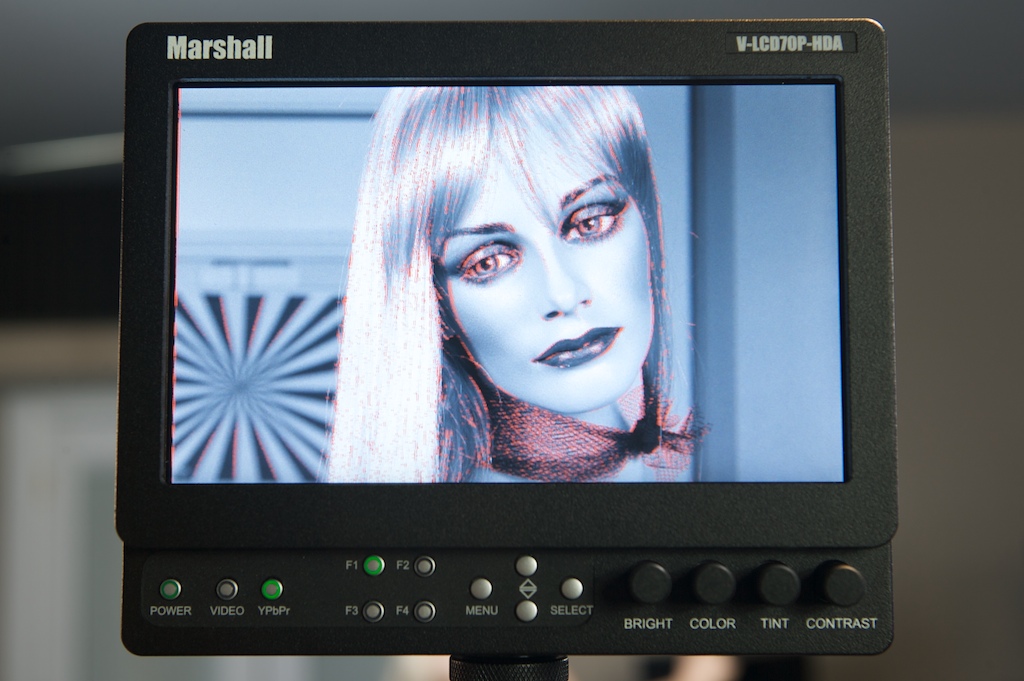
For onboard Monitors - the Panasonic 7" and 8" have an AWESOME "FOCUS in RED" featyre button that is an incredibly useful tool when pulling focus under extreme conditions like you described. (Highlights edges in red for Focus)

. Our A/C's swear by it, even those whom I would say have cinetape built into their eyes. Here is a link to a competitive monitor that is almost $1000 less.

A Marshal Monitor with a similar feature set.

10269d1230682123-new-7-hdsdi-hdmi-monitors-marshall-pi5j7604.jpg
 
i use 9 inch TV logic, but first i will measure, make marks and then check on monitor. It can show you pixel to pixel and overscan sou you can see how sharp you are ;-)
 
I find a tape measure works better than any monitor you'll ever buy - and it's much less expensive.

Agreed. I've seen 1st AC's get 86'ed from shows by big DP's for pulling with a monitor. Too much to drag around and it slows everything down. Focus has been pulled for how many years before video taps and digital?
 
Check out the Small HD DP6, it's 720p and very sharp, sdi in. TV logic sells a version with the small panel with a waveform but in a plastic housing. I prefer the aluminum casing. It is light enough that operators do not notice the extra 1-2 lbs. Some DP's and directors have preferred looking at it vs. the 7" TV Logic / Red 5.6".

If it is hand held wide open, I need a monitor to at least see the frame. I've got burned by "sharing monitors" so I finally just got my own, it saved me on several jobs. Even a talking head interview, @250mm t2.8 if the subject shifts in there chair they start to go soft. It's nice to have focus assist and peaking to double check yourself.
 
That's a bit dramatic Michael... its for himself... and he asked for a situation for SUPER SHALLOW focus on facials... that are moving... tape makes that HARD... the Panny is extremely accurate and faster than marks and tape... especially with an unpredictable actor in extreme circumstances.

Another solution is to surround the actors head with sharp objects... that usually helps them stay still LOL!
 
Back
Top