Welcome to our community

Be a part of something great, join today!

  • Hey all, just changed over the backend after 15 years I figured time to give it a bit of an update, its probably gonna be a bit weird for most of you and i am sure there is a few bugs to work out but it should kinda work the same as before... hopefully :)

back to pc, staying with premiere

Peter Osinski

Well-known member
Joined
Jun 5, 2009
Messages
370
Reaction score
0
Points
0
Location
New York
hey guys

I used to edit multicam 4k red one footage at 1/4 resolution just fine on adobe cs4 premiere with a 2008 octo core 2.8 ghz mac pro, 10GB of ram, and a raid 0 of 2 drives

I sold it a little while back and am looking for a new workstation. after the fcpx debacle I don't really feel great about reinvesting in pro apple gear for fear it will be discontinued.

I have come up with the following configuration for the hpz200 and would like some advice on whether it is or is not a good purchase


-Configurable- HP Z200 Workstation Windows SATA - VA206AV
HP Z200 Workstation
Genuine Windows® 7 Professional 64-bit
HP Z200 320W 89% Efficient Chassis
Intel® Xeon™ X3430 2.40 8MB/1333 QC CPU - Not Supported for Integrated Graphics option. Supported only on ECC memory.
NVIDIA Quadro 2000 1.0GB Graphics
HP 8GB (2x4GB) DDR3-1333 ECC RAM
HP 160GB SATA 7200 1st HDD
HP 16X DVD-ROM SATA 1st Drive
Intel Pro 1000 CT GbE NIC Card
HP eSATA 1 port PCI Bulkhead Kit
HP 3/3/3 (3-year parts/labor/next business day on-site) Warranty

I should be fine with the quad core processor, 2GB RAM per core (eventually more for hyperthreading), nvidia cuda for mecury playback, 160GB HD for OS and applications, and esata port for connecting an external raid.

I don't know if I need the network card though. The computer has an rj45 port on it, it appears to be the standard ethernet port I'm used to but if someone could confirm I'd appreciate it.'

I plan on purchasing adobe production premium cs5.5 or maybe just waiting til cs6 comes out if there is a release date set by the time I am ready to purchase.

I would appreciate any thoughts or comments
 
if it were me i would build a pc... you can get better parts at a better price. for that same amount you could have a beast. and you'll still have warranties on parts. but that's just me...

not counting the graphics card (which is an expense either way you go), i built a machine with almost identical specs for about $1k about 4 years ago. i'm pretty sure you can do better than that today.

i typically use http://www.newegg.com for components

it's really not very hard to put a computer together. hardest part is picking compatible parts... but if i'm not mistaken they have some kind of compatibility checker. and they also have some pre-configured setups.
 
yes, i meant that i would build one over buying one from hp, etc... just like with mac, you pay for the logo and the design on the box. and the "quality assurance"
 
If you can afford it, I'd look into a SS hard drive and more RAM, in that order.

Paul, I hear you on building your own PC's (I've built over 30 PCs from parts over the years, including my 200 cpu render farm). I talked a friend into building his own a few years ago and while he saved a few hundred dollars, it ended up being a big mistake for both of us (I spent a lot of time helping him fix issues). I think the key thing you wrote was: "if it were me...". Putting together a computer is "easy" but that term is relative to the amount of experience, knowledge, and actual interest the builder has in it. It takes more than a desire to save some $. It really take the type of person who has both the time and inclination (like both you and I do) to to do some tinkering for it to be worth the efforts in the long run. For most people, I now suggest going with a big name turn-key system like Peter is looking at. Yeah, he'll spend a little more than if he built it himself but most of the time that money is well-spent: especially if you consider what your time is worth.
 
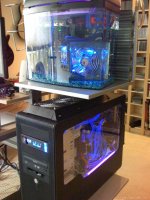
Speaking of home made computers, I thought you might get a kick out of my home made oil-cooled RAM drive! I made this a couple years ago before there were commercially available RAM drives (and this is still faster than the ones available now).

The lower black box is a water cooled, 8 core Xeon 3.00 GhZ with 12 GB of RAM. That's may main computer.

IMG_0005.jpg

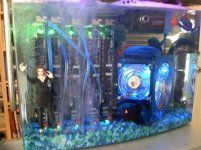
Above it is a fish tank filled with mineral oil. Inside it is a stand-alone PCI bus board I bought used on ebay for $20. It needed power so I just bought a standard power supply for it. In each of the five PCI slots I have a Gygabyte i-RAM drive. http://techreport.com/articles.x/9312

IMG_0006.jpg

Each card provides a SATA connection which fed into a RAID card on my main computer. Ta-daa: a 40 gig RAM drive. I could boot up my machin and load windows in under 3 seconds.

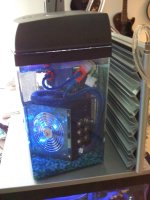
IMG_0007.jpg

I used a standard aquarium pump to pump oil out into an external radiator type cooler which went back into the bottom of the tank. And you just can't have an oil-cooled, RAM drive aquairum with colorful rocks and a bubbler, can you? :) I know this is really sick and not practical at all but it was really fun to build. And while it was "easy" it's not something I would recommend to anyone. :)
 
Nvidia cards are power hungry. That and running multiple drives and a maxed out CPU mean you need more power supply than 389 watts for stability and long term reliability. The graphics card and CPU alone consume about half the total available.
 
matt is probably right. i would either ask someone you know to build it for you, or try to find someone nearby that could help. if you do want to think about, be prepared to do at least a little reading.

i would start here: http://www.newegg.com/Store/MasterComboStore.aspx?StoreID=7&name=DIY-PC-Combos

maybe they have an option to assemble it for you, or something... you'd still save some money. but matt did make some good points about the hassle-factor. especially if it's your first time building a computer. on the other hand, if you use computers for a living, i highly recommend getting to know how they're put together and how they work on the hardware end. if you learn now, you won't ever have to buy from a major brand again, and it will be super-easy the second time.
 
+1 to learning how to build your own PC's. I can understand for people that aren't technology inclined that they would prefer to go to a manufacturer. But you will learn a lot by learning how to build your own.

On those specs, I would definitely upgrade the amount of RAM in that system. I'm thinking 16gb instead of 8gb would be a better starting point. The more the better.
 
but do keep in mind that the market for mac pro's is higher than for final cut pro... of course their attitude is clear, though perhaps underexpressed.
 
If you are going to run Windows, I can't think of a single rational reason to buy a Mac Pro.

Also, for Premiere Pro, Core i7 and Geforce are much better value compared to Xeon and Quadro. Of course, Quadro does have greater connectivity and 10-bit output.
 
ok how does this sound

6x4GB mushkin RAM
MSI motherboard with triple channel ddr3 memory
intel core i7 extreme 3.4ghz six core processor
nvidia quadro 2000
corsair tower and power supply

total cost about 2200

(obviously this does not include storage or monitor)
 
Looks much better so far.

Do you need the Quadro for 10-bit color output or it's different display connections? If not, I would switch this for a GTX570 - it should be both cheaper and faster :)

Edit: Also, if your not planning on doing any serious overclocking, swapping out the i7 990X for an i7 980 will save you a fair bit of cash for almost no appreciable difference in performance.
 
Last edited:
Word is the new mac pros will be killer... but I also worry about Apples seemingly fickle attitude toward pros.

Lets hope they launch the new Mac Pros soon. Apple has taken a lot of beating due to the "X Factor" :smile5: I hope they are working at improving and winning the Pros again.

Cheers,
Sabyasachi
 
If you are going to run Windows, I can't think of a single rational reason to buy a Mac Pro.

Also, for Premiere Pro, Core i7 and Geforce are much better value compared to Xeon and Quadro. Of course, Quadro does have greater connectivity and 10-bit output.

Subhadip, having read some of your posts in the past, I recall you are somewhat aware of the going ons in many phases of PC development. I seem to recall you are knowledgeable about Adobe workflows, as well. If the OP will forgive me for momentarily taking this thread down another path to the same end, I would like to ask if you have any opinions on the new AMD CPU/GPU combinations. I know that AMD only puts their own ATI graphics on the processor, but it is my understanding that Adobe will soon embrace Open GL in their software accelerations. Any thoughts?
 
Word was FCPx was going to be killer too. I'm not holding my breath for anything but another incremental change with maybe less slots for those of us that have been begging for more.
 
Subhadip, having read some of your posts in the past, I recall you are somewhat aware of the going ons in many phases of PC development. I seem to recall you are knowledgeable about Adobe workflows, as well. If the OP will forgive me for momentarily taking this thread down another path to the same end, I would like to ask if you have any opinions on the new AMD CPU/GPU combinations. I know that AMD only puts their own ATI graphics on the processor, but it is my understanding that Adobe will soon embrace Open GL in their software accelerations. Any thoughts?


I believe you mean to say "OpenCL", which is what Adobe will use when the software and hardware work properly.
 
Back
Top