Welcome to our community

Be a part of something great, join today!

  • Hey all, just changed over the backend after 15 years I figured time to give it a bit of an update, its probably gonna be a bit weird for most of you and i am sure there is a few bugs to work out but it should kinda work the same as before... hopefully :)

Avid Media Composer

mikeburton

Well-known member
Joined
Sep 5, 2007
Messages
1,757
Reaction score
0
Points
36
Location
Sacramento CA
Hey all,

So, I just saw version 4.0 of Media Composer and want to get back into Avid. I downloaded the demo and realized I am quite rusty in the app. There are quite a few simple things that are a snap for me in FCP that I can't seem to find and the little things are driving me crazy. I used to work with Avid for about a year roughly 10 years ago. Those brain cells are gone now and I'm looking for any advice on a good book or training dvd etc that anyone can recommend to get me back into the swing of things.

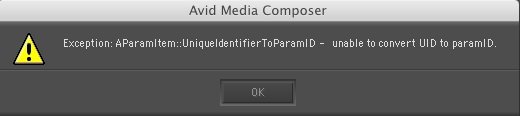
I noticed a few bugs as well, like getting a weird error message when I open up the Color Corrector, it won't load and crashes the program. Is Avid fairly stable on the Mac? FCP crashes every now and then but not too bad. Avid seems a little more finicky in my trial version. Any suggestions would be helpful.
System config: MacPro 2.66Ghz Quad Core Intel Xeon, 6gigs RAM, NVIDIA GeForce 7300 GT. I know its not the fastest machine but its what I'm working with right now.
Cheers!
 
are you running snow leopard? avid currently has no official snow leopard support.

what version quicktime are you running? there are specific quicktime version avid works best with u should look into, you can check it out on their website.

also check your avid mediafiles folder and make sure there aren't any ghost files hanging around where they shouldn't be, as i remember off the top of my head it should go avid media files ---- folder labelled 1 --- folder labeled mxf among others --- and all ur core mediafiles

usually if something is floating around where it isn't supposed to be it crashes out the system. ur hardware specs should be good
 
are you running snow leopard? avid currently has no official snow leopard support.

what version quicktime are you running? there are specific quicktime version avid works best with u should look into, you can check it out on their website.

also check your avid mediafiles folder and make sure there aren't any ghost files hanging around where they shouldn't be, as i remember off the top of my head it should go avid media files ---- folder labelled 1 --- folder labeled mxf among others --- and all ur core mediafiles

usually if something is floating around where it isn't supposed to be it crashes out the system. ur hardware specs should be good

I'm on 10.5.8 right now. I think they mentioned on the site that 4.0.2 is compatible with Snow Leopard but I could be mistaken. Also, running QT 7.6.4 (Latest version outside Snow Leopard). Everything seems in order of the Media files directory. Don't see any ghost files lurking. It seems Color Correction is the only module that seems to give a consistent error. Attached is the error it gives me. It doesn't crash the program just that the interface gets buggy and you have to go back to Source Record edit mode or another mode to get the interface back.
Still searching for any good Avid resources. If anyone has anything in mind please share!
 

Attachments

  • Avid Error.jpg
    Avid Error.jpg
    18 KB · Views: 0
so if starting from scratch... whats the preffered system? I always thought PC?

We are mostly MAC but want to establish an AVID suite...

what kind of hardware configs? We dont need a NITRIS online as we will have a hero suite... just want a fast AVID kit... thoughts, favorites? recommendations?

thanks !
 
I don't think that ever since v3, there's much of a difference between working on PC or Mac with Avid. On the PC, I heard that the application makes more use of the GPU; on the Mac, I heard it relies more on RAM.
If you're doing longform, don't go XP32, go Vista 64 with 8GB of RAM. Gives the application way more mem.
 
Metafuze only runs on a PC, or on a Mac via Bootcamp or VMWare. Also, you can use more advanced nVIDIA cards in a PC than you can on a Mac, FWIU.
 
Back
Top