Welcome to our community

Be a part of something great, join today!

  • Hey all, just changed over the backend after 15 years I figured time to give it a bit of an update, its probably gonna be a bit weird for most of you and i am sure there is a few bugs to work out but it should kinda work the same as before... hopefully :)

AVID EDL won't import in SCRATCH

severin schultze

Active member
Joined
Oct 9, 2009
Messages
35
Reaction score
0
Points
0
Hello all,

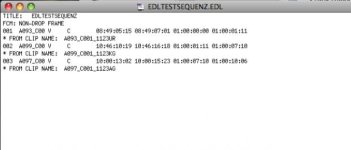
I'm trying to get an EDL out of Media Composer (4.0) via the EDL Manager. I exported an CMX 3600 and a RED16 EDL. Everything seems to work so far, but when I try to conform in Scratch, it would just ignore the EDL. Scratch would read EDL's generated with FCP or older versions of AVID. I also tried to copy and paste the content of the working EDL in Texteditor. But it also didn't work. I have no clue if it's just the new MC which causes the problems. Or do I miss something?

Any help is greatly appreciated!

Thanks, Severin
 

Attachments

  • screenshot.jpg
    screenshot.jpg
    17.3 KB · Views: 0
Hello all,

I'm trying to get an EDL out of Media Composer (4.0) via the EDL Manager. I exported an CMX 3600 and a RED16 EDL. Everything seems to work so far, but when I try to conform in Scratch, it would just ignore the EDL. Scratch would read EDL's generated with FCP or older versions of AVID. I also tried to copy and paste the content of the working EDL in Texteditor. But it also didn't work. I have no clue if it's just the new MC which causes the problems. Or do I miss something?

Any help is greatly appreciated!

Thanks, Severin

Hey Severin,

First - if you are a SCRATCH customer, please send this email to Support. That's the best venue to get this resolved quickly.

But... a couple of things:

1) What version of SCRATCH? 4.4? 5?

2) You say it "ignores" the EDL. Does that mean the EDL doesn't import at all, or you just can't get the events to match clips once the EDL is imported? Two very different problems.

If you can't import the EDL at all, that most likely means there are weird special characters in the EDL. To solve that problem, open the EDL in Notepad, or a similar plaintext editor, remove all special characters, and resave as a DOS Text file.

If you can't get events to match up, that is most likely one of two things:

1) Mismatch between Edgecode and Timecode in the R3D files. In SCRATCH, go to Process and switch the clips from Timecode to Edgecode and reconform.

2) In the EDL Viewer in SCRATCH, you are matching the wrong sets of metadata. Try matching just Timecode, or Timecode + Filename. Play around a bit and see if that helps.

or...

3) In the offline, you have somehow lost the timecode links to the original source files...

Best,

Lucas


Lucas Wilson
--------------
Director, Business Development
ASSIMILATE, inc.
LA, CA, USA
 
Hi Lucas,

thanks for your prompt reply! I'll get in contact with your support.

Best,
Severin
 
Also, how was the ALE file created in the first place?
 
looks like the timecode is source, numbers to high for edge. Try matching on TC only in ELD/Media Browser have found this to be the best method.

Scratch loves the truncated 4 character names, A001, A003 etc... when you match tape names.

Agreed with MP how was the material first imported... You can easily fix this by changing the CMX3600 and creating your own look under

tape_name_len 4 this will get you a 4 character name

Marcus
 
There is also a truncate function in the options if you want 4 characters. Depending on what you used for ALE, you will have both the 4 and the 16 available.

Michael
 
I exported the ALE with RocketCineX while transcoding the R3D's to DNxHD MXF's which I put into the AVID Media Files folder, imported the ALE and did a relink, edited a short test sequence and tried both: the CMX3600 and the RED16 setting within EDL Manager. But they won't work. SCRATCH doesn't give an error message like "failed to open EDL" or something. It just ignores the EDL. I manually matched the Avid exported EDL's with the other working ones (from FCP or older AVID systems) in texteditor but nothing happened.
I'm testing right now.

Thanks,
Severin
 
I don't know how to help troubleshoot since there have been no known issues with EDL Manager. EDL Manager can be pretty flexible in what it exports as source ID, timecode, etc since all that metadata came in with the original ALE.

What have been the differences you corrected to match the EDL's that did work?

Michael
 
I just deleted 5 space characters in each line and saved the EDL with a new name out of texteditor. I think it's a problem with AVID 4.0.4 (maybe just the trial) and SCRATCH since i was able to import the non working AVID EDL in FCP and exported that timeline as an EDL and imported that into SCRATCH without a problem. Does anyone have problems with that exact workflow?

Severin

Severin
 
If you use the 16Char EDL temlplate, make sure your sources are 16 charatcers in length. For sources that are 4 and 8, I would use the CMX3600 template.

Michael
 
I tried both. 16 and 4 character length. But they both won't open up in SCRATCH. It will open if i manually edit the EDL or do the AVID-FCP-SCRATCH trip. Strange! Any ideas?

Severin
 
severin,
could you mail me the bin and the edl, i can have a look in my scratch on monday.... also at the edl/bin in avid

marcus@mahvo.com zipped is preffered

/m
 
Hi again,

i think it might be a problem with the trial MC4. I got several EDl's out of an MC4 and all of them (CMX3600 & RED16) would conform in SCRATCH. I tried it with my trial again but it just won't work. SCRATCH will ignore these EDL's... That workflow (RCX - AVID - SCRATCH) doesn't seem to work rock solid?!

Any experiences with MC4, EDL's and SCRATCH?

Severin
 
Nothing has changed in the EDL templates for 16Char/RED, etc. I suspect something else has changed in the workflow. The trail MC4 online is the release version.

Michael
 
Back
Top