Welcome to our community

Be a part of something great, join today!

  • Hey all, just changed over the backend after 15 years I figured time to give it a bit of an update, its probably gonna be a bit weird for most of you and i am sure there is a few bugs to work out but it should kinda work the same as before... hopefully :)

artefacts in sky footage

Bernhard Ruebe

New member
Joined
Dec 8, 2010
Messages
4
Reaction score
0
Points
0
Location
Munich and Granada
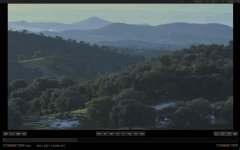
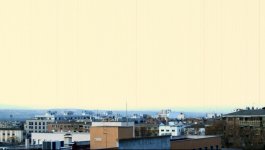
did anybody see or experience this before? shooting landscapes 4K and 2K, in the upper part of the image appear artefacts (dark vertical stripes).
was using RED M with nikon lenses (28-70, 17-35; 2.8) and polarizing filter. anybody an idea what could be the reason?

Thanks very much.
 

Attachments

  • strips red.jpg
    strips red.jpg
    55.3 KB · Views: 0
YES!
Mine turned out to be a bad video board and had to be replaced by RED.

HOWEVER, that said, you should also try and black shade to see if that resolves the problem, but from the first glance looks of it, looks just like my footage when my M sensor video board took dump. I noticed one line, then 3 etc....
 
better still

better still

here is a screen shot, where you can see better the lines in the upper part. was contacting the support today.
cheers
 

Attachments

  • lines in sky-1.jpg
    lines in sky-1.jpg
    64.5 KB · Views: 0
is it in the raw as well?

Did you receive an error before this occurred?

Has this happened before or after? Is it an isolated incident?

How overexposed is the sky in your shot? (seriously... it CAN happen... albeit rarely)
 
same results after black shade

same results after black shade

johnny, as you and the support suggested, I did a black shade on the camera, but the results stay the same. Full res is reducing the effect, but doesnt make it disappear.
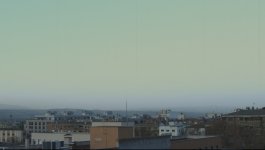
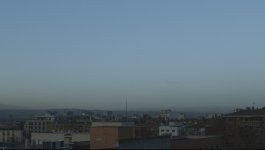
Ivan, yes, it's in the RAW, you can even see it in RED LCD. you're right, overexposing is reinforcing the effect, I attach a series of exposures, in the less exposed, the effect is almost disappearing. But don't we sometimes want to overexpose? I can not tell you if the phenomenon is there since always as these were my first landscape shots with sky in it.

I had an error the same day, but I dont think it has anything to do with it: wanting to shoot an important wildlife shot, the CF card didn't finish formatting, so I had to reboot, and the animal was gone...:incazzato:

awaiting further support by RED

thank you guys
 

Attachments

  • exposure 2.8.jpg
    exposure 2.8.jpg
    76 KB · Views: 0
  • exposure 2.8-4.jpg
    exposure 2.8-4.jpg
    49.3 KB · Views: 0
  • exposure 4.jpg
    exposure 4.jpg
    40.9 KB · Views: 0
Bernhard,
as much as trying to work around every issue with blackshading, trying new media....cf card, red raid etc....in the end, sure looks like a problem i faced last year and after every attempt at fixing in house, the camera had to go back to RED for a NEW video board. No reason why it went bad, it just went bad. Had to have it replaced. If it's under warranty your in luck. It can get very expensive so hopefully you have it in warranty. BUT, i'd get with RED and start a support ticket immediately and get it fixed. You won't be able to shoot reliably with that banding happening. I was in the same boat and everything i shot for 3 days was bad and not easily replicated since it was wildlife on/in the water. So have to bite the bullet and get it back to the big house for repair and replacement. RED is good about turnaround (in my experience) and quite helpful with the process.
Good luck
 
Johnny thank you very much for your detailed help. I do think the same, even if the support is still trying to find the reason. I will get back to you if I have some (hopefully good) news.
cheers
 
Hi Bernhard,

I've had almost exactly the same problem before with over exposed sky and snow.

The vertical striations were only obvious if you reduced the ISO in RedCine though, and almost impossible to see if you didn't. They were also exactly 1 pixel wide, (zoom on a full res TIFF in photoshop...), and in an exact vertical column.

It looked as if the pixels that were hitting near blow out were reacting slightly differently to each other on a line by line basis - which was impossible to see until you brought the footage down.

I black shaded multiple times without luck.

We were in extreme(ish) changes of temperatures (we were in and out of -3ish to +26degrees C all day long), which made me think that BSC was the solution.

We got a new body in, and what we heard back was that Red Europe had solved it with black shading - which made me look a little like a numpty.

But I never heard of that particular issue recurring with that body so I still wonder if it was something temperature related rather than a completely failing video board.

Anyway, just my notes for comparison - I'd very much like to hear what you hear back from Red.

Tom Turley
----------------------
London based DIT
tom@filmtom.com
www.filmtom.com
www.waitingonsound.com
 
I really doubt this was a temperature issue. That's typical indoor / outdoor winter temps in much of the world, do it all the time around here. Actually a much wider range than that yesterday and snowing, of course. If that temperature range was causing this on the camera, then the camera probably needs service.

Anyway I'm still thinking it's a firmware and black shading issue. I would update to the latest firmware if you have not. I'm finding the 31.6 beta to be working better with the M sensor than the official release. For some reason, the official release firmware has a few glitches.

Do a factory reset of the black shading calibration. Then format your media and do yet another black shade.

If this still does not fix it, then I would contact RED support.
 
Back
Top