Grzegorz Gill
Well-known member
- Joined
- Sep 2, 2010
- Messages
- 457
- Reaction score
- 0
- Points
- 16
- Location
- Los Angeles, CA
- Website
- cargocollective.com
Hi,
I had a small problem today with what seemed to be bad pixels on the bottom right side of my frame. When I got home I was able to correct it with a new black shade which is a huge relief! But during my shoot I had to shoot through the bad pixels because, I was documenting subjects that couldn't wait the 15 minutes for a new black shade. For documentary style photography I like to create two black shades prior to a shoot. 1) black shade preset for 1fps, 1 second shutter speed for my time lapses, 2) black shade preset for 25fps and 1/48th shutter speed. I then save these presets to my red mag and then keep a file on my macbook. I have been doing this in the past and never have had a problem until today. I noticed a huge amount of bad pixels on the bottom right side of the frame. I tried to restart the camera, the image was clean, but the black shade was off and every thing was purply. I then applied my temp black shade that I calibrated earlier, and the image had the pixels again. Switched cards and tried it again, same no luck. I just shot through it, and when I came home I applied a black shade to current temp and exposure. Image was clean and everything seemed fine.
I personally like the temporarily black shade option because, I bounce back from regular frame rates, to time lapses a lot during my documentary shoots. So it's nice and a lot easier then to black shade every time I want to shoot a time lapse, or regular frame rate, vise versa. And waiting 15 minutes for a black shade during documentary work is just a huge NO for me.
One thing I did notice that with the new firmware every time I transfer the calibration folder from my macbook to my red mag it doesn't quite transfer completely. Meaning I hear the transfer drop sound, and the folder itself is on the mag, but when I load it into the camera, no calibration options show. I then bring the red mag back to my macbook and see that my calibration folder isn't completely transferred. So I then transfer the calibration folder for the second time, bring the red mag into camera, and on the second attempt I have my calibration options available. That is strange and never happened on the previous builds.
Has any one seen this before? Am I missing some thing, or is this just some bug?
Are these bad pixels, or something else?
Has any one ever had problems with the temporary black shade option before?
Is there another way around fixing bad pixels other than performing a black shade?
I am running scarlet x with build 5.1.14, the footage is 4k-6:1, 25 fps, 1/48th. The T/E marks were at green.
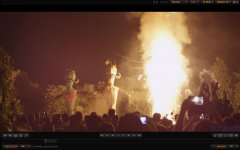
Please take a look at my screen shots for references.
Thanks in advance for any insight,
-GG
I had a small problem today with what seemed to be bad pixels on the bottom right side of my frame. When I got home I was able to correct it with a new black shade which is a huge relief! But during my shoot I had to shoot through the bad pixels because, I was documenting subjects that couldn't wait the 15 minutes for a new black shade. For documentary style photography I like to create two black shades prior to a shoot. 1) black shade preset for 1fps, 1 second shutter speed for my time lapses, 2) black shade preset for 25fps and 1/48th shutter speed. I then save these presets to my red mag and then keep a file on my macbook. I have been doing this in the past and never have had a problem until today. I noticed a huge amount of bad pixels on the bottom right side of the frame. I tried to restart the camera, the image was clean, but the black shade was off and every thing was purply. I then applied my temp black shade that I calibrated earlier, and the image had the pixels again. Switched cards and tried it again, same no luck. I just shot through it, and when I came home I applied a black shade to current temp and exposure. Image was clean and everything seemed fine.
I personally like the temporarily black shade option because, I bounce back from regular frame rates, to time lapses a lot during my documentary shoots. So it's nice and a lot easier then to black shade every time I want to shoot a time lapse, or regular frame rate, vise versa. And waiting 15 minutes for a black shade during documentary work is just a huge NO for me.
One thing I did notice that with the new firmware every time I transfer the calibration folder from my macbook to my red mag it doesn't quite transfer completely. Meaning I hear the transfer drop sound, and the folder itself is on the mag, but when I load it into the camera, no calibration options show. I then bring the red mag back to my macbook and see that my calibration folder isn't completely transferred. So I then transfer the calibration folder for the second time, bring the red mag into camera, and on the second attempt I have my calibration options available. That is strange and never happened on the previous builds.
Has any one seen this before? Am I missing some thing, or is this just some bug?
Are these bad pixels, or something else?
Has any one ever had problems with the temporary black shade option before?
Is there another way around fixing bad pixels other than performing a black shade?
I am running scarlet x with build 5.1.14, the footage is 4k-6:1, 25 fps, 1/48th. The T/E marks were at green.
Please take a look at my screen shots for references.
Thanks in advance for any insight,
-GG