Welcome to our community

Be a part of something great, join today!

  • Hey all, just changed over the backend after 15 years I figured time to give it a bit of an update, its probably gonna be a bit weird for most of you and i am sure there is a few bugs to work out but it should kinda work the same as before... hopefully :)

Any way to get touchscreen info overlays onto any external monitor??

David Bourla

Well-known member
Joined
Apr 16, 2008
Messages
252
Reaction score
0
Points
16
Location
New York City
Can't find this useful function anywhere in the menus. No way to see all the info (frame rates, iso, etc) normally seen on my Red touchscreen while ALSO being visible on my larger external LCD screen at same time. Possible?
Am I missing something? Basically to duplicate my touchscreen image.
Anyone?
 
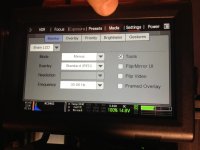
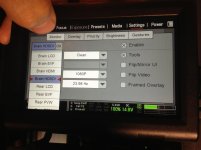
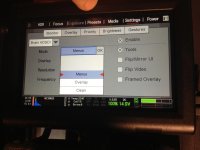
Yep you can-

1- Click settings
2- Display
3-Monitor Control
4- Under the MONITOR tab, upper left drop down select the output you want, for me its HDSDI
5- Under the MODE drop down select MENUS
6- the change will only take effect after you exit out of the menus

Cheers!
 
Pictures look a little goofy because I've got the EPIC rotated 90º with a ringo head right now for shooting green screen.
IMG_5021.jpg
IMG_5022.jpg
IMG_5023.jpg
IMG_5024.jpg
 
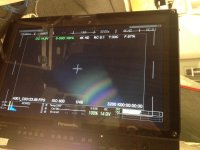
Argh. the overplay works but doesn't include the red bar highlight to tell you what option your are selecting on the touchscreen.
Oh well.
 
I'm curious, why you would want this displayed?
well, I sometimes want both the operator and AC to see what menu path is being followed.. it can be useful.. esp if I am not at the camera, and am teling the AC what settings to chose, while viewing at a video village.
 
well, I sometimes want both the operator and AC to see what menu path is being followed.. it can be useful.. esp if I am not at the camera, and am teling the AC what settings to chose, while viewing at a video village.

Thanks for the clarification. At the moment this is only possible with displays of the same resolution.
 
Argh. the overplay works but doesn't include the red bar highlight to tell you what option your are selecting on the touchscreen.
Oh well.

If you go to the PRIORITY page and put your desired output (eg HDSDI) at the top, then the full menu system including the highlights and dropdowns are displayed on that output. They won't be shown on the touch screen/evf though.

I use this to output the menu display to a large LCD TV for teaching purposes.
 
Back
Top