I was using this lens on a red camera the other day and found it to be slightly soft on th wide end of the len from 24 to about 50, I had checked back focus on camera with several wide primes and it was spot on. Even when I tried to adjust the angenieux zoom and focus by eye to a hd monitor it didn't get any better. So either the lens wasn't properly calibrated, which I doubt or the back focus on camera was out which I feel I have discounted. I cannot think of what could be wrong. Does anyone have any ideas.

Navigation
Install the app
How to install the app on iOS
Follow along with the video below to see how to install our site as a web app on your home screen.

Note: this_feature_currently_requires_accessing_site_using_safari
More options
Welcome to our community
Be a part of something great, join today!
You are using an out of date browser. It may not display this or other websites correctly.
You should upgrade or use an alternative browser.
You should upgrade or use an alternative browser.
Angenieux 24-290 issue
- Thread starter lib
- Start date

David Mullen ASC
Moderator
It's a big, heavy lens so maybe it wasn't being supported correctly and was tweaking the mount, or maybe it needs servicing.
I find the Ang. zooms to look pretty warm on the RED cameras compared to the Zeiss primes I am using...
I find the Ang. zooms to look pretty warm on the RED cameras compared to the Zeiss primes I am using...
- Thread starter
- #3
Hi David
Do you think that the back focus adjustive on the red camera is more sensitive when using a zoom lens. In other words I would not notice the back focus being out on a wide prime as much as I would on a wide zoom.
Thanks
Do you think that the back focus adjustive on the red camera is more sensitive when using a zoom lens. In other words I would not notice the back focus being out on a wide prime as much as I would on a wide zoom.
Thanks

Matthew Duclos
Well-known member
- Joined
- Feb 29, 2008
- Messages
- 915
- Reaction score
- 0
- Points
- 0
- Location
- Chatsworth, CA
- Website
- www.ducloslenses.com
Supporting the 24-290 Optimo is a big, big issue. It must be supprted properly or the entire lens will sag. How are you supporting it? Base plate, rods, low bridge, etc..
Mitch Gross
Well-known member
- Joined
- Nov 7, 2007
- Messages
- 3,657
- Reaction score
- 0
- Points
- 0
The Optimo 24-290 must be supported by 19mm rods and they must be steel. 15mm steel rods will mean a sag that I usually find to be about 30 microns out. This is enough to throw off focus. I love the ET rods but they are not appropriate for this lens and will definitely sag. I have not used the Red carbon fiber rods but have been told they do not sag.
A zoom is the most critical optic on judging backfocus. If you are off the image will drift focus as you zoom.
A zoom is the most critical optic on judging backfocus. If you are off the image will drift focus as you zoom.
Fredrik Callinggard
Well-known member
Hi Mitch,
Would that go for 19mm Alu rods as well? Or do they sag?
Fredrik
Would that go for 19mm Alu rods as well? Or do they sag?
Fredrik
David Mullen ASC
Moderator
Wide-angles show off back-focus problems more than long lenses.
Mitch Gross
Well-known member
- Joined
- Nov 7, 2007
- Messages
- 3,657
- Reaction score
- 0
- Points
- 0
Aluminum rods will sag.
- Thread starter
- #9
The lens I used had a large base plate, 19mm rods and extra support underneath. Do you think it is possible for back focus to be correct on a set of primes and then slightly out on a zoom. Would you then have to collimate each set of lens specifically to work with your camera?
Or maybe the back focus is slightly out on the camera but because a wide angle prime is naturally sharper than a zoom you would not notice back focus being out slightly. So whenever you check the back focus of your camera you should check it with a zoom and not a prime?
Or maybe the back focus is slightly out on the camera but because a wide angle prime is naturally sharper than a zoom you would not notice back focus being out slightly. So whenever you check the back focus of your camera you should check it with a zoom and not a prime?
Mitch Gross
Well-known member
- Joined
- Nov 7, 2007
- Messages
- 3,657
- Reaction score
- 0
- Points
- 0
What I would say is that you should check collimation (correct term for back focus on a cine lens) on every lens you ever rent, ever. The rental house you rent from had better be doing this for you on a proper collimator, not on a camera. If not, then find a new rental house! All lenses should be set to an absolute standard and your camera should be set to that same standard, and then everything will match out perfectly. Anything less becomes a game of chasing your tail.
Michel Gomes
New member
- Joined
- Nov 27, 2008
- Messages
- 1
- Reaction score
- 0
- Points
- 0
- Age
- 50
I had the same issue with the angenieux 24-290mm. The solution I found after assuring both lens and camera were properly collimated was to use solid (not hollow) 19mm rods, set a second lens support as close as possible to the edge of the lens (a third one assuming the mount is the first) and then set zoom carefully parallel to red one's mount. This was all to avoid sagging.
What's the proper way to mount such a large and heavy lens to the Red: set up the lens and mattbox and bring the camera to it or set up the camera first and slide the lens/support to the Red? Don't laugh, but are we doing this horizontally with the rig already attached to the base plate or set it up vertically and have the crew move it to the base plate once set up?

Peter Strietmann
Well-known member
- Joined
- Mar 31, 2008
- Messages
- 1,376
- Reaction score
- 0
- Points
- 0
- Location
- NorCal
- Website
- peterstrietmann.com
Mounting a 12x
Mounting a 12x
You shoule use the camera accessory heavy lens base plate, http://www.cameraaccessorysolutions.com/. It has supports for the end of the rods, I use 19mm. First slide the red on the base plate then put the rods on then with the bridge allready mounted to the base of the lens put the lens on the rods and slide it into the red's pl mount.
And I have to disagree with Mitch on this as I have been using ET rods on this base plate with no deflection for some time now.
Mounting a 12x
What's the proper way to mount such a large and heavy lens to the Red: set up the lens and mattbox and bring the camera to it or set up the camera first and slide the lens/support to the Red? Don't laugh, but are we doing this horizontally with the rig already attached to the base plate or set it up vertically and have the crew move it to the base plate once set up?
You shoule use the camera accessory heavy lens base plate, http://www.cameraaccessorysolutions.com/. It has supports for the end of the rods, I use 19mm. First slide the red on the base plate then put the rods on then with the bridge allready mounted to the base of the lens put the lens on the rods and slide it into the red's pl mount.
And I have to disagree with Mitch on this as I have been using ET rods on this base plate with no deflection for some time now.

paul engstrom
Well-known member
- Joined
- Apr 17, 2007
- Messages
- 936
- Reaction score
- 0
- Points
- 16
We put camera on a long plate first - slide it to the back of the dovetail plate. Then tilt the camera so its aiming straight up. Make sure you lock off the baseplate. Now put the lens on the camera. While it is still pointing up, attach the lens to rods/lens support. Finally, put on mattebox and ff. Now you're all set to go and tilt the camera back down for stable shooting.
This way you're not securing the camera with the weight already pulling against the mount.
I've made some custom lens supports specifically for the heavy Optimo lenses. They're for regular 15mm rods and long (e.g. 24") dovetail plates. This support works awesome--it replaces the Arri support bracket and handles the big stuff.
You guys with the 19mm rods have the definite advantage here.
Regards.
p
This way you're not securing the camera with the weight already pulling against the mount.
I've made some custom lens supports specifically for the heavy Optimo lenses. They're for regular 15mm rods and long (e.g. 24") dovetail plates. This support works awesome--it replaces the Arri support bracket and handles the big stuff.
You guys with the 19mm rods have the definite advantage here.
Regards.
p

Greg M
Digital FX
- Joined
- Dec 30, 2006
- Messages
- 5,133
- Reaction score
- 1
- Points
- 38
- Location
- Louisiana
- Website
- www.digitalfx.tv
Be very careful when mounting the lens. Dont overtighten the PL mount and make sure you have the lens properly supported and aligned in front of the PL mount. If you take your time and mount it correctly it looks great on Red.
This is assuming you followed Mitch's advise first and hired from a competent source.
I love the Optimo on a Red.
This is assuming you followed Mitch's advise first and hired from a competent source.
I love the Optimo on a Red.

Tim Sutherland
Well-known member
When your lens is properly supported, you should be able to easily move the iris ring without it becoming stiff. You should also be able to unlock the PL mount on the camera without the lens moving in the mount at all.
If you are using the ET hybrid baseplate, you absolutely must have rods long enough to go through the back and front supports on that plate. For the Optimo 12:1 that means 30" rods if you have a matte box on the front. We got some nice 30" 19mm Arri Steel rods that work great with the 24-290 and the MB28.
If you are using the ET hybrid baseplate, you absolutely must have rods long enough to go through the back and front supports on that plate. For the Optimo 12:1 that means 30" rods if you have a matte box on the front. We got some nice 30" 19mm Arri Steel rods that work great with the 24-290 and the MB28.
Mitch Gross
Well-known member
- Joined
- Nov 7, 2007
- Messages
- 3,657
- Reaction score
- 0
- Points
- 0
You shoule use the camera accessory heavy lens base plate, http://www.cameraaccessorysolutions.com/. It has supports for the end of the rods, I use 19mm. First slide the red on the base plate then put the rods on then with the bridge allready mounted to the base of the lens put the lens on the rods and slide it into the red's pl mount.
And I have to disagree with Mitch on this as I have been using ET rods on this base plate with no deflection for some time now.
The clever aspect of this plate is that it has the hole mounts to support the rods at proper height up in the front. That pretty much takes care of the deflection as the lens support is now floating in between two hard supports. We have these in rental for just such a purpose and I'm sure the ET rods would work with this plate in use. Ronford also makes a similar plate for their heads.
The only negative to this design is that the rods are now engaged to the dovetail, which means that one cannot simply slide the camera off the dovetail when moving between setups. Not the end of the world, but it is a factor. Also recognize that certain rigs such as particular gyroscopic crane heads and some model gear heads have their own integrated dovetails which means that you don't have a place to attach this special dovetail plate.
John "Woody" Glaser
Well-known member
- Joined
- Apr 10, 2008
- Messages
- 145
- Reaction score
- 0
- Points
- 16
I would agree that the CAS baseplate is a great tool !!! I was fortunate to try one out at a rental house in LA and use on the job...Very Nice
I think that the common mistake that people make with this lens is in the mounting/support side of the equation. As other's have mentioned, there are several ways to do this. When it is done properly, as Tim stated, the PL mount should open and close freely, not bind in any way, on the RED.
I think that the common mistake that people make with this lens is in the mounting/support side of the equation. As other's have mentioned, there are several ways to do this. When it is done properly, as Tim stated, the PL mount should open and close freely, not bind in any way, on the RED.
Brent J. Craig
Well-known member
- Joined
- Aug 31, 2007
- Messages
- 1,801
- Reaction score
- 0
- Points
- 0
- Location
- Toronto
- Website
- www.brentjcraig.com
I find the easiest way to mount this beast is to attach the lens support to the lens first, then you can simply lower it onto the rods and slide the lens into the mount.
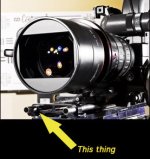
Everyone else's comments about proper support are very important. You absolutely need that extra rod support bracket that keeps the rods from flexing at the front:

Everyone else's comments about proper support are very important. You absolutely need that extra rod support bracket that keeps the rods from flexing at the front:
Attachments

Emmanuel Cambier
Well-known member
- Joined
- Dec 28, 2006
- Messages
- 920
- Reaction score
- 0
- Points
- 0
- Age
- 56
- Location
- South West France
- Website
- www.ecmp-prod.com
Where could I find some 19mm 30'' rods?
Emmanuel
Emmanuel