Welcome to our community

Be a part of something great, join today!

  • Hey all, just changed over the backend after 15 years I figured time to give it a bit of an update, its probably gonna be a bit weird for most of you and i am sure there is a few bugs to work out but it should kinda work the same as before... hopefully :)

Aliasing

Status
Not open for further replies.

Rainer Fritz

Well-known member
Joined
Apr 5, 2007
Messages
1,160
Reaction score
0
Points
0
Age
48
Location
Vienna
Website
www.aacamera.org
Hi !

I'm seeing aliasing artifacts and some other stuff in high detail and contrasty scenes specially when looking to the footage via the rocket. But it is still there if you exporting it via software only.... I have a R3D still on the server, and I will be very happy if anyone can export a 4k tiff and look at 100% to the picture....
please tell me what you think....

right click on the link and save:

http://dcs.co.at/pics/A091_C007_10255U.0000094F.R3D

thx
rainer
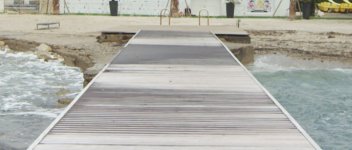
 
We have had problems with aliasing and moireing too. It has been creeping into a few of our shots. A harsheness and increase in aliasing and moireing appreared when we switched over to Mysterium-X. Does anyone have suggestions on how to get rid of it? I thought it might be caused by our zena card, but now hearing that you see it on the rocket I am going to look into this again.

Also, we have some shots that appear to have a pink and green rainbow effect showing up as a splotch in different textures. Very rare, but yet still evident in some shots. I'll see if I can get my R3Ds uploaded asap.

I have attached a pic of the dock. This pink color is very visible on the left side of the dock and further up at the top. This image was output directly from REDCine-X build 261 and downconverted using adobe CS4 64bit.
 

Attachments

  • Dock-zoom-pink-green-rainbow.jpg
    Dock-zoom-pink-green-rainbow.jpg
    80.2 KB · Views: 0
Hi Rainer

I just exported it out to TIFF on Redcine-X 348 and 351. Not really seeing anything obviously aliasing, although a still probably shows it less than a moving camera image.

Can you post your own uncompressed TIFF circling areas you are seeing the problem? And also a clean version without the circling.
 
There are almost no any aliasing and moire on RED M or R1-MX files.

It sound to me as a big joke.

People are mostly watching at RCX or some other apps at its preview windows where you can see aliasing and moire

because of scaling artifacts in that preview windows of that certain applications or they are mostly watching at non-professional monitors,

also without accelerating of RR card and that is exactly how they getting wrong picture about RED image.

The simple checking is to make from RCX a snapshot in tiff or dpx and check it out with photoshop, preview,

lightroom, aperture, even shake, nuke, aefx... or any other photo app.

Also I haven't seen worst RED image (also interlaced!!!???) that Rainer shown us on above example.
 
It is RC42 Nick, Wolfgang... thx for your response.... checked it also in our LAB on Baselight 7 at 4k pixel per pixel and it looks better...
also better with scaling to 2k....

First, I'm monitoring with Dual-Link HD-SDI RGB 10bit 4:4:4 straight to a 1080p professional 10bit Monitor in the 4k EUR range... via RR... so I see pixel per pixel what is coming out of the rocket... Sanjin I'm not playing playmobil.... we are shooting a feature for international cinema release... and I have to be sure that everything is ok with the footage and further post process, thats my job, thats my responsibility... so far this...
And the TIFF you are looking is exported via full debayer direct out of RCX351 64bit version... I made it first with the snapshot and then with an export and the results are same also if I disable the rocket.... ! When I opened it in photoshop at 100% I was wondering... thats the reason of this post...
So.... something wrong with the mcpro, rocket.... cant figure down the problem....
 
Sorry haven't had time to look at this.

You could try pulling your rocket card out - software disabling doesn't necessarily pull it out of the path I think I've read in another thread.
 
Rainer,

I would say that with RED1MX you are shooting or your computer is something wrong.

Every camera should be checked and tested on daily basis the same like a RED BULL racing car.

What I can do is to show a lot of examples with a similar situation (high contrast, details, etc,...)

that all were shot on my RED1MX and didn't face any aliasing artifacts as you can see that on those pictures below.

They were all cropped details from the full size 4.5K.

rainer_RED1MX_aliasing_01.jpg

Rainers's example (crop from 4.5K).

sanjin_no_RED1MX_aliasing_01.jpg

Sanjin's example 1 (crop from 4.5K).

sanjin_no_RED1MX_aliasing_02.jpg

Sanjin's example 2 (crop from 4.5K).

sanjin_no_RED1MX_aliasing_03.jpg

Sanjin's example 3 (crop from 4.5K).

sanjin_no_RED1MX_aliasing_04.jpg

Sanjin's example 4 (crop from 4.5K).

sanjin_no_RED1MX_aliasing_05.jpg

Sanjin's example 5 (crop from 4.5K).

sanjin_no_RED1MX_aliasing_06.jpg

Sanjin's example 6 (crop from 4.5K).

sanjin_no_RED1MX_aliasing_07.jpg

Sanjin's example 7 (crop from 4.5K).

sanjin_no_RED1MX_aliasing_08.jpg

Sanjin's example 8 (crop from 4.5K).

sanjin_no_RED1MX_aliasing_09.jpg

Sanjin's example 9 (crop from 4.5K).
 
now we know there went something wrong... definitely... and what is the question...
thx for the hint of putting out the rocket... I'm tomorrow in the office and check it with a non rocket machine...
 
Here is a longer seuqence trimmed out of the full take:

http://dcs.co.at/vids/A091_C001_102590_001.R3D

I was today again in the LAB with more time and the possibility to look with Baselight 8 and a 2k christie beamer as a plasma display deeper to this.... and it is in the footage as you see it on my still TIFF. The upper half in the middle and right side of the picture.
There is not aliasing only visible at pixel per pixel, I can see strange thin lines as well...
When we scale down to 2k its a lot better...
To view it via rocket is not the right way, because you see a scaled down picture... you need to see a full 4k source...
We then exported full 4k DPXs and reimported them... same problem... it looks a little better because of uncompressed source, but the aliasing and artifacts are still there....
What is going wrong here.... ??
First I will change the cam to other serial number range to see if there is a difference...
from my point of view we cant go the full 4k route in post in this case....
 
I see it in your R3D, too at 4k 1:1 or higher, and cannot remember ever have seen anything similar.

Have you opened a support ticket on this?

Cheers

G
 
Hi Gunleik !

Nice that you chime in.... YES Ticket is open, but the response is not really that what I hoped....

I had to escalate it internal with production dep. We now need to see if we have in less contrast and or detail scenes
same problems.... it is like pain in the a.... not funny times....
 
I see it with and without the Rocket at 1:1, if that's of any help...

Maybe you have the only 4,5k-i cam on the planet... -:)

I am with Nick.
looks like only every second line is read properly...

Have you swapped the cam?
 
Cam will be swapped tomorrow.... thx for the info... helps a lot...

lol yes its REDs first and only i-cam...
 
Here is a longer seuqence trimmed out of the full take:

http://dcs.co.at/vids/A091_C001_102590_001.R3D

I was today again in the LAB with more time and the possibility to look with Baselight 8 and a 2k christie beamer as a plasma display deeper to this.... and it is in the footage as you see it on my still TIFF. The upper half in the middle and right side of the picture.
There is not aliasing only visible at pixel per pixel, I can see strange thin lines as well...
When we scale down to 2k its a lot better...
To view it via rocket is not the right way, because you see a scaled down picture... you need to see a full 4k source...
We then exported full 4k DPXs and reimported them... same problem... it looks a little better because of uncompressed source, but the aliasing and artifacts are still there....
What is going wrong here.... ??
First I will change the cam to other serial number range to see if there is a difference...
from my point of view we cant go the full 4k route in post in this case....

Rainer,

here there are three more examples, one is from yours Rainer's shot (longer R3D) and two are from my shots although they both from RED M version.

I couldn't find any better example from my archived shots but they are very similar and have a look at R3D original files.

My reply here on this tread is about to show that RED1 can't show any aliasing or moire at all at the similar outdoor shooting situation.

That means something could be wrong with your camera (sensor OLPF,...) or I think is more about faulty recording media CF card, RED drive or RED RAM,...you were recording...???

Before I would enter in any serious international production I learned that is always good and

recommended to test cameras at the similar situation to see if any artifact or lens aberration could show up.

Also I saw a slight lens CA on your example that you can't find on my shots because was shot with Leica R lenses...

FF35mm Summilux-R 50mm f/1.4 where you by MTF don't get rendering of over sharpen image @ S35.

Maybe they are all results from your tests but as we can see they are not so good...!!!???

Hope this helps.


rainer_RED1MX_aliasing_02.jpg

A crop from full size 4.5K of Rainer's example 2.


sanjin_no_RED1M_aliasing_01.jpg

A crop from full size 4.5K of Sanjin's example 10, shot on R1M with Leica-R Summilux 50mm f/1.4.

Download>>> A011_C012_0326T4.0000000F.R3D


sanjin_no_RED1M_aliasing_02.jpg

A crop from full size 4.5K of Sanjin's example 11, shot on R1M with Leica Summilux R 50mm f/1.4.

Download>> A011_C019_0326KR.0000056F.R3D
 
i know that,
was visible on a forrest shoot we had (but back in April 2010).
at 2k when you did shoot a wide shot with a 12 mm or so.
when taking CU with a 20 mm in 2k it was better.

The redcode was 28 though.

strange was that it only happened in the forrest at that particular day, not in the city.

but i have to look for the footage of it

i remember that these shots were debayered with a clipster and a macpro with rocket installed...both had the same effect

But shooting with my private cam i had the quality like Sanjin
 
its a problem in compression or readout of the sensor... probably... media... possible...

we use master primes and i saw some interesting things here as well... if they are full open they show vignetting... on bright days i can see chromatic aberrations but the optical quality is stunning good... hard to see then a such damaged footage.....
media problems.... I thought as well on this also... but we mix drives and cards and I see the problem most on footage which was shot on drives....
 
Status
Not open for further replies.
Back
Top