Welcome to our community

Be a part of something great, join today!

  • Hey all, just changed over the backend after 15 years I figured time to give it a bit of an update, its probably gonna be a bit weird for most of you and i am sure there is a few bugs to work out but it should kinda work the same as before... hopefully :)

After Effects 5.5 Unsupported Format error

I did that - but thanks.
 
I tried the Trim r3d idea - no go. Still rejected the import...

I had high hopes for that one.
 
I'm still struggling with it as well. What is so maddening is that files that seem fine will turn into unsupported format during a routine save. Quit and reopen and they work again.

Tried a new drive as well - not the problem...

Can somebody with a working version please post retail/download/version/system, info?

Thanks.
 
Hi Mark,

I've just re-installed the Adobe plug-ins and now the Epic files are importing / displaying correctly.
Sorry, no tips on why all is working now.
Good luck with your solution.
Steve
 
Were you having the same problem of import and then unsupported format - or just no ability to import - before the plugin reinstall?

And how did you reinstall? From the installation disk?

Thanks.
 
Sounds like a different issue - but thanks.

Canon website?
 
Two months since the last post here...

I am getting the same errors.

At first, I could import Epic footage, but as soon as I moved the timeline it crashed.
I then did an update to the latest versions (which only seemed to update Premiere, not AE).
Now I can import and view the Epic file.
But as soon as I apply Warp Stabilizer, it gives the error "file ... cannot be imported - this `.r3d' file is damaged or unsupported."
AE_CS5_5_Epic_WarpStabilizer_error.png


This is followed by the error "zero denominator in ratio addition."
AE_CS5_5_Epic_WarpStabilizer_error2.png


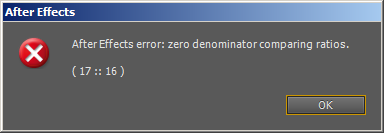
and then the error "zero denominator comparing ratios."
AE_CS5_5_Epic_WarpStabilizer_error3.png


I have tried using RedCine-X to crop and recreate the R3D file, but that still doesn't work.
 
Back
Top