Welcome to our community

Be a part of something great, join today!

  • Hey all, just changed over the backend after 15 years I figured time to give it a bit of an update, its probably gonna be a bit weird for most of you and i am sure there is a few bugs to work out but it should kinda work the same as before... hopefully :)

Adobe Premiere CC slow playback on 36 Core Machine

Michael Gregory

Well-known member
Joined
Jan 30, 2014
Messages
70
Reaction score
0
Points
0
Guys,

I finally made the switch to Windows from Mac. It has been a hard 10 days. I now am at the point of editing in Adobe Premiere. HOWEVER, the playback is VERY choppy. When playing in Red Cine-X, my Rocket-X fan fires up and I am getting amazing playback speeds. However this does NOT translate to Premiere Pro. I have Four (4) of the new GTX980 cards so playback is possible even without the Rocket but I can tell the Rocket is not being used during playback inside Premiere. When playing in Premiere Pro the playback is slow and choppy. I am working on Dragon footage shot at 60fps at 5k.

Please Help!!!

My machine is a 36 core Xeon beast with 12x 1Tb SSDs and 128 Gb of Ram along with 4 GTX 980s in a Cubix Expander.

Thx,

Michael
 
Lots of cores don't help with tasks that are single threaded... And at those tasks the many cored beasts are slower than my $1200 Core i5 box... A LOT slower. That's possible cause #1, another potential cause is problems with multiple gpu systems.

Check processor utilization... Is it locked at 1/36 of the potential utilization?
 
What resolution are you playing at? And render quality? You can bring both down to improve playback. Also, how fast are the drives you're playing off of? That could be affecting playback.
 
36 cores? So you have 72 threads available? Hmmm... If you spent big money on the 18-core CPUs, then it's hardly an ideal system for Premiere. Premiere tops out at about 24 threads or so, beyond that you're just spinning your wheels. Combine that with the rather low clock speed of the 18-core CPUs and you're actually holding yourself way back. Premiere only uses one of those 4 GPUs you have for playback. It can utilize more during rendering. This may change in the future as the software continues to develop.

I'm sure there's a way to get playback running smoother on your setup, but as of right now we don't know enough about your settings or more specific details about the hardware. I'm curious how you came to the configuration of 36 cores and 4 x 980 GPUs. How much RAM? How are the SSDs configured?
 
Thanks to everyone for their input. I have found when it comes to multiple cores and multiple GPUs there are aren't a lot of folks out there that have actually run systems such as this so the experience even at Adobe is somewhat limited. Most of what I have been able to learn has been from reading technical specs but mainly from what I have tested myself. So here goes....

The machine is a dual 18 core Xeons running 128GB of DDR 4 ram. I have a Twelve 1Tb SSD's (550Mbs sustained each). The SSDs are driven by an Areca ARC-1883ix-12 Raid card with 8Gb of DDR3 Ram on the card. Sustained Read/Write speeds are greater than 3,500 Mbs. The graphics cards are Nvidia's latest generation of Maxwell technology and even though Titans technically have more CUDA cores, these are faster... I've tested them myself. If you talk to the Nvidia guys they will tell you that not all CUDA cores are created equally and these represent the current state of the art.

In regard to Core i5 box being fast, I simply don't buy it. I have tried to render footage on i5 and i7's and they don't compare to Xeons and built in GPUs do not compare to separate PCIe cards. If you want to prove me wrong I welcome it.

So what I trying to do: Starting 1 hour of Dragon footage at 59.94 fps at 5k HD, adding 78Gb of 4k Graphics on 12 different tracks inside premiere, then exporting in to 1080p at 29.97 in h.264 at 45 Mbs to an elemental BluRay stream file. There is a lot for the machine to do.

So here's what I have learned so far:

Playback in Premiere:
Adobe seems to want to offer Nvidia as a replacement for the Rocket-X. While you can play back 24 fps 4k and 5k on a dual GPU machine with big GPUs just fine, when you get up to 60fps the playback becomes choppy at best.

SOLUTION: I turned off the Mercury Playback Engine during editing. Playback is now smooth all the way up to 120fps. The Rocket-X, especially with the new firmware, is amazing. I am getting north of 120 fps with no dropped frames (full test to follow) in Red Cine-X so I figured it must be something to do with the CUDA processors getting in the way of the Rocket-X.

Rendering in Premiere Pro:
I kept the Mercury Playback Engine (MPE) off for rendering.... BIG mistake, my estimated time is now in terms of moon phases. I turned it back on for the render stage.... it is running now but so far I am looking at estimates of 2 hours using the MPE for the rendering. I don't have a way to monitor the Rocket directly but the fan cycles up to high speed mode every minute or so.... So I believe it is doing its thing.

Cores and GPUs:
Adobe must be able to see more than 24 cores because I am seeing utilization between 50-90% across all 36 physical cores. It doesn't seem to be utilizing the hyperthreading very much. I suspect that the machine's architecture will direct task to a physical core before a virtual core if they are available. Looking at the GPUs (mine are overclocked to 1265Mhz) and all 4 are running at full capacity right at the temperature limits I have set in the configuration.

As an aside this process took about 5.5 hours on a 12 core MacPro with a Rocket-X card with and SSD Raid and 128Gb of Ram.

I am still running the render but being able to go directly from Raw footage to a fully rendered Blu-Ray in under two hours for 60fps 5K footage with 12 tracks of 4k Graphics is pretty incredible.... I would like to see a $1200 computer do that!

Michael
 
I have the 12 core Mac Pro trash can and it blazes. I got the maxed out one with the dual 700 GPUs and if you are using software that utilizes the power, it is incredibly fast. I have Premier, but don't use it unless a client insists, I find it a bit Klunky. I do use AE and Cinema4D (neither of which see my graphics cards thanks Adobe) but with FCPX...all resources are being used to produce phenomenal results. I know that doesn't help you, but the great thing about that piece of software (which was used to edit the new Will Smith movie Focus) is that it is optimized for my machine. At least for now!!!
 
Scott,

I completely agree with you with regard to FCPX and Macs. In 100% of my testing the Mac is faster with equivalent task on FCPX vs Adobe Premiere Pro. Now here is why I switched.... I bought one of the top of line 12 core machines, maxed out with dual 700s. Then I tested it against a 2010 MacPro with dual 6 core Xeons at 3.46Mhz (this was never offered by Apple but you can build it or get Edit Builder to do it for you) I added 4 Radeon 280x GPUs, hardware RAID with SSDs (GPUs and Rocket inside a Cubix Expander Chassis). The 2010 machine beat the new mac in every benchmark plus every real world side by side comparison I could think of. Add to this if you are shooting Dragon 6k, Thunderbolt 2 is limited to 4 PCIe lanes, so if you use a Rocket-X it is limited to 4 out of 16 lanes. Inside Red Cine-X you will get a warning telling you this.

At the end of the day I really like the FCPX workflow but with each passing day I get the feeling that Apple cares more about its phones and watches than it does about professional computer users. While the nMP is fast by most standards, it lacks the ability to be upgraded, has zero PCI slots. To Sum it up, I switched because I didn't see a future with Apple hardware or software. It is fine for iMovie and I know a lot of people love FCPX but I was pushed away from my Mac.... kicking and screaming.... the last 12 days have been hell, learning Premiere plus Windows. I will keep everyone posted on how I do or if I survive the transition.

BTW.... I am typing this on my MacBook Pro... where I still do 100% of email... etc.

Peace,

MWG
 
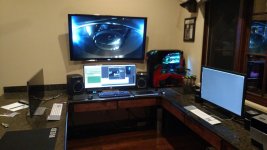
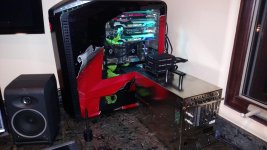
Pictures of the System

Pictures of the System

It took days to configure and install this... I am happy with the installation.... Now comes the testing to see if it worth it or not....
 

Attachments

  • IMG_20150210_192109088.jpg
    IMG_20150210_192109088.jpg
    93.1 KB · Views: 0
  • IMG_20150210_192122715.jpg
    IMG_20150210_192122715.jpg
    95.9 KB · Views: 0
Back
Top