Welcome to our community

Be a part of something great, join today!

  • Hey all, just changed over the backend after 15 years I figured time to give it a bit of an update, its probably gonna be a bit weird for most of you and i am sure there is a few bugs to work out but it should kinda work the same as before... hopefully :)

ACS: HDR Can't Be Ignored

Jon Pais

Well-known member
Joined
Jun 12, 2021
Messages
287
Reaction score
134
Points
43
ACS: HDR Can’t Be Ignored


Ben Allan, ACS hosted a video on YouTube entitled HDR: A Cinematographer’s Perspective which documents the ACS Technology Committee performing an HDR test shoot with the support of Lumen Arty Film Studios, Panavision, Sony and Cutting Edge Post.

They invited Toby Oliver, ACS (Day Shift) to light and shoot some example scenes and to monitor on set in both SDR and HDR. An accomplished DP, Oliver had never been able to monitor in HDR on set before. Committee member Tom Gleeson also made a short film that was to be monitored in HDR but because of COVID lockdowns, it ended up being monitored in SDR - though it was finished in HDR. One of several stated goals of the test shoot was to determine the importance of having an HDR production monitor on set.

After wrapping up the shoots, they graded one of the scenes in SDR first, extrapolating the HDR version from that, and for the other scene, an HDR version was created first and an SDR version was made using Dolby Vision’s trim controls. The consensus seemed to be that starting with the HDR grade and making an SDR trim pass afterward not only saved time but also yielded great results.

Can industry professionals distinguish between the ‘hand graded’ SDR version of a Hollywood film and a Dolby Vision derived SDR version? Find out by following the link.


On a side note, regarding Apple’s 2021 laptops with Liquid Retina XDR display, in the comments section of the video, the Australian Cinematographers Society writes,

"We had a MacBook Pro 16” on set on our test shoot and when we compared it to the fifty grand AUD Sony BVM-HX310 we were amazed at how good the MacBook was. It is an impressive HDR display."

The only very minor quibble I have with the otherwise excellent presentation is when Ben Allan refers to the BT.2100 standard, ratified by the ETU in 2016, as 'new'. Ironically, as so often happens, the ACS was unable to upload the video to YouTube in HDR.

For those wishing to dive deeper, I can’t recommend this brilliant series of interviews by the ASC highly enough:

ASC StEM2 Making Of and Download

The Making of The Mission

The Mission is a 17-minute short film, carefully crafted by ASC cinematographers and associate members, image scientists, colorists, manufacturers and technologists to provide a cinematic and diverse piece of media that may be freely used to test theatrical projection, theatrical emissive displays, professional monitors, consumer monitors and post production image processing software and hardware.

The ASC has also created test material free of charge to the motion picture industry to evaluate exhibition systems and processing software:

Download The Mission (HDR version of StEM2) here.

Below are the cameras and lenses that were used to shoot The Mission.
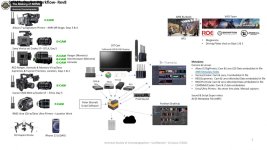
Click image for larger version  Name:	Screen Shot 2022-10-01 at 1.16.56 PM.jpg Views:	0 Size:	115.3 KB ID:	3801857
 
Last edited:
I admit, I haven't looked into HDR mastering practices beyond being on the sidelines but from what I understand of this term of "HDR", it's really like looking at False Color for exposure instead of what you can see on the monitor. I'm currently grading my feature and I don't know if I'm setting things up for HDR or not as my computer monitor is HDR and my old production monitor is just as-is but both look good save for brightness and contrast differences. To me, this whole HDR thing with LOG and all that needs to be solved with better on-set monitors as it's just gearing a camera LUT for being displayed through another LUT built into TVs these days.

Watching my new TV switch between HDR mode and SDR mode for Youtube is quite telling as most online content is just SDR and looks better without the HDR mode which just blows out brightness and crushes contrast and, quite frankly, if that's all it is then perhaps there needs to be a more mainstream approach to HDR mastering than making everyone re-learn color grading. Even at the AMC theatres yesterday when my brother and I went to see "Smile", they showed a demo for Dolby HDR and there was some sort of big CG ball or planet and it was trying to show the side-by-side differences and funny enough, the SDR image looked better than the HDR one which just showed too much detail and brightness in the CG.
 
“I admit, I haven't looked into HDR mastering practices…”

Perhaps you should. There are lots of excellent online resources explaining best practices if you know where to look.

“from what I understand of this term of "HDR", it's really like looking at False Color for exposure instead of what you can see on the monitor.”

I’m curious: what gave you that impression? Because HDR is not about false color at all: it’s about wider gamut and greater brightness and contrast. You’re free to use any combination of exposure tools you like: waveform, zebras, histogram, false color, traffic lights or exposure meter.

Are you saying that you ordinarily judge exposure just from looking at your monitor?


“I'm currently grading my feature and I don't know if I'm setting things up for HDR or not”

Proper color management is an absolute must. Again, there are lots of resources online.

“my computer monitor is HDR”

Are you sure about that? Just asking…

“my old production monitor is just as-is but both look good save for brightness and contrast differences.”

In other words, you’re realizing that your SDR monitor is ill-suited to evaluating the image in HDR at all.

“To me, this whole HDR thing with LOG and all that needs to be solved with better on-set monitors.”

Well, you're old monitor certainly isn't going to cut it if it doesn't support HDR. The problem is not that excellent HDR production monitors don’t exist but that they’re prohibitively expensive. As remarked in the ACS video, one solution is to rent an HDR monitor on test shoot day. I'm almost afraid to ask what "this whole HDR thing with LOG" means. Are you saying that feature films are typically recorded with anything but log or RAW?

“Watching my new TV switch between HDR mode and SDR mode for Youtube is quite telling as most online content is just SDR and looks better without the HDR mode which just blows out brightness and crushes contrast…”

Could you explain what you mean by HDR mode and SDR mode? There is HDR and then there is SDR. Mode implies some sort of artificial enhancement that mimics HDR. HDR is not a fake enhancement like Vivid mode, it's a removal of the constraints imposed by SDR. HDR in and of itself neither crushes shadow detail nor blows out highlights: on the contrary, provided it's properly exposed and graded, it has greater contrast/dynamic range than SDR. It sounds like your television is not HDR capable.

“quite frankly, if that's all it is then perhaps there needs to be a more mainstream approach to HDR mastering than making everyone re-learn color grading.”

Not to be Debbie Downer, but if filmmakers and colorists stubbornly refuse to update their skills, they'll be happily replaced by those that do.

“Even at the AMC theatres yesterday when my brother and I went to see "Smile", they showed a demo for Dolby HDR and there was some sort of big CG ball or planet and it was trying to show the side-by-side differences and funny enough, the SDR image looked better than the HDR one which just showed too much detail and brightness in the CG.”

Was it a Dolby Cinema theater? If not, it’s like a food critic evaluating Japanese cuisine by purchasing days-old sushi from a gas station vending machine. I find it incredible that you've never watched a good HDR representation in your life, as there are billions of HDR capable devices around the planet, with people enjoying HDR content on YouTube and on streaming platforms like Netflix on everything from smartphones to tablets to laptops and televisions.
 
Last edited:
Yes, it was a Dolby Cinema theater with vibrating chairs and all, actually the first horror film I've seen like that, and I have seen HDR content and always go for HDR 4K Blurays, I know what the difference is and how it looks but what I'm saying is that unless you have that expensive HDR monitoring setup on set, it's calling for something that may not be necessary on every set. Like 3D, HDR mastering can be done afterwards but does it add so much beyond what was there already with SDR? I'm not so sure, but I do know that my "Avengers: Infinity War" Bluray looked flat and milky compared to the 4K HDR Bluray and I think that shows the problem in that you have to do double the work for an SDR grade and also an HDR grade which both would require additional quality control checks along the pipeline for whichever format it is being created for.

As for the TV, it's a new Samsung and it automatically senses the devices plugged in so when we plugged in the new Sony PS5 to go with it, it threw it into HDR Game Mode which looked neat for some videogames but blew out just about everything else to the point I had to go in and turn the HDR off. If it's all coming down to changing everything for an optional TV setting then it's clearly something that needs to be tackled elsewhere in the line and as I've called for a push from RED to bring real HDR video recording in a future camera with the full range of highs, mids, and lows then this HDR mastering process would just be post settings and making for the possibility of a simple "SDR Safe" preset like there is for "Broadcast Colors" (which admittedly isn't the best but it's there).

Now, I wouldn't mind aiming for HDR on my next productions but again, like 3D, if I don't have the tools to do it properly and a properly exposed SDR image isn't going to cut it, then perhaps there needs to be more training done in the "SDR for HDR" line of thinking until some sort of technological breakthrough happens.
 
Yes, it was a Dolby Cinema theater with vibrating chairs and all, actually the first horror film I've seen like that, and I have seen HDR content and always go for HDR 4K Blurays, I know what the difference is and how it looks but what I'm saying is that unless you have that expensive HDR monitoring setup on set, it's calling for something that may not be necessary on every set. Like 3D, HDR mastering can be done afterwards but does it add so much beyond what was there already with SDR? I'm not so sure, but I do know that my "Avengers: Infinity War" Bluray looked flat and milky compared to the 4K HDR Bluray and I think that shows the problem in that you have to do double the work for an SDR grade and also an HDR grade which both would require additional quality control checks along the pipeline for whichever format it is being created for.

As for the TV, it's a new Samsung and it automatically senses the devices plugged in so when we plugged in the new Sony PS5 to go with it, it threw it into HDR Game Mode which looked neat for some videogames but blew out just about everything else to the point I had to go in and turn the HDR off. If it's all coming down to changing everything for an optional TV setting then it's clearly something that needs to be tackled elsewhere in the line and as I've called for a push from RED to bring real HDR video recording in a future camera with the full range of highs, mids, and lows then this HDR mastering process would just be post settings and making for the possibility of a simple "SDR Safe" preset like there is for "Broadcast Colors" (which admittedly isn't the best but it's there).

Now, I wouldn't mind aiming for HDR on my next productions but again, like 3D, if I don't have the tools to do it properly and a properly exposed SDR image isn't going to cut it, then perhaps there needs to be more training done in the "SDR for HDR" line of thinking until some sort of technological breakthrough happens.
Not sure what you’re referring to by ‘full range of highs, mids and lows’ [sic] - all RED cameras record HDR without any additional settings or hardware. Three RED cameras were used in the making of The Mission. With 16-bit RedCode RAW, you’re always capturing HDR. As for exposure, I just rely on the traffic lights, ensuring that highlights aren’t clipping. Nothing could be simpler. When I throw my R3D files onto the timeline of DaVinci Resolve Studio with the proper color management, all the clips appear in their full HDR WCG glory, on both my MacBook Pro (2021) and LG CX OLED. IPP2 was built from the ground up with HDR in mind. From what you’ve written, it would appear that neither your computer monitor nor your TV support HDR. Also baffling is how you go to a Dolby Cinema but rather than discuss the presentation of the film itself, you talk about an SDR/HDR demo featuring a CG ball. Are we to surmise that the ball was more interesting than the movie?

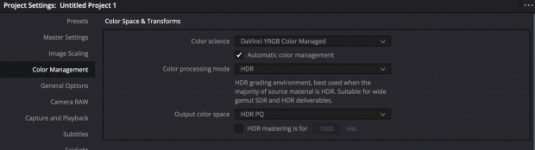
While I wouldn’t recommend using them, Resolve’s presets have made HDR pretty much idiot-proof for beginners as can be seen from the screenshot of the color management page.


Click image for larger version  Name:	Screen Shot 2022-10-02 at 3.53.08 PM.png Views:	0 Size:	70.4 KB ID:	3801902


Dolby Vision's trim controls make creating an SDR version fairly straightforward. The process of creating an SDR LUT for YouTube is a little more involved, but doesn't require an excess of technical knowledge to figure out (though it managed to stump the ACS!)

Hope that assuages your concerns. If you have any other questions, feel free to ask.
 
Last edited:
ACS: HDR Can’t Be Ignored


On a side note, regarding Apple’s 2021 laptops with Liquid Retina XDR display, in the comments section of the video, the Australian Cinematographers Society writes,

"We had a MacBook Pro 16” on set on our test shoot and when we compared it to the fifty grand AUD Sony BVM-HX310 we were amazed at how good the MacBook was. It is an impressive HDR display."

MacBook Pro Liquid Retina XDR display is indeed amazing, hands down the best screen for HDR content on a laptop! I was mind blown when the 1600 nits specular highlights shine through my eyes (while retaining shadow details and great contrast!).. one should really see it in action to get the experience. Even an OLED HDR screen can't reach that nits value.

That was my comment the Australian Cinematographers Society replied to :victorious: he he
 
Back
Top