Welcome to our community

Be a part of something great, join today!

  • Hey all, just changed over the backend after 15 years I figured time to give it a bit of an update, its probably gonna be a bit weird for most of you and i am sure there is a few bugs to work out but it should kinda work the same as before... hopefully :)

About the RedCine project AUTOSAVE function

Wayne Chiang

Member
Joined
Oct 13, 2009
Messages
18
Reaction score
0
Points
0
hi guys, I want to ask something about the AUTOSAVE function in RedCine project setting panel, the questions is:

what's the interval of the autosave action? is there an interval or does it automatically save after every one of my movements?

thanks.

oh by the way, is there any detailed official RedCine manual or instructions staff, i've only watched the 6 mov clips from the website and couldn't find any more information, but still I have a lot of quesstions and uncertain parts about RedCine...
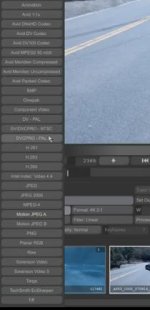
 
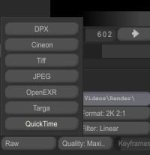
oh and one more question about the tutorial mov files, I see in the tutorial when the person chose QuickTime as the OUTPUT format, he's got a list of over 20 different kinds of codecs. However mine's only got no more than 8 kinds, for example, I've got nothing Avid.

well my RedCine version is 20.0, I wonder if it is because I'm not using the latest version, or did the tutor in the video added optional plug-ins or staff...if you guys know what I mean, my english is broken...
 
I can't help with the REDcine autosave question, but as for what codecs you'll have - it depends on what is installed on your system. If you download and install the (free) Avid DNxHD codecs, then they'll show in the REDcine export options for QT.

Philiop
 
look this picture, more options ,
 

Attachments

  • 1.jpg
    1.jpg
    13.1 KB · Views: 0
  • 2.jpg
    2.jpg
    5.9 KB · Views: 0
I've never been able to save RedCine projects as separate projects. No matter the different names under which I save them, it's only the last project I work on that opens up.

E.g. I create project A and then create project B. Later when I open project A it is project B that opens up. Project A and all it's clips and settings just seem to disappear and it's only the clips and setting of project B that open up in project A.

Hope I'm clear. Thanks
 
I've never been able to save RedCine projects as separate projects. No matter the different names under which I save them, it's only the last project I work on that opens up.

E.g. I create project A and then create project B. Later when I open project A it is project B that opens up. Project A and all it's clips and settings just seem to disappear and it's only the clips and setting of project B that open up in project A.

Hope I'm clear. Thanks


So do you mean that the AUTOSAVE function never worked as in your case?
 
Back
Top