Welcome to our community

Be a part of something great, join today!

  • Hey all, just changed over the backend after 15 years I figured time to give it a bit of an update, its probably gonna be a bit weird for most of you and i am sure there is a few bugs to work out but it should kinda work the same as before... hopefully :)

3 monitor setup for Late 2013 MacPro

Von Thomas

Well-known member
Joined
Jun 9, 2008
Messages
529
Reaction score
0
Points
0
Location
Los Angeles
Website
www.digitaltechnyc.com
I have a problem, trying to connect 3 monitors to my Late 2013 MacPro. I have 2 DVI monitors, and a 55" HDMI panel. So far, I can only get 2 monitored to work at same time. Does anyone have this setup, and if so, how did you get all 3 to work together? I think I've tried almost every suggestion from Apple Care, but no luck.

Von Thomas
Colorist, DIT, VC
 
I ran into the same issue when I got my 2013 MacPro. The only way I got it to work was the following way (and not ideal at all) there are 2 rows of TB2 ports, 3 on the left side and 3 right side. Choose the middle port of each side. The left side is a Display-port cable to DVI running one monitor, the right side is a Display-port to VGA cable to the second monitor, and HDMI port to the third. It is my understanding this Mac cannot run (2) DVI monitors and a HDMI at the same time. Hope this helps.
 
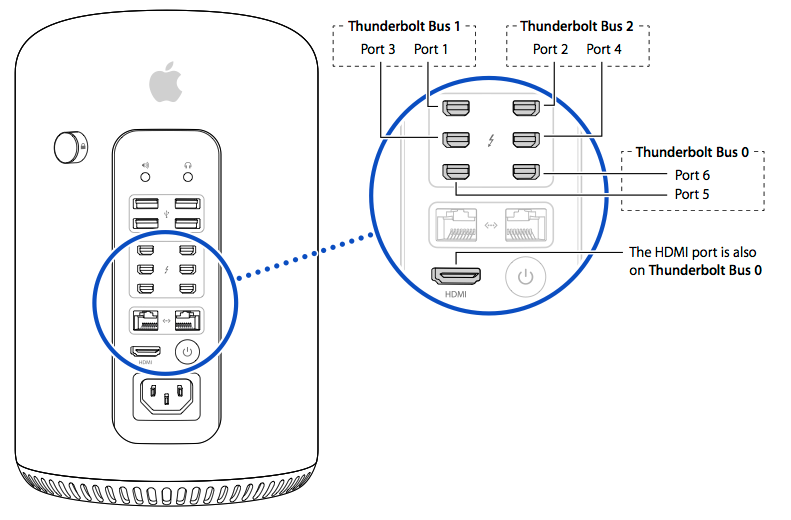
You have to separate the monitors so that you only have one monitor per bus. There are six connectors, but only three busses.

display_ports.png
 
Thanks, but connecting each monitor to a separate does not work with 2 DVI connected monitors. Gregg may be correct, but I was unable to get a VGA connection to work at all. I'm going back to Fry's.
 
I found a working solution.

I added to one DVI monitor a active mini display port to dual link DVI adapter, 2nd monitor to passive mini display port to DVi adapter, and the 3rd monitor connected to HDMI, and all three work perfectly.
 
Back
Top