Welcome to our community

Be a part of something great, join today!

  • Hey all, just changed over the backend after 15 years I figured time to give it a bit of an update, its probably gonna be a bit weird for most of you and i am sure there is a few bugs to work out but it should kinda work the same as before... hopefully :)

Beta REDCINE-X (Build 221) & REDLINE (Build 194)

So, love the new UI. But rendering w/ rocket is still twice as slow as RocketCine.

Any reasons for the speed decrease?

Looking into it. It seems to happen only on some machines with some formats.
 
3.2 8core 14GB Ram.

Still on Leopard on this one. Could that be hindering it?

Not sure yet. Can you email the logs to redcinex at red . com?
Maybe a also a brief description of format source, dest, burn in, codec, etc.
 
What are the chances in future builds of RedcineX having Sound Meta Data (.Wav Filename, Roll and Sound TC) being put into the ALE generated when exporting MXF/AAF files from RedcineX after syncing?

Cheers,
 
Could we have a shortcut to generate proxies? Like a voice "make quicktime proxies" in the menu? Going to the export etc. it takes time.
Thanks.
 
Could we have a shortcut to generate proxies? Like a voice "make quicktime proxies" in the menu? Going to the export etc. it takes time.
Thanks.

That's where it was.
 
Lack of Timeline Ruler

Lack of Timeline Ruler

Now all my projects, created with current version, or with past RCX versions, does not show the timeline time-ruler.

Also, to move the position line, I need to drag it from its current location to the new desired location. So, clicking in "where-the-ruler-used-to-be" in other place do not make the line to move, as it used to (well, also I can move it pressing the FWD or REV buttons from the Tangent Wave).

Note: is there an estimated timeline to get the modules capability, like Magic Bullet and others?
 
I have tried making an export preset to make QuickTime wrappers, and chosen "Output with clip filename to clip folder". However when I try to use it, I get asked for a destination folder. So I can't get it to re-make proxies a whole bin of clips in one go. Has anybody else got this to work?
 
Some thoughts about the new UI solution.


The good thing is that it’s more clear and organized.


The thing is that this solution has a price of negative influence on other factors.
Please don’t take this the wrong way, I’ll try to explain. First the negative factors then the suggestion for the solution without the issues.


There are many times when you want to get the perspective of the all the settings, which one influences what, think about what is happening with the picture, re-check the settings, go back and fine tune, compare...etc etc...

With new UI logic this is more restricted. Much more clicks will be needed to do the same job because of:

  • redundant opening and closing windows
  • unnecessary effect on user’s visual memory of all the settings
  • complication when applying looks and comparing them


Essentially, with this you are stacking a large bunch of creative controls into a small space whereas you want to have the largest controllable space (and perception) you can, especially considering that you're dealing with users who in general have enough screen estate.
For watching and changing one parameter you have to close the other one - not good.

The advantage hardware controller gives to grading is multiple controls available at the same time.
With this new UI solution you cannot even see multiple controls at the same time.

If you guys really really like this version please allow fully independent UI setups for individual customization.


This scheme could be very useful for a laptop use, for example, but on a large screen estate doesn’t use the full potential of the software.

New vertical placement of RGB wheels is more confusing, lift and gain are upside down, more space is used for them (wasted space on the sides) and they are generally too small, IMO, same as sliders under them. All the sliders are too short (as with previous versions).

The huge advantage of 12 bit space and great fine tuning abilities is extremely limited with tiny adjustment space on the screen.

It is great that you guys are constantly developing and trying different things, and the speed of development is amazing.
I suggest not to stop here.


Solution suggestions


Designing picture settings in proportions which allow better combinations on the screen. Also individual settings scaling. What could also help is if user could arrange settings windows and in "preferences" - or by a small check box on the main bar - turn on “glue window groups” and/or “lock all windows position”, so that with further work one can’t accidentally move a window.

That way all the tools on the “table” user has arranged become fixed and one can concentrate fully on work. User could also move the whole group in the other side of the screen without fiddling with the redundant stuff and each individual window.

The simplest solution for more precise lift-gamma-gain control would be adding a stripe for precise tuning above each slider. Moving across it would move the main slider in smaller increments (affecting numerical value also, of course).
For the rest of the sliders, the simplest general feature implementation, which would release more of Redcine’s potential is in enabling larger control paths - more detailed movements - more precise visual feedback (or just fully independent scaling) - goes for curves also.

Combining browser/bin/export and ablity to slide the mutual bar is very good.
I suggest adding a horizontal switch option if it’s not a problem.


On 100+ shot projects any miniscule redundant action is multiplied and in the end greatly slows down the whole process. GUI optimization shouldn’t be to hard to iron out (guesswork) and can give a great benefit.
 
Hi,

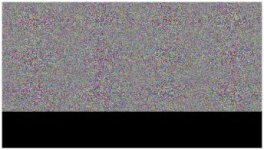
Great update. But I think I am having a bug here. RCX exports 4K 16:9 to ProRes HQ 2K 16:9 without a problem. But when I am trying to export 2K 16:9 100p/25p slowmo-files to 2K 16:9 ProResHQ I get nothing but split screen frames with noise in the upper 2/3 and black below.

I tried trashing all of my QT- and RCX-preferences plus deleted the red-folder in App Supp but to no help.

Otherwise the QT-wrappers/proxies/refencefiles open up without a problem in FCP and they display the right colors, which is awesome.

Deanan, should I email you Verbose files or is it enough with the RCX log-files?

Best of luck,

Calle
 
Hi,

Great update. But I think I am having a bug here. RCX exports 4K 16:9 to ProRes HQ 2K 16:9 without a problem. But when I am trying to export 2K 16:9 100p/25p slowmo-files to 2K 16:9 ProResHQ I get nothing but split screen frames with noise in the upper 2/3 and black below.

I tried trashing all of my QT- and RCX-preferences plus deleted the red-folder in App Supp but to no help.

Otherwise the QT-wrappers/proxies/refencefiles open up without a problem in FCP and they display the right colors, which is awesome.

Deanan, should I email you Verbose files or is it enough with the RCX log-files?

Best of luck,

Calle

Verbose please.
Send them to redcinex at red . com

Can you also email a screengrab of what the bad frame looks like?
 
... I get nothing but split screen frames with noise in the upper 2/3 and black below.

I've just experienced the same thing. Exporting 2K 16:9 (2048*1152) unscaled to ProRes 4444 I get the upper 3/4 noise and lower 1/4 black. But exporting to 1920x1080 works a treat.
 

Attachments

  • Screen shot 2010-04-18 at 10.01.36 PM.jpg
    Screen shot 2010-04-18 at 10.01.36 PM.jpg
    17.9 KB · Views: 0
Bug report:


on a non rocket system (MBP 15") the debayer quality setting (at the top of the main window) doesn't display it's drop down properly after going into full screen mode and after.

Same thing here, the drop down menu won't work after the first change.
 
I've just experienced the same thing. Exporting 2K 16:9 (2048*1152) unscaled to ProRes 4444 I get the upper 3/4 noise and lower 1/4 black. But exporting to 1920x1080 works a treat.

Can you email the logs to redcinex at red.com?
 
Back
Top