Welcome to our community

Be a part of something great, join today!

  • Hey all, just changed over the backend after 15 years I figured time to give it a bit of an update, its probably gonna be a bit weird for most of you and i am sure there is a few bugs to work out but it should kinda work the same as before... hopefully :)

Ballooning Data Rates and Crippling Workflow

dev.doyle

Member
Joined
Nov 14, 2008
Messages
16
Reaction score
0
Points
0
I was just on a job with two MX cameras shooting 4KHD RC42. The nature of the show required long takes, which naturally inflated file size. Running on a 2.8 GHZ MacBook Pro w/ a FW800 express card adapter I had three destination drives. Two were connected directly to the FW800 adapter, and the third was daisy chained behind one of those direct drives. The RED RAIDs were being connected directly to the MacBook's FW800 port.

Being a diligent data manager I began using R3D Data Manager to ingest the footage, but the combination of daisy chained drives and steep shooting ratio I began to get backed up (on a side note - R3D used to be so much faster, two upgrades ago it suddenly took 30% longer to dump - what happened?). Anyways, when pushed to the point of running out of media to hand the ACs I switched over to ShotPut Pro which allowed me to make up some time (I'm well aware of the pitfalls of ShotPut, and whenever using it I'm sure to watch all the footage to verify integrity).

All day it was a struggle to catch up, and at end of day required an additional 3 hours to transfer the rest of the footage. The question I pose is this: with data rates growing every build (which is great for image quality) what's a data manager to do? I'd use eSata for the destination drives but if you're limited to FW800 out of the RED RAID isn't it a moot point? Daisy chaining with eSata makes sense I suppose to boost speed between the two...or does it? Can anyone shed any light on that?

What are people doing to cope with these ballooning data rates? I don't know about you guys, but after a 15 hour day on location after 4 company moves the last thing I wanted to do was hang around for an additional 3 hours. Transferring the footage safely and verifying is priority one, but surely something can be done to make this faster. Any gear or suggestions anyone has would be greatly appreciated!
 
I was just on a job with two MX cameras shooting 4KHD RC42. The nature of the show required long takes, which naturally inflated file size. Running on a 2.8 GHZ MacBook Pro w/ a FW800 express card adapter I had three destination drives. Two were connected directly to the FW800 adapter, and the third was daisy chained behind one of those direct drives. The RED RAIDs were being connected directly to the MacBook's FW800 port.

Being a diligent data manager I began using R3D Data Manager to ingest the footage, but the combination of daisy chained drives and steep shooting ratio I began to get backed up (on a side note - R3D used to be so much faster, two upgrades ago it suddenly took 30% longer to dump - what happened?). Anyways, when pushed to the point of running out of media to hand the ACs I switched over to ShotPut Pro which allowed me to make up some time (I'm well aware of the pitfalls of ShotPut, and whenever using it I'm sure to watch all the footage to verify integrity).

All day it was a struggle to catch up, and at end of day required an additional 3 hours to transfer the rest of the footage. The question I pose is this: with data rates growing every build (which is great for image quality) what's a data manager to do? I'd use eSata for the destination drives but if you're limited to FW800 out of the RED RAID isn't it a moot point? Daisy chaining with eSata makes sense I suppose to boost speed between the two...or does it? Can anyone shed any light on that?

What are people doing to cope with these ballooning data rates? I don't know about you guys, but after a 15 hour day on location after 4 company moves the last thing I wanted to do was hang around for an additional 3 hours. Transferring the footage safely and verifying is priority one, but surely something can be done to make this faster. Any gear or suggestions anyone has would be greatly appreciated!

Be happy you aren't shooting uncompressed?

Sorry... couldn't help myself. Someone qualified needs to help with the real answer.

Jim
 
Epic/Scarlet will have built in checksums for each frame so it'll be easier to verify after a copy rather than during the copy.

We to often see productions go out with much less media than they really need. Sometimes it helps if you can get safety media as part of the rental that you open up only if you are in an emergency.

The other recommendation is to double up the backups. Get an older laptop and do the backups in parallel so you can turn around faster.
 
One of the reasons I dislike this job - 19+ hour days on two camera shoots.

On several occasions we've shot in excess of 400GB per day on commercials. On a two day shoot, we once did 830GB in just two days! Ok, now, if this was common, the solution would obviously be higher end hardware, such as a Mac Pro / RAID setup. But, when clients normally only shoot 60-150GB per day, it's difficult / nigh impossible to expect them to pay for a "real" downloading station 100% of the time. It always ends up being a laptop for budget reasons. I wish I had the answer, the OT is sometimes nice. But, what would be even nicer is to have a normal work day, go to bed at a reasonable time, and earn just a little less money. Or, own your own drives, and get a second day to actually replicate them, instead of doing it all night long. Haven't yet decided to go all out on a downloading system yet, but I probably will to save my sanity on the next 2 camera job. Again, if you're doing episodic television or features, you gotta have that stuff. But for many of us, it's only an occasional need.
 
Last edited:
For professional level 2+ camera shoots a tower with at least two available busses (1FW800 and 2+ esata) is imperative. You can handle a one camera shoot that is primarily CF card based with a laptop but beyond that you seriously need to build yourself a proper data management cart, ideally with some sort of fast RAID. It's amazing how fast FW800 can be when you free up the bus to just read. That said we're really looking forward to trying the new Red Station card reader.
 
As Evin said you need a faster rig. MacBooks are not appropriate for that much data, nor are they safe. Build a professional rig or don't take on the larger jobs, it's as simple as that.
 

Attachments

  • dit.jpg
    dit.jpg
    78.8 KB · Views: 0
  • RedCine-X.jpg
    RedCine-X.jpg
    86.3 KB · Views: 0
Epic/Scarlet will have built in checksums for each frame so it'll be easier to verify after a copy rather than during the copy.

That's fantastic news.

As for dev, the MacBook Pro is not a tool that will have an extended future for data handling on higher-end production. It just sounds like you had the wrong tools for the job.

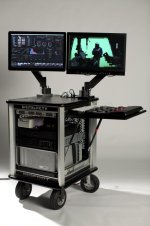
When we're shooting 3-7+ cameras on a movie or TV show, it requires a certain amount of equipment that most people do not own. There are carts out there that you can rent [generally $750-1,250 per day] that have the necessary data throughput to enable data transfers at the speed necessary for larger productions. You can build one yourself, but the cost of entry is very high.

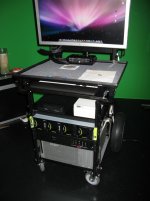
Just as an example, here's a picture of the old cart I built two years ago for Southland:

oldcart.jpg


My current cart is roughly twice as fast with many times more storage. Keep in mind that this sort of tool is designed as a DIT cart - not as a loader's cart - so its primary function is accurate color correction with data handling falling into the background. Needless to say, one has to have some very powerful equipment to turn a task that would take hours on a laptop into a task that takes minutes in the background of a tower.

Get the right tools for the job! If it's taking more than 15 minutes after wrap [or so, depending on certain situations], somebody messed up.
 
Last edited:
Just got off a 14 hour data-tech day here in beautiful downtown Burbank...

Basically I try to never let the RedRaid drives get over 20% full, so the readout on back of the camera never goes under 80%. A lot of times I end up taking the drives home with me and either taking them back to the set the next day, or if it's the last day of the shoot, taking them back to the rental house the next day myself. Couldn't do that tonight though, as the owners are on dawn patrol for Vegas first light tomorrow...
 
For professional level 2+ camera shoots a tower with at least two available busses (1FW800 and 2+ esata) is imperative. You can handle a one camera shoot that is primarily CF card based with a laptop but beyond that you seriously need to build yourself a proper data management cart, ideally with some sort of fast RAID. It's amazing how fast FW800 can be when you free up the bus to just read.

Aren't the FW and eSata busses separate on a MacBook Pro with the express34 slot doing eSata? So you do have 2 available busses w/ a MBP, right?
 
Can't wait for RedCode100... ;-)

Can't wait for RedCode100... ;-)

IF all you have is a MBP laptop, and it has the Express/34 slot so you can add the 2 port eSATA card, the fastest set up I have tried is reading off the RedDrive via the R2E cable and back out via eSATA to a G-Tech 2 drive RAID. Second best is reading off the RedDrive via FW800 and writing out via eSATA. There are many issues with this set up that make it less than ideal.

As Evin & Brook have noted a serious integrated solution with a MacPro tower on a cart is a sensible way to handle bigger demands. The Red Station should look pretty good on a DIT cart if you're shooting CF.

A wish list item from RED would be a Red Station module that I could slide a Red Drive into, that has the Lemo receiver. This is basically what the R2E cable does, but if RED actually made a module to do this that could compensate for the high signal levels out of the drive, send a proper signal to the computer's eSATA tap and fit the form factor...

My personal solution is another step beyond that as I have both a MacPro and a Globalstor PC in my van so I can divide up the copy operations (plus a lot of other cool stuff beyond this thread).

Cheers - #19
 
IF all you have is a MBP laptop, and it has the Express/34 slot so you can add the 2 port eSATA card, the fastest set up I have tried is reading off the RedDrive via the R2E cable and back out via eSATA to a G-Tech 2 drive RAID. Second best is reading off the RedDrive via FW800 and writing out via eSATA. There are many issues with this set up that make it less than ideal.

Yeah but w/o an eSata port multiplier your R2E cable leaves you 1 port short because you are backing up to 2 separate drives, but you only have 2 ports and you need 3.

And yes the G-Raids are faster, but Raid 0 for backing up R3D's makes me nervous...
 
Aren't the FW and eSata busses separate on a MacBook Pro with the express34 slot doing eSata? So you do have 2 available busses w/ a MBP, right?

For us lowlifes with our Macbook Pro's the answer is: using firewire and E-Sata together makes sense because they are on separate buses. So you will get the full throughput of the FW-800 coming from the Red-raid to your E-Sata drives.

When you daisy chain you must also understand that the information still passes into the computer and then out again. Thus with overhead you get less than half of the throughput time when you source and destination are on the same line. The same will be true if you have 2 Firewire ports on the side of a laptop, they are still on the same bus, so exactly the same as daisy chaining.

If you copy to two destination drives simultaneously from a single source drive you are forcing the source drive to search back and forth for different files. Imagine the needle on a record player trying to play two songs at once. The needle would spend most of its time traveling between the two grooves instead of in the grooves playing the music. That's what happens when you copy to two places at once on a mechanical hard drive, the transfer time is much more than double the time of one copy operation because the source drive is spending all of it's time searching between places. Instead do one copy and then the next.

On more little secret, most people don't do checksums. They're in the closet though and this is not a safe space so don't bother asking. Be your own checksum, by testing and inspecting the data on your destination drives. (The frame checksums do sound amazing though... bravo Deanan)

I carry on two 17-inch MBPs. Not much fun pushing a DIT cart when a glacier just calved and you have to run for your life ;)

Cheers,
IBloom
 
Evin and Brook - thanks for the thoughtful insight. Brook we met before my nightmare job the other day at Keslow. I come from the camera assisting side - worked at Panavision for two years, have been camera assisting for a couple years, and have gotten in to data management as it's become the new loader position. Obviously there's a very clear line between digital loading and doing DIT work. On one end you're dumping and verifying, as well as lending a hand to the camera crew when you can - fulfilling the second/loader role. On the other end of the spectrum (IE: Brook and Evin) it's a committed DIT position with full post-production support brought right on set.

I suppose it took that job for me to realize where that line is. Full on RED teching w/ a $20k cart isn't where I'm heading, nor what I'm interested in. That being said, I'd like to operate at maximum efficiency in the capacity of a digital loader, and there have been several helpful tips above.

The R2E cable - it doesn't work with drives that have the SATA_TRANS_FAULT fix does it? Which nowadays is most of the drives? Say you were able to snag some old 320GBs, now that you're losing an eSata port strictly for ingestion, daisy chaining one of your destination drives via eSata would be a zero sum gain wouldn't it? Or would the gain in transfer speed nullify the additional lag on the daisy chain? Wonder when/if the R2E boys are going to fix that.

I've tryed to stay away from ingesting the RED RAID via fw800 and writing to destination drives thru the eSata adapter as it always gave me checksum errors with R3D Data Manager. That's great news about EPIC though...
 
If you copy to two destination drives simultaneously from a single source drive you are forcing the source drive to search back and forth for different files.

Is this true if you are using dedicated software, or does this just apply for dragging and dropping? Because ShotPut Pro, at least, copies faster to 2 drives simultaneously than if you did one at a time, and it's only a little slower than it would copy to 1 without it. 60 gigs takes about 40 mins, for instance...
 
If you copy to two destination drives simultaneously from a single source drive you are forcing the source drive to search back and forth for different files.

The current version of R3D Data Manager for windows does not have this issue. One read from the source to dozens of destinations. We are just about finished porting the Mac version of this. With this, your copy is as fast as your slowest destination.

As for the original post, in addition to Brooks' insight, I suggest getting rid of firewire wherever possible. When producers come to me with firewire-only drives, I send them back. Minimum connection, eSATA.

In addition, you wouldnt approach a multi-camera shoot with one AC. So you shouldnt approach it with one computer. Adding parallel processes can only help.

One last suggestion: you can do the third copy later. You said the third is daisy-chained, which mean both of those drives are getting less than half the original bandwidth. Because you are using checksums, you know the second copies are exactly like the originals. So take advantage of it, and do the third drive later (still asap, just not in order).
 
The current version of R3D Data Manager for windows does not have this issue. One read from the source to dozens of destinations. We are just about finished porting the Mac version of this.

Conrad,

When do you think the Mac version will be done?
 
also keep in mind that's y the red team is work on RED STATION, for all these grow needs for more bandwidth for safe redundancy. I actually had the idea of trying to build one myself with maybe 70% of the specs they put together in their mock up. Just never really had the money to "experiement" not knowing how well it would work.

plus faster ports are emerging, usb 3.0, esata is becoming more common on a lot of drives.

my quickest solution though for current MB Pro, red drive with esata cable connection to express card (or cf to express card reader). FW800 to a raid 1 drive, and create redundants later, or offloading to a usb drive at the same time too. the key is to keep all ur buses independant and at full use to single drives only. daisy chaining is only gonna cause problems.
 
Conrad,

When do you think the Mac version will be done?

ASAP.

Unfortunately unlike our favorite camera manufacturer, we cant release beta products. We are directly dealing with peoples data, and people trust us and the software.

That said, I was showing a beta version at REDucation in Vegas last week.
 
Back
Top