Welcome to our community

Be a part of something great, join today!

  • Hey all, just changed over the backend after 15 years I figured time to give it a bit of an update, its probably gonna be a bit weird for most of you and i am sure there is a few bugs to work out but it should kinda work the same as before... hopefully :)

Lack of x8 slot on my Mac Pro

Rick Darge

Banned
Joined
Dec 29, 2006
Messages
3,775
Reaction score
0
Points
0
Age
44
Hello, I have the latest Mac Pro system. Just installed my Rocket card and now it is giving me this warning upon Redcine-X startup,

RedRocket is in a 4x PCI-Ex Lane. Rocket requires an 8x lane to perform properly.

How do I solve this problem? I currently have a eSata card installed and my ATI Radeon HD 4870 card which as far as I know, is taking up 16 lanes already.

Am I limtied to 4 lanes?

I am running a 2x2.26 GHz Quad-Core with 8GB of RAM

Thanks
 
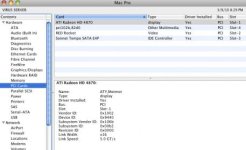
mine works fine with this configuration:
From bottom of PCIE slots going up (with one being at bottom)
1. 4870 card (bottom card)
2. second slot is actually covered by 4870 card
3. Rocket card
4. Sonnet Esata (4 connectors)
5. Matrox MXO2 video card

in this order i have no problems. I've heard that some folks need to move PCIE cards around to get performance--i think i just lucked out.
Good Luck
 

Attachments

  • Screen shot 2010-03-09 at 8.30.04 PM.jpg
    Screen shot 2010-03-09 at 8.30.04 PM.jpg
    20 KB · Views: 0
3rd slot from the bottom.

Right now, bottom is ATI card, then slot above that is ATI, then eSATA, then Rocket, then HDSDI connectors

The best slot in that mac is the second from the bottom (x16 next to the graphics card). The manual has some pictures showing which slot is ideal.
 
Unfortunately, this is where the Kona LHe card wants to go, too.

We are having a lot of issues just recently with our Rocket. It's causing the fans to never stop. Not only is this loud, but it doesn't sound good for the computer with them going all the time at a high rev. We also have had some stability issues so we took the Rocket card out and the Mac seems to be happier. Hope these get worked out soon...especially if it could work in another slot without bugs/loss of speed.
 
Unfortunately, this is where the Kona LHe card wants to go, too.

We are having a lot of issues just recently with our Rocket. It's causing the fans to never stop. Not only is this loud, but it doesn't sound good for the computer with them going all the time at a high rev. We also have had some stability issues so we took the Rocket card out and the Mac seems to be happier. Hope these get worked out soon...especially if it could work in another slot without bugs/loss of speed.

When there are numerous cards in the mac, the fans automatically go to high rev on the mac in order to make sure the cards and the system are being kept cool. GPU+Rocket+kona means a fair amount extra cooling is needed.

Speed loss in a 4x slot is going to mainly affect dealing with full 4k frames going back to the computer.
 
But, Deanan:

-This just started happening. I don't think the fans were staying on all the time before the past couple weeks. Did the new REDCine-X do something?

-Extra cooling when not being used? I'm talking the fans on when NOTHING is being done...as in all night long. Sleeping the computer doesn't help.

Seems buggy to me...just recently. Hope our card isn't going bad.
 
But, Deanan:

-This just started happening. I don't think the fans were staying on all the time before the past couple weeks. Did the new REDCine-X do something?

-Extra cooling when not being used? I'm talking the fans on when NOTHING is being done...as in all night long. Sleeping the computer doesn't help.

Seems buggy to me...just recently. Hope our card isn't going bad.

Rocket only controls it's own fan it's generally not what you're hearing in a mac (the mac fans are what's usually the loudest when the crank up). If you can, try and see how much the system fans are blowing as it's more likely that for some reason those are now blowing much harder.
 
Okay, but when we take out the RR card, the fans don't blow. It's definitely related to RR.

I'll do some tests...probably this weekend.

Thx.
 
Okay, but when we take out the RR card, the fans don't blow. It's definitely related to RR.

I'll do some tests...probably this weekend.

Thx.

Introducing another card into a system will do two things which increase the heat within the system and therefore raise the rpms on the fans resulting in more system noise.

Adding an extra card will decrease the airflow withing the system, and as the card itself is a processor creating heat, it is raising the ambient temperature of the system.

Everything is thermally controlled, so its no big deal.
 
The Mac Pro will ramp up fan activity right from start-up if there are more cards installed. Call it a preemptive measure to control heat. I don't know if it's based on the number of active slots or on the amount of power drawn.

I put my Rocket card in slot-2 and that's where it has stayed for the past few months since getting it. Initially I tried to have it in slot-3, but I had some stability issues with it there, moving to slot-2 fixed that. It may perform better in slot-3 now. Bandwidth didn't seem to be a problem back then with slot-3. For the most part, none of the outboard codecs, like ProRes, scale well across multiple CPUs or make efficient use of system resources to any extent where the Rocket can't feed the uncompressed frames faster than the codec can handle them. The only situation I saw a speed increase by moving the Rocket to a faster slot was for 2K DPX transcodes, which are very fast.

Anyway, leaving the Rocket in slot-2 forced me to pull my Kona LHi from the system since it refuses to run in a 4X slot. I borrowed a Kona3 from someone and have been using it. The system runs really hot with the Kona, Rocket, ATTO R380 and GTX 285 in there!!! But the Kona3 likes slot-3 just fine. I have to give it back. I haven't decided what I'm going to do about the LHi card. I'm thinking I may pick up another Mac Pro and make it my Kona system. Will probably wait for the new models (due real soon) and will look for a deal on an '09 Mac. Unless Apple gives us a better PCI configuration in the updated models (we can dream, right?). Either way, I'm going to wait for NAB to see if any other new products show up. I'm expecting a new card offering from AJA sometime between NAB and Siggraph. It's been a while since they have offered any new cards and I'd love to see an updated Kona LHi or similar that is PCI-E 2.0 compliant and perhaps supports HDMI 1.4.

@ Deanan... I've been curious since its release and have to ask. How come the RED Rocket wasn't designed to be a PCI-E 2.0 capable card? That would've solved much of the bandwidth concerns.
 
x8 is really more for when you're transferring full res 4k rgb back to the computer. Transferring 4k scaled to 2k RGB back from the card is well under the bandwidth for x4.

Kevin, adding the rocket triggers the macpro to increase the cooling through the system. More cards, more drives, the faster the fans go.
 
I was able to resolve my problem by moving the card from Slot 3 to Slot 2.

Thank you
 
Deanan,
I came across a statement on another thread that the RR card belongs in a 16x slot....and see from one of your statements within this thread you have confirmed this. NOW, if I am running a Radeon HD4870 card at the bottom---It's a fat card and takes up two slots---my only other option is the next one up a x8 slot.

QUESTION:
Is this then limiting performance of the RR card?? AND should i look for an alternative DISPLAY card OTHER THAN the Radeon 4870 card that is THINNER ?? If so, what are some recommendations?

Thanks for monitoring so close these threads Deanan.
 
Did you solve your problem with the ATI? That's the card I am leaning toward since in every other respect it seems to play well.


Deanan,
I came across a statement on another thread that the RR card belongs in a 16x slot....and see from one of your statements within this thread you have confirmed this. NOW, if I am running a Radeon HD4870 card at the bottom---It's a fat card and takes up two slots---my only other option is the next one up a x8 slot.

QUESTION:
Is this then limiting performance of the RR card?? AND should i look for an alternative DISPLAY card OTHER THAN the Radeon 4870 card that is THINNER ?? If so, what are some recommendations?

Thanks for monitoring so close these threads Deanan.
 
Anyway, leaving the Rocket in slot-2 forced me to pull my Kona LHi from the system since it refuses to run in a 4X slot. I borrowed a Kona3 from someone and have been using it. The system runs really hot with the Kona, Rocket, ATTO R380 and GTX 285 in there!!! But the Kona3 likes slot-3 just fine. I have to give it back. I haven't decided what I'm going to do about the LHi card. I'm thinking I may pick up another Mac Pro and make it my Kona system.

I'm running a Kona LHi just fine in my new MacPro in slot 3.

The configuration is as follows (reading from my system profile):
ATI Graphics Slot1 x16
Rocket Slot2 x 8
Kona LHi Slot3 x4
Apple Raid Slot4 x4
 
Back
Top