Welcome to our community

Be a part of something great, join today!

  • Hey all, just changed over the backend after 15 years I figured time to give it a bit of an update, its probably gonna be a bit weird for most of you and i am sure there is a few bugs to work out but it should kinda work the same as before... hopefully :)

new REDCINE-X feedback

Build 84 is crashing in the middle of every Export render after the first successful one. Not sure why. I'm running OS 10.5.8 on a MBP 3,1 2.4GHz with 4GB ram. Reading/writing from and to the internal 7200RPM 320GB drive (with over 50% free). Rendering 5 clips of about 10-30 seconds each to ProRes422 1080P. It worked the first time, but continues to crash about 15 minutes into the render every time I try again with a different grade. I've tried rebooting, but no dice.

Hi Satsuki, welcome aboard!

Can you please email the crash log, as well as the Redcine-x log (it's in your home folder under Library/Application Support/Red/RedCineX/Logs), to rob_at_red.com?
 
Last edited:
Just my two cents but...
I don't miss Redcine at all. The worst UI I have ever seen. SOOOOO not intuitive.
I always liked RedAlert! and now I'm digging Redcine-X. BIG improvement.
Cheers,
Harry
 
Red also has to provide the sdk. Which deanan says will be out like, next week. Right on red!!!

Rob loman has also stated new qt codec is forthcoming.

Miles ahead. This is great.
 
I would say that until Redcine-X is moderately sorted out, the original Redcine should be reinstated on the Red Support page.

Better yet, incorporate the new colour science into it as a kind of "last hurrah" to at least have a stable app whilst the newcomer matures into something beautiful.

I imagine that would please 99% of us here and allow new clients to continue to use Red software without a thousand questions to those of us trying to support the camera's changing goal posts. Don't get me wrong, I LOVE the changing goal posts as the new colour science is amazing, but right now we are being put into the position of telling clients to use software that really is too early in the beta phase to be realistically used on productions. It's fine for testing as long as we have Redcine (original) to fall back on when things go wrong.

Sure, we have it on our USB keychains and give it to all our clients, but the newcomers (the ones who need the most stable workflow) are the very ones who will be most negatively impacted by it (and who are the ones who will ask why a two year old camera system doesn't have stable tools). This seems antithetical to all Red has achieved thus far at a time where the next generation of cameras are creating a lot of new interest in the Red way of doing things.

Just my 2 yen :)

Cheers,

Paul
 
Hi Reds, I've recived my Rocket couple of weeks ago and I'm trying to use it with Redcine-X 84. I like the Flut idea but I didn't use enough to judge it, first feeling is really positive.

I've got some issues:
1. I tried to render out to H264, many times with different settings and I always got this kind of results (Pic 1) ProRes422HQ came out just fine.

2. I tried to export the clips in timeline as divided clips with their original names but I can't. I can only obtain one single long clip (and I have to chose its name), impossible to have separate sub-folders, where am I wrong? Or is just not possible now? (used settings in pic 2)

3. I do not understand how to select and put in timeline multiple clips at same time, is it possible? I can select only as much as I can see without scrolling in the Clip Selection window and they do not appear in the timeline following their name order (at least if you have more than 1 column of thumbnails in Clip Selection). I tried to select and put on timeline 20+ clips but this is the perfect way to crash the app.

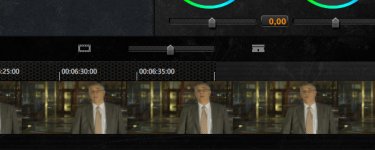
4. The time indication above the frames of the timeline do not refresh fine when scrolling, actually some time it did not show up (Pic 3).

5. Render time are a bit different, RocketcineX is definitely faster:
I run some test on our 2x2.8GHz Quad-Core / 8GB DDR2 reading on external e-sata 7200rpm drive and writing on a second internal drive (not the drive of the OSX). But who cares we're flying on the Rocket!
I did a classic transcode 4K 16:9 RC36 to Apple ProRes422HQ 1080x1920

Clip 1
1103 Frames // Running Time: 44"
Render Time in Redcine-X 56"
Render Time in Rocketcine-X 48"

Clip 2
4953 Frames // Running Time: 3'18"
Render Time in Redcine-X 4'13"
Render Time in Rocketcine-X 3'31"

Clip 3
11062 Frames // Running Time: 7'22"
Render Time in Redcine-X 9'38"
Render Time in Rocketcine-X 7'48"

A couple of things more:
Any idea of the timing for a Rocketcine-X build with Flut?
I second the idea of simplify the UI of RedcineX for better use on Laptop screens, we'll wait for it.
Is in the plans to have a realtime Histogram during playback? Bigger???

Anyway thanks for the Flut and the RedcineX and the Rocket, now it's a better work. I hated all the time I've lost looking to REDrushes!
 

Attachments

  • H264.jpg
    H264.jpg
    18.5 KB · Views: 0
  • Sub-folder.jpg
    Sub-folder.jpg
    16.7 KB · Views: 0
  • Timeline.jpg
    Timeline.jpg
    30.4 KB · Views: 0
I would say that until Redcine-X is moderately sorted out, the original Redcine should be reinstated on the Red Support page.

Just my 2 yen :)

Cheers,

Paul

There will be no more support for REDCINE. Our best effort is to tune up REDCINE-X as quickly as possible... and update ROCKETcine-X. It makes no sense to take resources off REDCINE-X to resurrect REDCINE and then be further behind on the app of the future.

Everyone is working pretty hard on this.

Jim
 
Carlo Rho,
Here are a couple things you can try:

1. I tried to render out to H264, many times with different settings and I always got this kind of results (Pic 1) ProRes422HQ came out just fine.
In the Quicktime Compression settings dialog (accessible from the Export Settings dialog) increase the value in the "Limit data rate to" field. Alternatively you can disable the option as a test. With a larger data rate or a non-limited data rate you should not get those artifacts in H264.

2. I tried to export the clips in timeline as divided clips with their original names but I can't. I can only obtain one single long clip (and I have to chose its name), impossible to have separate sub-folders, where am I wrong? Or is just not possible now? (used settings in pic 2)

This action can be done from the bin but not from the timeline.
Step 1: Put the clips you want to export separately into a bin
Step 2: Set the "Export To:" drop down to either "bin (all clips)" or "bin (selected clips)"
Step 3: Choose your export preset with "Sub-folder per clip" selected.
Step 4: click Export

3. I do not understand how to select and put in timeline multiple clips at same time, is it possible? I can select only as much as I can see without scrolling in the Clip Selection window and they do not appear in the timeline following their name order (at least if you have more than 1 column of thumbnails in Clip Selection). I tried to select and put on timeline 20+ clips but this is the perfect way to crash the app.

Click in the file browser or a bin and press Apple/command + A on the keyboard to select all clips.
You can also Apple/command + mouse click on each clip you want to select.
 
Last edited:
Trying...
QT H.264
Setup: no Limit Data Rate, 25 fps & Key frame every 5, Frame Reordering & Single-Pass checked. Quality Medium.

1st->
2 clips in Bin 1, 1103+2683 frames, C001 and C002 of the same .RDM
RCX Build 84 crash at 99% of the first clip rendered, C002.

Hey RED is it useful for you to send you the crash automatic report from OS-X or not?

2nd->
Everything the same but I rendered C001 and then C002 everything works fine.
 
Carlo: we know about the export crash, it's been fixed for the next build that we're testing internally right now
 
Thanks Rob, It's fine I'm just playing my RED Rocket™™ and I know it's a beta version.
I would love to have R1/RedcineX/RocketcineX stable build with Flut, my 2 R1 upgraded to M-X and my 1st EpicX in customs waiting for VAT payment but this is January, not May!
I think that the only big issues with this software are:
- UI, needs to be savable, less head on the windows and custom presets for Laptops with only 1 screen, I'm on 1 CinemaDisplay 23" moving windows all the time.
- I would really like a real time Histogram, playing with the clip. Is that impossible?

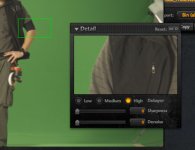
As concern rendering times, crashes & UI errors like the timeline time or the Detail window (Pic 1), I know all this issues will be solved just a matter of time, on this I'm not in a hurry!
I know you've got the right engine from sensor to post, it just need to be tuned, but the interface it's an other game.

I prefer to have REDcolor/REDgamma & Flut stable on RocketcineX before everything else!
I need to render good DPX/ProRes/DNxHD clips today! I need the skills to pay the bills!
I'll be a better filmmaker tomorrow.
 

Attachments

  • Detail.jpg
    Detail.jpg
    16.7 KB · Views: 0
i m trying to export manually some vfx shot from Redcine x, i ve got the edl to copy the in and out, but it uses TOD timecode, how can i set those in redcine x ?
 
Now my detail window works just fine... :hurray:
I love Betas... so funny for free days...
 
I am not sure it has been reported yet but I am not going to wade through 14 pages.

Bug:
Tangent Wave with firmware 1.0 connected to RedCine-X B84
Moving the level buttons, (Big round flat ones) there is no correction on the image, only when I touch the "balls" it jumps to the setting I previously set them.

It seems they are not in the checking for change loop.
 
Couple of notes...

1. REC 709 throws info away that REDgamma keeps.

2. The U/I has been scheduled for a clean up AFTER we get everything working. I think you will like where it will go.

3. Camera RGB is not accurate. REDcolor is.

Jim
Thanks for addressing my concerns Jim.

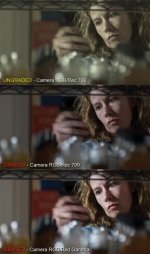
Could you please clarify #1? What info is being thrown away in Rec 709 gamma? My main concern is the difference in look (see attachment).

(BTW, sorry for not using Redcolor but I had already graded this shot in Camera RGB/709 and did not have time to redo it. I've left the other shots in RGB so as to compare apples to apples.)

#2 is my preferred grade. The only difference between #2 and #3 is Red Gamma, otherwise the grades are identical. You can see how Red Gamma greatly increases contrast in the midtones. I found it difficult to get back to the look of #2 without going into Curves, which I'd prefer not to do because it tends to take more time.

Now, #3 is a not bad look at all, but it is not what we shot. I would have a hard time showing this to the DP and saying "this is the shot." When the time comes when we can monitor on set in Red Gamma, then I think it will be a great step forward. But in the meantime, I would have a hard time selling it.
 

Attachments

  • Rec709-Redgamma-test.jpg
    Rec709-Redgamma-test.jpg
    40.8 KB · Views: 0
There will be no more support for REDCINE. Our best effort is to tune up REDCINE-X as quickly as possible... and update ROCKETcine-X. It makes no sense to take resources off REDCINE-X to resurrect REDCINE and then be further behind on the app of the future.

Everyone is working pretty hard on this.

Jim
Thanks for your reply Jim. I knew writing it that there wasn't much chance of any further updates to Redcine.

What is more important is just getting Redcine build 20.0.0 back on your website so new clients etc can download it and have a stable app to grade on with current build footage (ie. build 21.4.1). I'm giving it to my clients from a USB keychain I always carry with me, but not everyone will have that advantage.

As always, thankyou for taking time out to answer our criticisms :)

Cheers from Tokyo,

Paul
 
Bug report for Redcine-X build 54 on PC:

Selecting Full Screen option gets rid of the program border and top menus, but there's no apparent way to bring it back again! And weirdly enough, although the panels don't remember their position, the full screen option does which means I can't get back to the text menus up top any more.

Hopefully this is fixed in build 84 for PCs. Can't wait to try it out!

One more question - does the Tangent Wave work with the PC version as well? Seems like the Redcine-X/Tangent Wave/RedRocket option for PCs might be a great low cost solution at last!

Cheers,

Paul
 
There will be no more support for REDCINE. Our best effort is to tune up REDCINE-X as quickly as possible... and update ROCKETcine-X. It makes no sense to take resources off REDCINE-X to resurrect REDCINE and then be further behind on the app of the future.

Everyone is working pretty hard on this.

Jim

Fairenough. Looking forward to the clean UI and RT with or without rocket.

We don't need anymore features, We are good. Just the ones we had - Guides, Xml export, Shake/Nuke/Flame/Combustion windowless like UI.

thx
Ash
 
Debayer @ full resolution

Debayer @ full resolution

Debayer at full resolution - can you explain?
(i posted this earlier, but i believe in a wrong thread)

QUOTE BELOW FROM JANNARD:

"3. ALWAYS do a full resolution debayer output for grading and finished work. Half-res ONLY for offline editing."

ok...from a shooter to now shooting and editing in the field. I believe i understand this however, but can you elaborate on exactly what this means when sitting at my computer and outputting to prores 422?

I believe i do this properly in the field. I grade at 1/2 resolution--usually white balance, tint and slight color and then output to a prores 422 file. I'm sure the nomenclature is throwing me here, but what does it mean to debayer at full resoution? or maybe i should ask, how would i find myself NOT outputting at full resolution?

A basic setup i follow to convert R3d files to prores 422 is as follows:
set output path to quicktime
choose apple pro res 422
format: red 1 4k
quality normal
filter: linear
process: standard

set framing to fit width

**some of the above i get, but setting process to standard and quality to normal as opposed to using the other settings are a mystery to me. As well as choosing prores 422 vs prores hq--seems there is no difference in quality.

NOW, where would i find myself NOT debayring in 4k? THIS IS A MYSTERY

Is it that within PROJECT, i should set the viewer on full resolution HIGH? I thought the viewer had only to do with viewing footage. OR, does setting the viewer determine if one is DEBAYERING IN full / half / 1/4 resolution ??
**and is this what RED means by DEBAYER IN 4K ??

Thanks for the comments. I assume i'm not alone here. I'm finding myself having to learn far more than i bargained for. But enjoying the process.

.....thanks (from a newbie to to digital transcoding)
 
Back
Top