Welcome to our community

Be a part of something great, join today!

  • Hey all, just changed over the backend after 15 years I figured time to give it a bit of an update, its probably gonna be a bit weird for most of you and i am sure there is a few bugs to work out but it should kinda work the same as before... hopefully :)

RAW False Color never clips?

Cail Young

Well-known member
Joined
Jan 2, 2007
Messages
1,852
Reaction score
0
Points
0
Age
40
Location
Melbourne, Australia
Website
www.inspirationstudios.com.au
Just noticed today that we cannot get the RAW false color to hit red, even shining a Maglite LED straight into camera. Note that the rainbow meter is well into the red but the Maglite is showing up as orange (1/3 stop under clip).

This makes highlight protection somewhat difficult.
 
False Colors

False Colors

Which version of Build 20 are you on?

(that statement was true, but should not be true for Build 20 v20.1.3 )
 
Which version of Build 20 are you on?

(that statement was true, but should not be true for Build 20 v20.1.3 )

20.1.3, or so I thought... I can try redownloading it I suppose? Perhaps I grabbed a faulty upload?
 
RAW false color

RAW false color

The feedback is RAW false color indicates clip - we tested explicitly for that and had it confirmed by Beta testers.
 
The feedback is RAW false color indicates clip - we tested explicitly for that and had it confirmed by Beta testers.

Well, I'll try to replicate when I next have a camera in front of me; however my exact circumstances were:

Shooting toward a sunny sky, with a 25mm RPP at T1.8 - in REC709 and Redspace the sky was red in false color, but orange in RAW false color. Even a torch straight down the barrel would not clip RAW false color.

This was after a firmware reload of 20.1.3
 
RAW false color

RAW false color

O.K do that, and then send us a LOG file from the camera and we'll take a look.
 
I have the same problem. I´m shooting 25fps 4K 16:9 RC36 on build 20.1.3. I have been changing the shutterspeed between 1/50 and 1/25 a few times. The last time there were no red indication on false color while on 1/25, then I got it back for a couple of shots on 1/50, until it did not indicate red the rest of the day.
 
everyone did a black shading as soon as you upgraded correct?
 
I noticed the same problem today. We have three cameras on Build 20.1.3 and one of them cannot clip on Raw False Color. I've used a maglight and even gone into time lapse to put exposure about ten stops over, and still no Red to indicate clipping in Raw False Color. We've been shooting 3k 16:9 36MB/s 50fps with 25.00 time base, but I've now tried under a variety of project settings with no luck.

Very strange that I reverted back to Build 17 v3.4.1 and had the same problem. Only happens with False Color under Raw view. Went back to Build 20.1.3, black balanced and problem continued, and I have since re-installed again with no luck.

Again, Raw false color in our other two cameras is working fine. I changed just about every variable that could be changed, booted up in RAW view, etc. and nothing helped. What eventually happened when I was playing with the settings, however, was very strange and that was that REC709 false color clipping stopped as well. It was the exact same thing that happened to the Raw false color -- about ten stops over and still no clipping. False color clipping only worked in Redspace. This had nothing to do with look settings -- those were reset along with system and user settings.

I reinstalled Build 20.1.3 and Rec709 worked again, but Raw False Color still doesn't. Any help from Red would be greatly appreciated.
 
O.K do that, and then send us a LOG file from the camera and we'll take a look.

I have reinstalled build 20.1.3 and done a black calibration, and for a while it indicated red in false color, a couple of days later it did not again. It now comes and goes, without me being able to see a pattern to why it happens. The problem is in redspace 36, in raw it indicates red. I will be happy to send you the LOG file from the camera, to where shall I send it?
 
We were checking this out on our three cameras side by side and saw that in each of them, there was no red in false color in the upper right hand corner of the image. For one camera, there was orange in all but the lower left corner which indicated red, and in the other two there was orange in the upper right and red everywhere else. At times the red in false color would also stop working in REC709, but a firmware reinstall sorted it out. Unfortunately, even reverting to B17 and back to B20.1.3 doesn't seem to help.
 
I've also been experiencing this bug on 20.1.3. Red in lower left corner, but no red in other areas. Also, there appears to be a structure inside the orange area - very visible when panning (but not visible on the footage shot). Black shading (or resetting for that matter) has no effect.
 

Attachments

  • 9919_138474178066_522563066_2809389_1320190_n.jpg
    9919_138474178066_522563066_2809389_1320190_n.jpg
    45 KB · Views: 0
I would like to echo this issue...build 20.1.3...I could only get some yellow color but no RED in false color which confused my DP after telling him he could trust this tool. It never clipped, I black shaded but that did not help. I re installed and that did not help. I noticed it working towards the end of the shoot randomly though. On another random note the batteries indicator was showing DC only instead of lvls...is this another issue being ironed out?
 
What should be trusted more, the false color (not clipping in B21.3.2) or the zebra bars (set at 100 low ire, 108 high)?

The DIT called from the set and has reported that the False Color is not clipping(only hitting yellow), but the zebra bars are already appearing.

Thanks for the help.
 
Hi,

I've been experimenting with the false color bug on the new firmware beta (build_21_v21.4.1) and i've been experiencing some strange behavior.

The bug only seems to appear in specific circumstances and it seems that the view mode in the AV menu has something to do with the problem.

I took our camera and pointed it at one of the over head lights in our storage room, zebras set to 100 - 108 IRE.

If i set it manually (via the AV menu) to Red Space, REC 709 or RAW turning on false color works fine and dandy, the parts of the image that indicate clipping by the zebras are marked in red. But if I set it to Red Space and then change view mode with a user key (set to 'VIEW RAW') and then turn on False Color (via user key or via the menu) the parts marked as clipping by the zebras only turn orange. If i flip back and forth between Red Space and RAW while False Color is turned on then the behavior reverts back to normal.

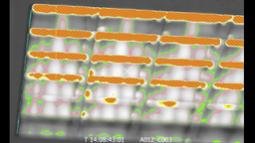
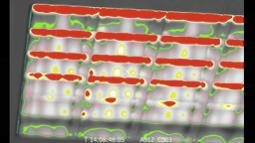
I've attached some images (apologies for the tiny sizes) to perhaps better explain what I'm seeing:
1 # view mode set to Red Space (via menu) and user key (VIEW RAW) pressed. Zebras, while maybe to small to see, indicate clipping
2 # False Color turned on.
3 # VIEW RAW user key pressed to go back to Red Space
4 # Like 3, VIEW RAW user key pressed. this should be the same as image 2
5 # Red Space without False Color

Could someone else test this and confirm what I'm seeing.
 

Attachments

  • clip00000012a.jpg
    clip00000012a.jpg
    6.4 KB · Views: 0
  • clip00000013a.jpg
    clip00000013a.jpg
    8 KB · Views: 0
  • clip00000014a.jpg
    clip00000014a.jpg
    9.9 KB · Views: 0
  • clip00000015a.jpg
    clip00000015a.jpg
    8.9 KB · Views: 0
  • clip00000016a.jpg
    clip00000016a.jpg
    4.8 KB · Views: 0
Back
Top