Welcome to our community

Be a part of something great, join today!

  • Hey all, just changed over the backend after 15 years I figured time to give it a bit of an update, its probably gonna be a bit weird for most of you and i am sure there is a few bugs to work out but it should kinda work the same as before... hopefully :)

Komodo Screen weirdness

Joined
Mar 2, 2021
Messages
7
Reaction score
1
Points
3
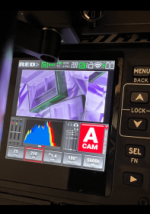
Hi guys, noticed recently more times where my screen (only shot view) on the camera goes a bit funky and offset wraps horizontally by about a quarter and the colours go almost false colour looking.

I remember something similar happening a few times when first got the camera but went into a more log looking view and didnt wrap, but recently been looking like this. Happens usually when its linked to Red Control app on the iphone, or i think has happened with SDI monitor but can't remember for certain, but the app or monitor view looks totally fine and the shot seems to record fine too, so seems not to be a sensor issue. Wondering if anyone else experienced this? I can only get it to reset by restarting the camera which is frustrating.
View recent photos-min.png
 

Attachments

  • View recent photos-min.png
    View recent photos-min.png
    84.1 KB · Views: 0
Hi guys, noticed recently more times where my screen (only shot view) on the camera goes a bit funky and offset wraps horizontally by about a quarter and the colours go almost false colour looking.

I remember something similar happening a few times when first got the camera but went into a more log looking view and didnt wrap, but recently been looking like this. Happens usually when its linked to Red Control app on the iphone, or i think has happened with SDI monitor but can't remember for certain, but the app or monitor view looks totally fine and the shot seems to record fine too, so seems not to be a sensor issue. Wondering if anyone else experienced this? I can only get it to reset by restarting the camera which is frustrating.
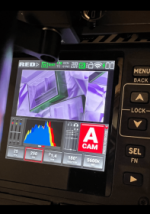

I would say this is normal look when you have enabled EDGE detect and EXPOSURE guides on your camera at the same time.
Nothing is wrong with your camera.
 

Attachments

  • photo120235.jpg
    photo120235.jpg
    80.1 KB · Views: 0
  • photo120236.jpg
    photo120236.jpg
    81.7 KB · Views: 0
I have experienced this screen weirdness only once (unfortunately on a set while doing playback to the client), and had to restart the camera to get rid of it. Around that same time I noticed my EXT port and touchscreen stopped working (I am not sure if this is any way related with screen acting up, could be just a coincidence). After a diagnosis at RED service in US, they had to replace the processor and SDI Flex. I received the camera recently, works good, no issues so far.
 
Thanks for the responses. Definitely not edge detect as mentioned the screen flips and offsets and the monitor feed on the app is normal / no guide overlays active.

have tried reinstalling the firmware but had the latest installed. Am in contact with red and given the log file, no word back yet. Really hoping not a ‘send in for repair situation’ but dreading that it will be i imagine unless red can find something in the log.

happens also when changing nothing like lens hotswap etc so ruled that out.
 
Just for anyone who might experience too, think I pinned down what triggers it, or at least one thing that does - if I turn the camera on the first time in a day for example, and then punch into the lcd 1:1 magnification, the view does the offset and colour shift and stays like that.

if I then turn the camera off and turn back on and do the same thing, it’s totally fine and punching in and out works as normal.

Red not sure the issue, but seems to be hardware, possibly flex cable to the LCD where the pins not connecting properly when cold, but as soon as started up twice, the second time maybe they’ve warmed and expanded a little to connect better.

speculative, but looks like not normal and needs a repair apparently :(
 
Back
Top