Welcome to our community

Be a part of something great, join today!

  • Hey all, just changed over the backend after 15 years I figured time to give it a bit of an update, its probably gonna be a bit weird for most of you and i am sure there is a few bugs to work out but it should kinda work the same as before... hopefully :)

V-RAPTOR Beta Build 1.3.1 June 30, 2022

Phil Holland

Administrator
Staff member
Joined
Apr 19, 2007
Messages
13,392
Reaction score
796
Points
113
Location
Los Angeles
Website
www.phfx.com
Big, big beta update for V-Raptor filmmakers.

https://www.red.com/download/v-raptor-firmware-beta

Some very much requested features like a new lower data rate ELQ REDCODE RAW Setting, very boot friendly and persistant timecode, super useful DSMC3 monitor upgrade via firmware once you upgrade to PageOS5 via SmallHD, and other goodies. Sounds like Calibration got a big speed boost, like a crazy big one.

I'll be diving deep into this build over the weekend, but as always be cautious upgrading firmware during any actual shoot, especially a beta build.

SIGNIFICANT CHANGES SINCE PREVIOUS BUILD
  • Added RED PRO 1.3TB and 4TB support
  • Added Angelbird AV PRO MK2 660GB, 1320GB, 2TB and 4TB support
  • Added ProGrade 325GB and 650GB support
  • Added ELQ quality setting
  • Added DSMC3 Monitor through-camera firmware update support (Requires SmallHD OS5 or later)
  • Added discrete monitor LUT support
  • Added RED CONNECT (BETA) - Full Resolution Live R3D Streaming (See Operational Notes Below)
  • Added timecode persists across boots
  • Added Basic, Standard and Technical overlay mode
  • Added Tint to SDI Advanced Overlay
  • Added Overlay Opacity control
  • Added Low Voltage Warning control
  • Added voltage display for non-communicating batteries
  • Added User calibration optimization reducing process from several minutes to approximately 30 seconds
  • Added QR code support for Wi-Fi passwords
  • Added RCP2 external lens data support
  • Added 'Auto' to Top LCD Resolution menu
  • Added AF Improvements
  • Fixed custom preset disappearing when assigned to user page
  • Fixed Unintended RF lens motor movement in manual mode
  • Fixed Sigma Cine lens communication issue
  • Fixed incorrectly displayed minimum lens F stop
  • Fixed static IP connect on startup
  • Fixed incorrect scrolling text
  • Fixed issue with Sensor Flip calibration
  • Fixed horizontal tear in 4K 8:1 at HFR
  • Fixed horizontal tear in Flip/Mirror mode
  • Fixed 'low speed' message with SanDisk CFx card
  • Fixed refresh of LUT menu after import or delete
OPERATIONAL NOTES
  • RED CONNECT is a license enabled feature, for more info see https://support.red.com/hc/en-us/articles/7391709361683
  • Calibration must be performed in Sensor Flip mode.
  • Some devices may experience intermittent connection issue over USB-C tethering.
  • Warning message will occur with unapproved Media and Batteries.
 
  • Thread starter
  • Moderator
  • #2
Also, I have updated framesToDataRate at phfxtools to support ELQ.

For the curious, on the largest capacity RED/Angelbird CFx media at 4TB you net nearly 11 hours of roll time when filming at 8K at 24fps.

8K 120fps is about 2 hours and 11 minutes.

Wild.

Testing the firmware aggressively throughout the weekend.
 
Can anyone clarify this line?
  • Added RCP2 external lens data support

That would be for when using a device like the DCS - LDR-R2 that allows you to Record and Inject lens metadata over the CTRL port for non-smart lenses, more on their site below.
https://dcs.film
 
  • Thread starter
  • Moderator
  • #6
For the Komodo riders out there, sounds like RED is going to implement ELQ near fall 2022.
 
Wow. ELQ is about half the data rate of LQ. Using Phil's calculator (25fps 8K 17:9):

HQ - 1.31TB/h
MQ - 1.08TB/h
LQ - 623GB/h
ELQ - 312GB/h

So there's about a 20% difference in size between HQ and MQ, then 40% between MQ and LQ, then 50% between LQ and ELQ. I'd be interested to see some tests to see how ELQ holds up. Also wondering if it enables any higher frame rates and/or longer pre-record?
 
Last edited:
  • Thread starter
  • Moderator
  • #9
Wow. ELQ is about half the data rate of LQ. Using Phil's calculator (25fps 8K 17:9):

HQ - 1.31TB/h
MQ - 1.08TB/h
LQ - 623GB/h
ELQ - 312GB/h

So there's about a 20% difference in size between HQ and MQ, then 40% between MQ and LQ, then 50% between LQ and ELQ. I'd be interested to see some tests to see how ELQ holds up. Also wondering if it enables any higher frame rates and/or longer pre-record?

I'll double check pre-record, but based on how the frame buffering works I believe it's based on the resolution and frame rate.

No higher frame rates. Raptor isn't exactly data rate limited in that direction. 120 8K and sub-res/higher fps is what the camera does.
 
Last edited:
For the Komodo riders out there, sounds like RED is going to implement ELQ near fall 2022.

Any word on better autofocus for our beloved Komodos? I mean, it's useful, but it's not really useful. . . yet.

A BIG improvement would include a setting on focus TIMING. That is, imagine you're on a subject and then someone or something quickly crosses the frame. Currently, the autofocus jumps right to the new subject then back to the original, resulting in horrid pulsing. But what if we could turn a variable delay feature on that told the AF to only jump to the thing in front of the frame if it stayed there for an specific period of time. That way, things could cross the frame without jumping. It would be a great, and likely rather easily-adopted feature.

Thanks.

Stephen
 
I know it was 4th of July recently (for those of us in the US) but I am surprised there's a minimal amount of user reports regarding this major beta update.

Everything shouldn't depend on Phil Holland for something like this.

Very intrigued by the ELQ mode as it's a feature that may manage the concerns many have with data rates for the new DCT based REDCODE. How does the quality standup?

What are the changes regarding Autofocus?

Can we say with confidence that the timecode persists across shutoff and boots and functions to expectations?

I'm really not into plugging into the Facebook (have my reasons) but if there are any brave souls can report findings from the FB Matrix to RU alliance it would be greatly appreciated.

Brian Timmons
BRITIM/MEDIA
 
I know it was 4th of July recently (for those of us in the US) but I am surprised there's a minimal amount of user reports regarding this major beta update.

Everything shouldn't depend on Phil Holland for something like this.

Very intrigued by the ELQ mode as it's a feature that may manage the concerns many have with data rates for the new DCT based REDCODE. How does the quality standup?

What are the changes regarding Autofocus?

Can we say with confidence that the timecode persists across shutoff and boots and functions to expectations?

I'm really not into plugging into the Facebook (have my reasons) but if there are any brave souls can report findings from the FB Matrix to RU alliance it would be greatly appreciated.

Brian Timmons
BRITIM/MEDIA

Manual focus on RF lenses has been VASTLY improved. Pretty happy I kept my Canon RF 24-70 f2.8. Seems closer to a fully linear response, vs the “ramped” default setting that was only adjustable via a Canon body. I gotta test it with a focus motor to see how consistent the stops will be now. That was my main issue with the Canon RF lenses on Raptor, because the glass itself is amazing.

Only looked briefly at ELQ footage, and (without any pushing of the color or image) it looks damn good to my eye. I’m curious to see how it holds up to further scrutiny and a more intense grade or something. But on a 2TB card, you’re looking at close to 6 hours (!) of 8K 16:9 24fps, which has me VERY excited for an upcoming documentary.

all in all, I agree with your comment, this is a pretty cool update and I’m also curious to hear others’ thoughts
 
Manual focus on RF lenses has been VASTLY improved. Pretty happy I kept my Canon RF 24-70 f2.8. Seems closer to a fully linear response, vs the “ramped” default setting that was only adjustable via a Canon body. I gotta test it with a focus motor to see how consistent the stops will be now. That was my main issue with the Canon RF lenses on Raptor, because the glass itself is amazing.

Only looked briefly at ELQ footage, and (without any pushing of the color or image) it looks damn good to my eye. I’m curious to see how it holds up to further scrutiny and a more intense grade or something. But on a 2TB card, you’re looking at close to 6 hours (!) of 8K 16:9 24fps, which has me VERY excited for an upcoming documentary.

all in all, I agree with your comment, this is a pretty cool update and I’m also curious to hear others’ thoughts


Thanks for the report Ryan.

Brian Timmons
BRITIM/MEDIA
 
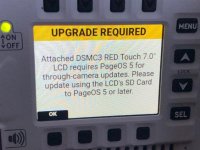
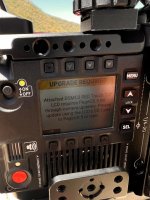
A warning came on the screen during the upgrade process for V-Raptor Beta Build 1.3.1 about needing to upgrade the RED Touch monitor to PageOS 5 Firmware with a SD card.

So I go searching the SmallHD site and find the download for PageOS 5 Firmware Beta 1 and 2 both say the same thing -

Important Beta Software information:
  • Beta 1 Supports all monitors except the DSMC3 RED® Touch and Action 5
  • Beta 2 Supports all monitors except the DSMC3 RED® Touch and Action 5
Firmware Compatibility:
  • This firmware is NOT compatible with the DSMC3 RED® Touch or Action 5
So what are we doing? The camera upgrade tells you to upgrade the monitor Firmware, and SmallHd says it doesn't support it?
 

Attachments

  • IMG_2991.jpg
    IMG_2991.jpg
    45.3 KB · Views: 0
Last edited:
  • Thread starter
  • Moderator
  • #16
A warning came on the screen during the upgrade process for V-Raptor Beta Build 1.3.1 about needing to upgrade the RED Touch monitor to PageOS 5 Firmware with a SD card.

So I go searching the SmallHD site and find the download for PageOS 5 Firmware Beta 1 and 2 both say the same thing -

So what are doing? The camera upgrade tells you to upgrade the monitor Firmware, and SmallHd says it doesn't support it?

You need the firmware from this link:
https://downloads.smallhd.com/firmware/red-touch

Specifically the beta on the right of the page.

DSMC3™ RED® Touch 7.0" LCD Firmware v5.0.0 Beta-1
 
A warning came on the screen during the upgrade process for V-Raptor Beta Build 1.3.1 about needing to upgrade the RED Touch monitor to PageOS 5 Firmware with a SD card.

So I go searching the SmallHD site and find the download for PageOS 5 Firmware Beta 1 and 2 both say the same thing -

Important Beta Software information:
  • Beta 1 Supports all monitors except the DSMC3 RED® Touch and Action 5
  • Beta 2 Supports all monitors except the DSMC3 RED® Touch and Action 5
Firmware Compatibility:
  • This firmware is NOT compatible with the DSMC3 RED® Touch or Action 5
So what are we doing? The camera upgrade tells you to upgrade the monitor Firmware, and SmallHd says it doesn't support it?

i had the same problem and reinstalled old release firmware because of this.
 
You need the firmware from this link:
https://downloads.smallhd.com/firmware/red-touch

Specifically the beta on the right of the page.

DSMC3™ RED® Touch 7.0" LCD Firmware v5.0.0 Beta-1

I had the beta OS5 installed on my monitor and beta on my camera..Stupid me went out shooting stuff with this setup and after shooting 1 hour i had to change a battery, boom restart and i get this error
75YicXs.jpg

So basically monitor became useless and i had to use my phone to shoot with my camera.It was laggy but at least it worked..
 
Back
Top