Welcome to our community

Be a part of something great, join today!

  • Hey all, just changed over the backend after 15 years I figured time to give it a bit of an update, its probably gonna be a bit weird for most of you and i am sure there is a few bugs to work out but it should kinda work the same as before... hopefully :)

Samsung UN55/65F9000 UHD display design

Blair S. Paulsen

Well-known member
Joined
Dec 28, 2006
Messages
5,503
Reaction score
34
Points
48
Location
San Diego, CA
Website
www.alacritymedia.com
I want to give a big shout out to Samsung for creating a 2 piece solution for early UHD adopters. By separating the processing section from the panel they offer a much better value proposition to the buyer. Even if upgrading the "One Connect" control box in a year or two, when HDMI 2.0 and other interconnect options manifest, ends up being several hundred dollars - it still makes a lot more sense than spending $4,000 or more on a display forever crippled by HDMI 1.4a.

I would have picked up a Sony VPL VW-1000ES projector already if I was confident it could be upgraded later, but at $25,000 list that's too big of a risk.

FWIW I strongly believe that 120Hz refresh (60fps x 2 for S3D), 10bpc, is a prerequisite for any UHD or 4K device to be ready for the next decade. I grasp the rationale behind CE companies doling out improvements on a schedule that suits their desire to speed the upgrade cycle. That said, if 2014 is the year that the CE companies expect UHD sales to have a meaningful impact on their bottom line they better have product offerings that the more tech savvy early adopters can trust to have a reasonable service life.

Perhaps Samsung has managed something that has eluded most of their competitors for years, getting marketing and engineering on the same page. Kudos.

Here's to hoping that Jeff gets his soon, and that the execution of the concept fulfills the promise.

Cheers - #19
 
I wouldn't count on them to actually release an updated external processor/control box at some point down the line. Manufacturers have done that (external box) in the past mostly because they wanted to make the panel slimmer at a time when the technology didn't allow the electronics to be that small, not because they planned to release updated processors/control boxes for the panel. And none of them ever released an updated box. They would rather you buy an entire new display/TV.
 
I hear you Mike, it could play that way. That said, the HDMI 2.0 timetable makes it plausible Samsung might actually follow through - if nothing else, the first gen box at least supports a 4x HDMI 1.4a connection immediately so if you have the right source device, RedRay anyone?, you can immediately bypass the limitations of a device with only a single HDMI 1.4a port.

Cheers - #19
 
I would bet that the panel won't operate without that box. That's how TV's with external boxes have worked in the past (going all the back to DVI days). You needed the box for the TV to function. Samsung will likely replace this model TV in the next 6-12 months, so I am sure they wouldn't bother upgrading the box to an HDMI 2.0 version. It is not in their interest to do so. I used to work in that industry for over a decade, and never once saw a manufacturer do any kind of upgrade like that.
 
Thanks for starting the thread, Blair. I did indeed receive the 55" Samsung today. I am swamped and have yet to actually put my own hands on it! Will attempt to get it up and running soon. More info coming, stand by.
 
4 by 4

4 by 4

As I noted above, even if Samsung never releases an upgraded "One Connect" external processing box, that doesn't change the fact that it's the only consumer display system I know of that can support 4x HDMI 1.4a as a connection option. So even if Samsung bails on upgrading, which wouldn't surprise me even a little, the system they are offering right now breaks through the single HDMI 1.4a bottleneck which, while less elegant than a single cable solution, is still the most capable option in the UHD consumer landscape.

So Stuart, or anyone at RED who knows, have you been able to test the RedRay player with the Samsung "One Connect" using the 4 HDMI ports each device offers? Have you tested HFR and/or S3D? Or is the overworked Mr. Kilgroe our guinea pig? ;-)

Cheers - #19
 
Just unboxed. The stand, thankfully I'm only using it temporarily is SHIT.. The TV is seriously front heavy! I would not trust this stand to support the TV from falling over. Yeah, it may look cool or whatever, but wow, major fail here.

I'm going to plug it in, connect the REDRAY, turn it on and take a picture. Will report back shortly....
 
I look to this TV series to be a good one...

I have had their Series 9000 super thin (iPhone thin) 3D HDTV since it first came out and paid 7k for it, so their pricing on this new F9000 UHD series is more then fair...

I agree with Jeff, that even so I did not picked up one as of yet, since I am returning to LA and would make absolute no sense to buy one for Europe when I am trying to sale all my gear, the beautiful look of the low arched stand, seemed not properly designed to actually counterbalance the Monitor it self.

But I am positive that they will impress any one with their image quality... At list that is my high hope with 4k material... ;)

Upgradability always welcome on such important aspect as Blair mentions...

ALso to note that Samsung uses rechargeable (via USB) Electronic Shutter 3D glasses, and that to some is a bother do to the dimming of the image, it has not been for me, even so for some situations I much enjoy the Oakley Passive Polarization 3D glasses, priced similarly to those of Samsung.
 
First impression is not good, guys. My unit is DOA.. :(

I guess I'll swap it for another, that will take a few days. Here's a picture of the One Connect box. Has 4 x HDMI inputs, digital optical audio output, analog audio output, two USB ports on the side. The USB's are clearly labeled as to how much power they can output. Also has a network port and connectors for legacy component and composite video. Legacy connectors are combined into 3.5mm 3-channel mini-plugs. Single cable to run between One Connect and TV. Ends look like oversized DisplayPort connectors. There is no way provided to mount the One Connect box to the rear (or anywhere else) on the TV and it only comes with a 1.5 meter cable. Assholes.

OneConnect.jpg


Rear of the 55" F9000 has the power connector, One Connect connector, VESA mount points, another USB port and a service port of some kind. The OneConnect connector, USB and service ports are in a recessed section that has a really worthless plastic cover that serves no purpose. Unusable with OneConnect or any USB device other than a flash drive or small stick device connected. And it likes to just fall off anyway. WTF? Maybe it's just protective for shipping, but seems like more of a liability in that sense to me...


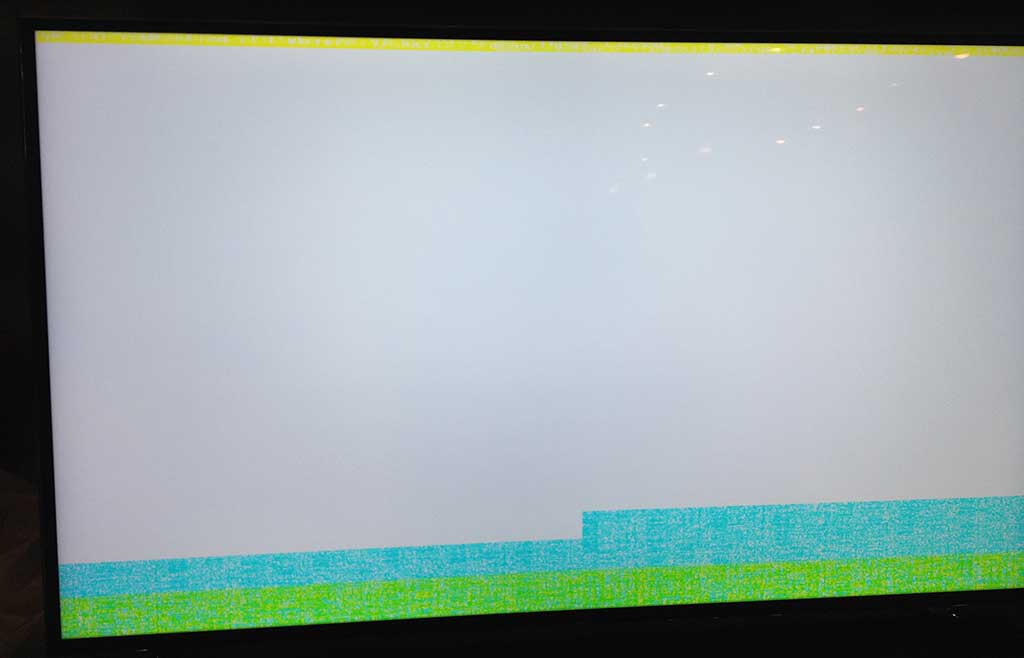
Like I said, this unit seems to be DOA. When I plug it in, the white LED on the bottom at the Samsung logo comes on, that's it. The panel makes a noise and slightly flickers at the bottom upon being plugged in, as if it is turning itself on. Power button or remote won't turn it on/off. Nothing on the screen, just infinite black. No change in white LED or any other form of LED feedback. LED light only goes off if I unplug. If I disconnect the One Connect box or just not have it connected at all, after the set has been plugged in about 30 seconds, I get a mostly white screen with green and blue on the bottom and yellow on the top. Just random patterns of garbage. Looks like this:

55F9000-bad.jpg


That's the only image I can get to display on the set. There seems to be no way to get the TV to respond to anything such as powering it on or off, it seems to just be on like this if I plug it in. No Smart features working or menus or anything. Doesn't matter if there are sources plugged in or anything. No audible anything if I move the joy-button on the rear or push on it (power toggle) or use the remote.... Just dead.

I'm boxing it back up.... :-(
 
Worked with it again this morning after some sleep... Same results. It's all boxed up now and I guess I now wait for the swap to happen... Frustrating.
 
First off, thanks Jeff for riding point on this one, bummer it was such a fail.

Such is the price for living on the bleeding edge. On the flip side of fail, I have something here that does work and I wish I could tell you guys about it! ;)

A new 55" Samsung is being dispatched to me. Won't be here until next tuesday, with monday being a holiday... Unfortunately I don't think I can speed it up. DOA unit is all boxed up and will be picked up when the new one is delivered.


Second, any chance one of these units has found it's way into the RED testing lab? Stuart...

I would love to know the same, would be surprised if they don't have one or won't be getting one soon.
 
Just sittin' here.... waiting for the delivery truck.... or Godot... Not sure.
 
Yay! It's here and it works! Review coming soon.
 
Nice. I assume you will try the 4x HDMI connection to the RedRay from the "One Connect" box. Do you have any HFR or S3D content to screen?

RedRay is specced to do 120fps 2D or 60fps each eye, but AFAIK that's only theoretical so far...

Cheers - #19
 
The HDMI 1.4 connection out of the REDRAY plays beautifully. The display is very nice, minimal LED clouding as it is edge-lit. I'm curious to see how it looks once I get it dialed in. So far color is good, but reds are a bit weak, as is typical with LED systems other than the higher-end Quattrons or the new Sony 4K/UHD panels. I think it can be calibrated to look just as good as the Sony 4K unit, but we'll see. Overall styling is very minimal and nice. Thin bezel that is smokey-clear all around with the outside surfaces in brushed aluminum. Back panel is black brushed aluminum. Just little observations I didn't note the last time around as I was too busy trying to make something work.

I don't have any HFR or S3D content to play via REDRAY. Best we can input to the display or output via HDMI on the REDRAY (or any other current HDMI source) at 4K is 30Hz and 2D. Anything over that and we're back to working at 1080p.

I'm seeing judder on some 24fps material, but I have not given everything a full test just yet and won't jump to any conclusions. Motion on the Samsung so far is way better than the SEIKI, but seems inferior to the Sony. I'll investigate this more when I get everything set up. I'm trying to set up my new office at the same time and was just about to start wall-mounting this thing. :) As I noted in my previous quickie review of this set, the included stand is garbage. Don't use it if you value your TV.
One Connect box so far is a pain. Nice idea, but they didn't really think the design through very well. No way to wall-mount it or to attach it to the display or anywhere without just rigging something up. If I actually wanted to wall-mount the display and pull the One Connect cable through the wall I can do that, but it's not very long, just about 2 meters or maybe a fuzz longer. Not sure how they decided on the length. Would work OK if the One Connect box is in a cabinet directly below the TV or on the other side of the wall. For those of us who have HDMI, COAXIAL/SDI, and a few CAT-6 ports right where the panel hangs, the whole One Connect thing is just a nuisance. I'm going to have to make a bracket for it or screw it to the wall via the screw-down zip-ties or something and then manage the One Connect cable along with the power. I'm putting it on a tilting and articulating wall mount, so access to ports and whatnot will be a breeze anyway.

So far, my only real complaint is that it's edge-lit instead of full-array back-lit like its larger 85" cousin. That couldn't have increased the cost of this display more than $150 to do full back-lighting. You know, like the nice LED TVs were all doing just fine up until about 18 months ago when someone decided edge-lit was mo' betta. WTF..

The One Connect annoyance isn't worth complaining about, if they make good and offer updated interfaces in the future to make it worthwhile.

Smart features on this set are spiffy in 4K. I'll have to see what the upscaled Netflix streaming looks like....
 
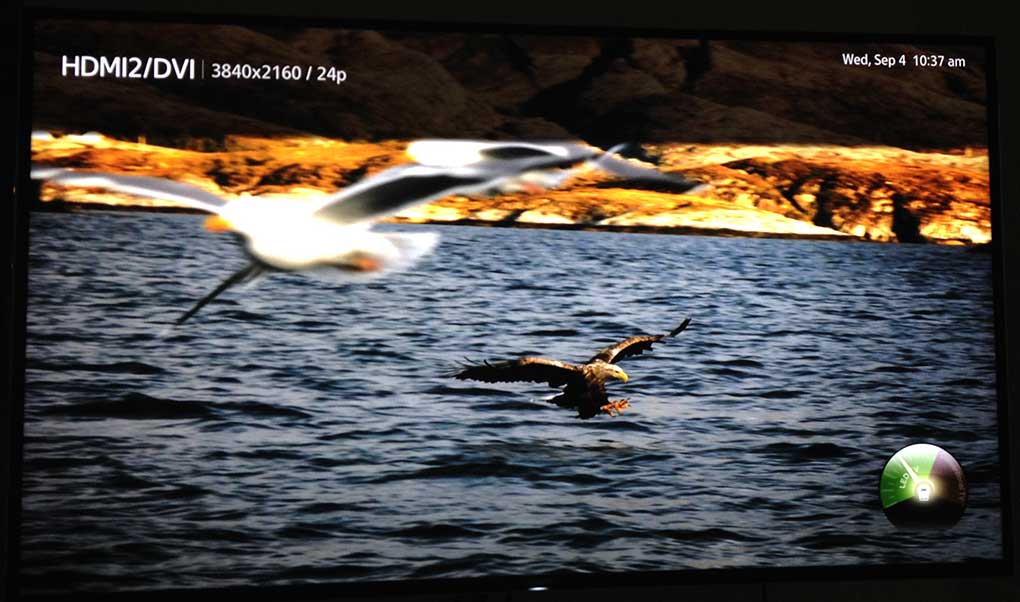
Build quality and edge lighting aside, I'm really liking the Samsung. Seems to have fewer issues and is an overall more friendly display than the Sony 4K units. I have the picture dialed in where I like it for the moment, very minimal adjustments to get it that far. Will take a real stab at calibration after it breaks in a bit, but I'm not expecting much change as it breaks in, it's not a plasma... ;) I figure a good 120 hours should do it. It will probably take that long for me to reassess my calibration approach and tools.

samsung4kgood.jpg
 
Last edited:
Thanks for the review Jeff.

The backlight choice is complicated. I believe Dolby bought the patent to the selective dimming method, and they want their licence fees, so it's more than cost of goods decision ;)
 
Back
Top