Welcome to our community

Be a part of something great, join today!

  • Hey all, just changed over the backend after 15 years I figured time to give it a bit of an update, its probably gonna be a bit weird for most of you and i am sure there is a few bugs to work out but it should kinda work the same as before... hopefully :)

Premiere and Epic Files

Paul Hudson

Well-known member
Joined
Mar 8, 2011
Messages
323
Reaction score
0
Points
0
Location
Dallas, TX /Phoenix, AZ
I am have a difficult time importing Epic files into Premiere CS6. Scarlett files are no problem.

Anyone have a suggestion.

So sorry if this is the wrong format.
 
Hey Paul, try using the Media browser to find your footage on the disk, open a clip in the source monitor and drop a clip into the timeline.

How are you "importing" the Epic footage? Are these R3D files you shot yourself or ProRes from another source?
 
How are you doing it? I've used CS6 for well over a year now, as a part of their test team... I've never had a single issue.

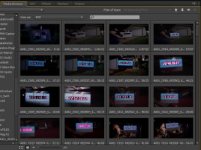
Are you bringing them in through the Media Browser? If so, have you selected the "RED" file format in the "view as" portion of the upper left side of window? What about "Files of Type"? Make sure that says either R3D/Red or "all supported files." If not, you won't see the material.

(Please look at the photo... you'll see the check boxes I'm talking about... all of these files are ONLY R3D files.

Good luck. Let us know how you do!
 

Attachments

  • CS6-structure.jpg
    CS6-structure.jpg
    19.8 KB · Views: 0
Hi Will,
This is R3d files I shot. I can find the folders just fine but when I attempt to open them it says files are incompatible, or something like that. It works fine with the Scarlet files.

We used to get the same dialoge with Scarlet files in CS5.
 
Thanks Curt,

We should get together someday when I am in Phoenix. I have a house in Chandler.
 
Hi Will,
This is R3d files I shot. I can find the folders just fine but when I attempt to open them it says files are incompatible, or something like that. It works fine with the Scarlet files.

We used to get the same dialoge with Scarlet files in CS5.


You're in PHOENIX!??!? Well, maybe we can get together and check it out. I'm a certified instructor too! I'd love to help if I can. Always good to know another Epic user too!
 
You're in PHOENIX!??!? Well, maybe we can get together and check it out. I'm a certified instructor too! I'd love to help if I can. Always good to know another Epic user too!


I am in Phoenix a lot. I split time between Dallas and Phoenix. I am in Dallas right now but will be returning to the Valley soon. I will give you a shout.
 
Is it 5KHD? That seems not to be supported properly last I updated... sure its on its way. Adobe have been good with that sort of thing.

I am afraid it is. Any work arounds found? I suppose I could open it in another NLE and save a quicktime but the only other thing I have is FCP7. I would like to keep it to at least 4k. The footage is product shoots for a pharma.
 
Paul, sounds like you need to download the R3D support files. Is is a separate download and must be manually installed. Let me go search around my e-mails to figure out just what I did. This will get you started.

Try updating to the latest version and I'll find you the link.

http://labs.adobe.com/technologies/redepic_importer/

This will add support for RC3/RG3 and some stability fixes. Not sure if this is going to solve your problem, actually.

You could also contact West Howell from Adobe who is often helpful, PMed you his e-mail.

Hope you figure it out soon and when you do, report back to us.

Best.

Hi Will,
This is R3d files I shot. I can find the folders just fine but when I attempt to open them it says files are incompatible, or something like that. It works fine with the Scarlet files.

We used to get the same dialoge with Scarlet files in CS5.
 
Last edited:
I have this problem too, and the problem seems to be as I found out, and noted here as well, 5K HD. 4K HD works just fine, so I figured that 5K is not a good option in CS6 yet. Waiting for an update, but it's been a while now...

Also, it seems that when exporting a R3D sequence RedRocket is not enabled/used because exporting takes a long time. It works just fine when editing though. You guys have that too? Is there a way to fix it?
 
You have to use the labs plugins....
All I work in is 5k HD.....

And if you already had them, and updated PPRo.....the last update installed its plugins over the lab ones which are still needed.....
 
You have to use the labs plugins....
All I work in is 5k HD.....

And if you already had them, and updated PPRo.....the last update installed its plugins over the lab ones which are still needed.....

...So what is the answer. Please explain.
 
AFAIK the importer was released as a quick fix for CS5 and 5.5 so that one could work with Epic footage, but CS6 already had it implemented natively. So, you mean it should be overwritten with the older version then? Weird...

The latest CS6 update caused problems and the RED importer needs to be re-installed in order to get it to work properly (and also give access to RC3 etc) - there's a specific CS6 installer.

I agree it's weird - but I remember some comment from Adobe that the updater is essentially beta and it's in advance of the normal version in support of Red colour science changes etc... there was another thread about it somewhere :)
 
Our CS6 systems are working with 5k perfectly at the moment with latest updaters but I have to say Im not quite sure what we did to fix them.

Whilst we are n the subject whats the maximum timeline length people have working with R3D's in CS6, any problems with max length for docs and features ?
 
yup reinstall the Red plugins from adobe labs....

the updates overwrite them with outdated plugins...which I view as a mistake on adobe's behalf...but at least they provide them...
they should warn you however....took me about an hour to figure out what was going on after I updated
 
Back
Top