Welcome to our community

Be a part of something great, join today!

  • Hey all, just changed over the backend after 15 years I figured time to give it a bit of an update, its probably gonna be a bit weird for most of you and i am sure there is a few bugs to work out but it should kinda work the same as before... hopefully :)

Colorista or Speed Grade?

8 bit vs 10 bit, what's the real difference and is it worth the extra hardware?

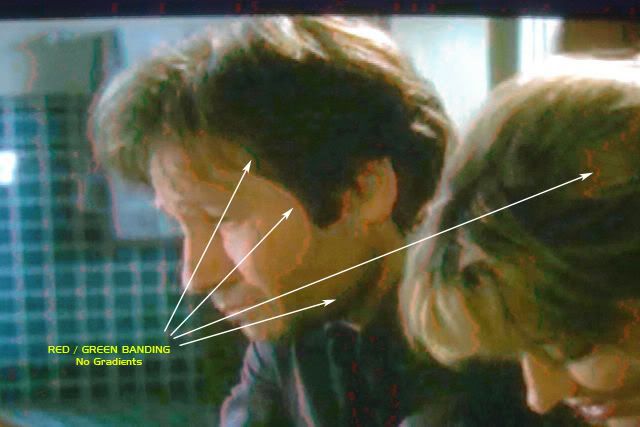
The difference is between grading images and enjoying life and constantly explaining to worried client why the images have color banding all over the place. Incidentally, there is a zero difference for the end result.
 
Do you have any pictures for comparison? What the images the client is worried about and the ones that make them feel comfortable?

Color banding? Similar to this? Do you have a shot of a frame with color banding (8 bit) and one without (10 bit) for comparison?
ex1.jpg
 
Do you have any pictures for comparison? What the images the client is worried about and the ones that make them feel comfortable?

Color banding? Similar to this? Do you have a shot of a frame with color banding (8 bit) and one without (10 bit) for comparison?
ex1.jpg

I don't, but you can use any image with graduated background, like the blue sky or even better, black and white image. What you had shown is a much more extreme example, where I'm not even sure of the origins of the problem.
 
Any recommendations? Are there 4k monitors for CC work yet?
Not that I've seen. Traditionally, most of the LA post houses I know of (doing world-class network series and studio features) are using 2K projection, typically Christie, Barco, or Sony for D-Cinema / DI, and Panasonic 30-series or 300-series Plasma 50" monitors for 1080 broadcast delivery. I have routinely done quite a few 4K projects where we color-timed the whole show in 2K, the client approved it, then we loaded in the 4K files and output 4K files for final delivery. There are systems out there now (like Mystika) that will move lots of 4K material very quickly, but I have no experience with them at this time.

If it's direct-to-video, the Panasonics are fine, and retail for under $3000.
 
Davinci Cons:

*Archaic Database system is still in place. It's not designed for a single user system.

Can you elaborate?

BTW - to me, the major downside of DaVinci, is that you can't apply NeatVideo as the first node (where it has to be), but would have to process at the very end to rendered DPX (which some do, but ... is definitely far less than ideal).

If they add OFX plugin support, I'd probably jump on the bandwagon, as the tutorials I've seen are great, and it's nodal based like I'm used to in Fusion and other programs.
 
BTW - to me, the major downside of DaVinci, is that you can't apply NeatVideo as the first node (where it has to be), but would have to process at the very end to rendered DPX (which some do, but ... is definitely far less than ideal).

If they add OFX plugin support, I'd probably jump on the bandwagon, as the tutorials I've seen are great, and it's nodal based like I'm used to in Fusion and other programs.
BM is hardly the only one, that's not utilizing third party plugin support. Beside VERY rudimentary support for hardware makers, like Tangent, AVID and JL Cooper, there are no third party products supported. Lustre and Speedgrade are the same in that respect. It is a VERY difficult proposition to support such a heavy resources hog, like Neat Video. The way Resolve designed to work, everything MUST be processed by GPU(s) in real time. If you had used Neat Video, then you know, it is anything, but real time. Most of the time it takes a LONG time to process. So, your proposition is not very practical, unless BM finally start utilizing proper caching techniques, like some other software makers.
 
BM is hardly the only one, that's not utilizing third party plugin support. Beside VERY rudimentary support for hardware makers, like Tangent, AVID and JL Cooper, there are no third party products supported. Lustre and Speedgrade are the same in that respect. It is a VERY difficult proposition to support such a heavy resources hog, like Neat Video. The way Resolve designed to work, everything MUST be processed by GPU(s) in real time. If you had used Neat Video, then you know, it is anything, but real time. Most of the time it takes a LONG time to process. So, your proposition is not very practical, unless BM finally start utilizing proper caching techniques, like some other software makers.
The OpenFX NeatVideo plug-in would only have to be active during rendering, and maybe during color adjustments while on a single frame - but not while playing the video in real time.
 
The OpenFX NeatVideo plug-in would only have to be active during rendering, and maybe during color adjustments while on a single frame - but not while playing the video in real time.

Sorry, but that is not how the real world operates. While using Resolve, the video needs to be first NR and then graded, all in real time. Noise reduction needs to be adjusted on per-scene bases, according to a given material and you'd need to see it's effects during grading and the playback. NR creates a lot of artifacts and in order to avoid it, the result needs to be seen in real time. Right now Resolve doesn't properly utilize the necessary technology in order to facilitate this operation. FilmMaster and Baselight are examples of how it can be implemented with proper caching technology. It's really a shame, as Resolve currently possesses this technology, but makes it practically useless, just as with the Log grading and noise reduction.
 
Marc Wielage;1051827we color-timed the whole show in 2K, the client approved it, then we loaded in the 4K files and output 4K files for final delivery.

So your 2k grade didn't have to be "redone" or "touched up" moving to the 4k source?
 
Sorry, but that is not how the real world operates. While using Resolve, the video needs to be first NR and then graded, all in real time. Noise reduction needs to be adjusted on per-scene bases, according to a given material and you'd need to see it's effects during grading and the playback. NR creates a lot of artifacts and in order to avoid it, the result needs to be seen in real time. Right now Resolve doesn't properly utilize the necessary technology in order to facilitate this operation. FilmMaster and Baselight are examples of how it can be implemented with proper caching technology. It's really a shame, as Resolve currently possesses this technology, but makes it practically useless, just as with the Log grading and noise reduction.

I like that Resolve is specifically designed for grading, but ... I may end up using Eyeon's Fusion (which does support OpenFX plug-ins like NeatVideo) - and provided support for RedGamma3 back in March.

It's nodal, and I'm already familiar with it as I use it for compositing. It currently provides EDL suport for Premiere thru this http://peterbako.hangman.hu/edlimporter/ , but ... hopefully ... they will build it into the product as Premiere has become so popular after FCP's demise.
 
I like that Resolve is specifically designed for grading, but ... I may end up using Eyeon's Fusion (which does support OpenFX plug-ins like NeatVideo) - and provided support for RedGamma3 back in March.

It's nodal, and I'm already familiar with it as I use it for compositing. It currently provides EDL suport for Premiere thru this http://peterbako.hangman.hu/edlimporter/ , but ... hopefully ... they will build it into the product as Premiere has become so popular after FCP's demise.

If you planning to do compositing, great. Color grading on Fusion? Check please...
 
So your 2k grade didn't have to be "redone" or "touched up" moving to the 4k source?
No. Color space and levels were identical. Power windows stayed in place. No issues.

The only thing that happens between a 2K DPX file and a 4K DPX file is that the end result is sharper. And not necessarily a lot shaper -- it depends on the original source material. Many of my projects are film-based, so the results would be a case-by-case thing.

I agree with Jake above that noise reduction is a difficult scenario, and it's easy to go way overboard and do too much, especially when so much of it has to be rendered. On some occasions, we'll do one entire layer in Baselight just for a mild NR pass (sometimes luminance only) on old movies, just to minimize the constant grain. The typical thing in restoration work is, they go and remove the grain from the source files, then use grain management to keep the grain consistent, so it doesn't kick up alarmingly high in opticals.

The last Resolve project I had, I was pretty happy with the amount of grain I had removed from some gnarly EOS D7 footage that did not cut very well with some Red One footage, but the director wound up vetoing it in favor of liking the grain. So there's always the issue of somebody actually wanting it as "texture."
 
If you planning to do compositing, great. Color grading on Fusion? Check please...
Fusion has great tools and tracking, and does what it does well, but ... it's not designed to be a grading application like Resolve is.

So what's the solution?

What if cut in Premiere and apply NeatVideo as the first operation, then output 4k dpx or exr for use in Resolve?

You'd lose much of the power of the R3Ds unfortunately, but ... would that be fairly workable and the best available choice for now?

What would the workflow be to output from Premiere to dpx or exr or ??? to get the highest possible quality and range of values?

What settings would you apply to the R3D first (to maximize the range available), and then convert to linear for exr?

What do you think?
 
Fusion has great tools and tracking, and does what it does well, but ... it's not designed to be a grading application like Resolve is.

So what's the solution?

What if cut in Premiere and apply NeatVideo as the first operation, then output 4k dpx or exr for use in Resolve?

You'd lose much of the power of the R3Ds unfortunately, but ... would that be fairly workable and the best available choice for now?

What would the workflow be to output from Premiere to dpx or exr or ??? to get the highest possible quality and range of values?

What settings would you apply to the R3D first (to maximize the range available), and then convert to linear for exr?


What do you think?

Contrary to popular belief, there is nothing wrong with using DPX, as an intermediate codec, as long as it is done correctly. EXR is a work in progress and I personally don't feel, that right now it's as easy, as DPX. PP can output DPX (send to Speedgrade is an example), so it's very easy to do, but the case can be made for sparing use of Prores 4444 as well, if drives speed and available space is an issue.
 
Contrary to popular belief, there is nothing wrong with using DPX, as an intermediate codec, as long as it is done correctly. EXR is a work in progress and I personally don't feel, that right now it's as easy, as DPX. PP can output DPX (send to Speedgrade is an example), so it's very easy to do, but the case can be made for sparing use of Prores 4444 as well, if drives speed and available space is an issue.
Assuming a fast RAID along with SSD cache, what is the best workflow that sends the files to Resolve with as much information as possible?

If you render from Premiere, some settings have to be applied to the R3D. Even if you do nothing, you are still applying the 'default' setting - and my guess is that is less than ideal?

So, there should hopefully be an ideal setting, or range of settings, where the information in the R3Ds sent to the output format is maximized - so that Resolve can have the most to work with? Some workflow process for the R3D to

I'd personally prefer to work in linear, and I presume that's an easy format to work with in Resolve?
 
Assuming a fast RAID along with SSD cache, what is the best workflow that sends the files to Resolve with as much information as possible?

If you render from Premiere, some settings have to be applied to the R3D. Even if you do nothing, you are still applying the 'default' setting - and my guess is that is less than ideal?

So, there should hopefully be an ideal setting, or range of settings, where the information in the R3Ds sent to the output format is maximized - so that Resolve can have the most to work with? Some workflow process for the R3D to

I'd personally prefer to work in linear, and I presume that's an easy format to work with in Resolve?
There is no such thing as "ideal metadata settings", same as there is no such thing as "ideal exposure or a ideal lens settings to shoot with". Everything depends on the material. That is why something, like Magic Bullet is fine for something quick and simple, but not really useful for real life. Unfortunately, you're looking for a Magic combination of buttons settings, which do not exist...
Frankly this notion, that somehow you always need to be able to adjust metadata is not really practical. Rarely do I need to adjust the metadata once I start grading. Sure, ISO or FLUT are you best friends and the best way to deal with exposure discrepancies. And that is why I had said "there is nothing wrong with using DPX, as an intermediate codec, as long as it is done correctly". Once you have your exposure and WB in the bulk part, you're pretty much done with metadata. So, do your proper debayer first, apply NR and then grade it in Resolve. No problem...
If you prefer linear workflow, fine. I prefer 10 bit LOG DPX, but that is my personal choice. Once EXR and ACES gets more mainstream, I'll be happy to switch...
 
There is no such thing as "ideal metadata settings", same as there is no such thing as "ideal exposure or a ideal lens settings to shoot with". Everything depends on the material. That is why something, like Magic Bullet is fine for something quick and simple, but not really useful for real life. Unfortunately, you're looking for a Magic combination of buttons settings, which do not exist...
Frankly this notion, that somehow you always need to be able to adjust metadata is not really practical. Rarely do I need to adjust the metadata once I start grading. Sure, ISO or FLUT are you best friends and the best way to deal with exposure discrepancies. And that is why I had said "there is nothing wrong with using DPX, as an intermediate codec, as long as it is done correctly". Once you have your exposure and WB in the bulk part, you're pretty much done with metadata. So, do your proper debayer first, apply NR and then grade it in Resolve. No problem...
If you prefer linear workflow, fine. I prefer 10 bit LOG DPX, but that is my personal choice. Once EXR and ACES gets more mainstream, I'll be happy to switch...
OK - then adjusting the exposure and WB is the only workflow necessary. Leave the R3Ds as they are except for those changes.

And from what you seem to be saying, that would be quite workable in Resolve, as you rarely adjust metadata anyway (and thus, having the native R3Ds in Resolve wouldn't be very important to you).

This would probably be quite a lot faster (grading with DPX or EXR or whatever) than grading from Resolve with R3Ds.
 
Back
Top