Welcome to our community

Be a part of something great, join today!

  • Hey all, just changed over the backend after 15 years I figured time to give it a bit of an update, its probably gonna be a bit weird for most of you and i am sure there is a few bugs to work out but it should kinda work the same as before... hopefully :)

Transcoding to ProRes

Arnold F.

Well-known member
Joined
Dec 1, 2009
Messages
772
Reaction score
0
Points
0
Location
NYC, Atlanta
I have determined that my 2008 MBP is not going to cut it. I can only look at footage at 1/8 res which, while disappointing, is not a disaster since I'm not an editor.

However, I'm training with the Scarlet and Glidecam and want to see (and upload) the results. Is it possible to transcode the R3D's to something else in PP? What would be appropriate? I would also do a light grading in PP.
 
Don't know about PP, but RedCineX is free and awazing (especially for the price.) You'll need to have the ProRes Codec on your machine, if that's the format to which you wish to transcode. Eventually you'll want to buy a red rocket card if you're going to be do a lot of transcodes - or a really bad-ass PC. Currently PCs kill Macs in power-for-dollar... and I'm a 'Mac guy!'
I believe you can download and use PP for a couple weeks as a full-power trial. Same with Media Composer. Hope that helps a little.
 
I have both Redcine X and PP. I just don't know which program does it. Strictly speaking, it doesn't have to be ProRes. It can be another format as long as it's relatively robust so that it can withstand a bit of grading, if necessary. I would like the footage for my Glidecam reel (assuming I can master the Glidecam at all). Also, it would only be short clips..a couple minutes of footage at a time at the very most.
 
I have Redcine X (not Da Vinci) but can find no documentation on it from RED or any proper 3rd party tutorials. And, since I can only play at 1/8 res, there's not a strong motivation to figure it out myself through trial and error.


Arnold - have you tried doing less than a full debayer from Redcine X?
If not you may want to look over this thread:
http://reduser.net/forum/showthread.php?55559-debayer-test

Using the '1/2 Good' setting instead of 'full' should cut your export time by at least 1/2 if not more.
And if your export is 1080p it should be 'good enough' (especially for testing work).
 
Last edited:
I have determined that my 2008 MBP is not going to cut it. I can only look at footage at 1/8 res which, while disappointing, is not a disaster since I'm not an editor.

However, I'm training with the Scarlet and Glidecam and want to see (and upload) the results. Is it possible to transcode the R3D's to something else in PP? What would be appropriate? I would also do a light grading in PP.

Your bottleneck may be simply your hard drives. 2008 MacPro 8 cores here I can playback 1/4 res in PPro no problem. USB 2.0 external drives will not cut it though. In Davinci you MUST have the right config of the right NVidia video cards in the right slots, or forget it. I would throw any non-Nvidia cards onto e-bay for all editing and post applications - really NVidia Cuda cards are the only way for reasonable performance in PPro, Davinci, or any other app.
 
RCXP to DNxHD is the way to go. Then you can view the files without having a license for FCP. Since both the DNxHD codec and RCXP is for free... Proress on the other hand is not a free download. DNxHD is working just as good in Avid and FCP and Premiere but Proress needs a FCP install...

So if Apple does not open up their process reader I think their format will fade away quite quickly.
 
Unfortunately, I don't think it's possible to change cards in my 2008 Macbook Pro.


Your bottleneck may be simply your hard drives. 2008 MacPro 8 cores here I can playback 1/4 res in PPro no problem. USB 2.0 external drives will not cut it though. In Davinci you MUST have the right config of the right NVidia video cards in the right slots, or forget it. I would throw any non-Nvidia cards onto e-bay for all editing and post applications - really NVidia Cuda cards are the only way for reasonable performance in PPro, Davinci, or any other app.
 
I have determined that my 2008 MBP is not going to cut it. I can only look at footage at 1/8 res which, while disappointing, is not a disaster since I'm not an editor.

However, I'm training with the Scarlet and Glidecam and want to see (and upload) the results. Is it possible to transcode the R3D's to something else in PP? What would be appropriate? I would also do a light grading in PP.

http://www.reduser.net/forum/showthread.php?74312-DEBAYERING-PRO-RES-from-RCX-for-best-results

or...

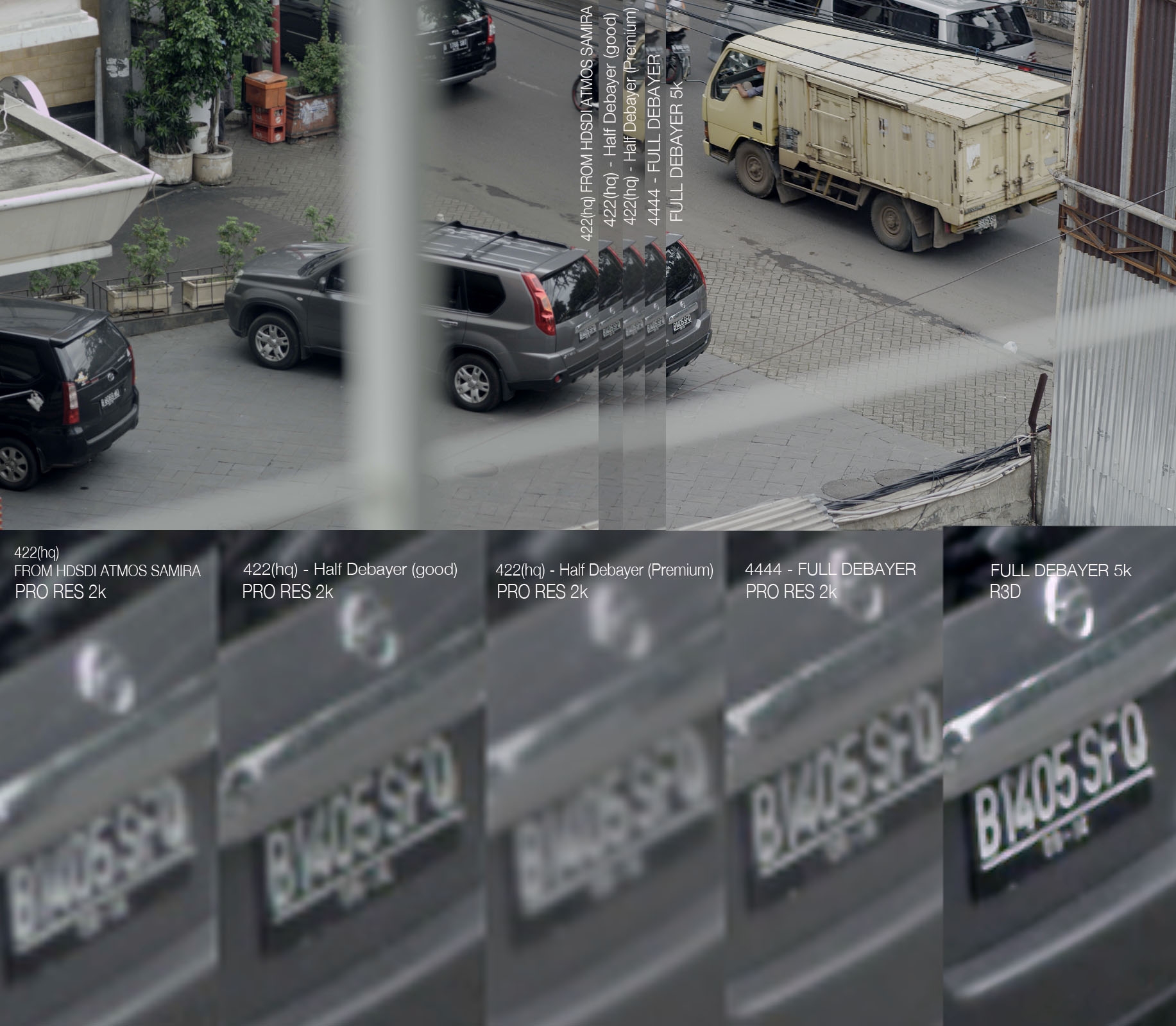
[COLOR=#FFFFFF !important]Been doing quite a few tests with debayering PRO RES... looking for the optimum settings for my HOTEL ROOM work flow. Just to see if anything has changed over the last 12 months.

Firstly 4k PRO RES is bloody AWESOME!!!!!

ok

test 1.
The HDSDI feed is so clean, going through the ATMOS SAMURAI I was shocked how good the pro res file looked.. it was completely useable for any project including 2k projection. PIN SHARP! and super clean. Great output RED..

RCX, i tried all the debayer settings and was shocked to see that 1/2 debayer (premium) was so soft...
Half debayer GOOD and 4444 full debayer looked identical at 800% and pushed around in a grade... there was nothing in it.
File sizes between the two were massive! 4444 was 102meg, 422Hq 1/2 debayer was on 43meg - sharpness was identical at 800%...

if you are just using PRO RES only for your projects... the ATMOS SAMURAI gives you identical PRO RES images in real time, with no long winded transcoding necessary.
Set your camera to REDLOG and its even better to grade with.

Here are my side by sides if your interested.

debaryer%20stills%20copy.jpg
[/COLOR]
 
Great test Mark!

Aside from buying a Samurai, I too am looking for a decent method to transcode my Scarlet footage for easy hand off to FCP or PP or whomever. I am starting to think RCX is the best option, by using the DNxHD codec, but I am still unconvinced. I did a test out and it was all janky (footage stuttered and twitched) during playback - I had a 2k high quality DNxHD setting. I am going to experiment with lower quality settings, but QT is really just getting clunky on my PC, VLC is more responsive and looks better for most files.

Anyway, I am trying to find something for people who are unwilling or unable to play with the R3D files, since I can get work if I keep things simple.

Anyone doing the same? What do you do? Details?
 
by using the DNxHD codec, but I am still unconvinced. I did a test out and it was all janky (footage stuttered and twitched) during playback - I had a 2k high quality DNxHD setting.

The is no 2K DNxHD setting in Avid. Maybe through RCX, but not inside Media Composer. Maximum frame size is 1920x1080 (16:9). Or were you referring to the specific DeBayer tab setting?

- Oliver
 
Thanks Oliver. I thought it was going out with the 2k settings I saw in the main window, I didn't realize QT and DNxHD were over riding it.

Since posting that I have had a "breakthrough" with RCX and found a good (for the moment) setting:

Avid DNxHD
1080p 23.978 35 (or whatever the lowest setting is)
Mitchell Debayer
1/2 good debayer thingy
Stereo Sound ( not that that matters right now )
RGB color
 
Oh, my jittery playback was fixed byu playing full screen! ... no sense there since half size is all messed up still.
 
My Epic X footage/test (in my signature) was edited in Final Cut Pro 7 after transcoding from redcine X to Apple prores 4:2:2 HQ. its more than enough for a simple edit. It grades well and looks great for the most simple and common low end jobs. For higher end stuff I suggest going 4:4:4 at 1080p, but that requires faster HDD's. I'm using consumer grade internal 7200rpm drives, by the way, which just can't handle 4:4:4.
 
Back
Top