Welcome to our community

Be a part of something great, join today!

  • Hey all, just changed over the backend after 15 years I figured time to give it a bit of an update, its probably gonna be a bit weird for most of you and i am sure there is a few bugs to work out but it should kinda work the same as before... hopefully :)

Anamorphic look without using a anamorphic lens?

omar robles

Well-known member
Joined
Nov 16, 2008
Messages
325
Reaction score
0
Points
16
So I am wondering Is it possible to achieve the look of anamorphic without having to use anamorphic lenses? I ve inquired about shooting with anamorphic lenses but they are ridiculously expensive I understand there are streak filters that give you the flare of using anamorphic. But I am looking into the texture and organic feel of anamorphic.

any help would be appreciated.

thanks
 
You can try to replicate in post. But there is a reason people shoot with the glass in the first place...no offense intended, but they cost a lot for a reason.

When I had this issue about a year ago, I looked into renting Lomo's. A russian anamorphic set of lenses, which they have both round and square fronts (different streaks, bokeh, look in general, speed).
They were FAR cheaper to get and as long as you have enough light to get them to AT LEAST a 4/5.6 split, if not at a full 5.6, then you're golden, and they are gorgeous. They remind me of old westerns.
 
there is a filter which can create the flares. but thats the only thing you van create with spherical lenses trying to mimic anamorphic.
blue streak or so is the name of the filter
 
yes.

the streak filters are a good way to get the "streak" effect as known from
the panavision anamorphic lenses... (which was a actually a "bug" of the glas, coating)

they come in different size (two cut, "thickness") 2mm or 3 mm (effect gets stronger)
check here:
http://www.tiffen.com/displayproduct.html?tablename=filters&itemnum=4565STRK2

here're some grabs from a commercial I shot:

http://www.christianpfeil.de/streak01.tif

http://www.christianpfeil.de/streak02.tif

http://www.christianpfeil.de/streak03.tif

http://www.christianpfeil.de/streak04.tif
 
There are cheap(er) solutions, but I agree with the rest of the guys that have posted... real Ana's are the best way to go.

But, if you want to replicate the texture/bokeh and 'organic' feel of anamorphic, you can try the cheaper route of a front of lens adapter (lots of the DSLR guys use this) - essentially put a Kowa or something in front of a modern lens and you get anamorphic results.

Downside of this is limited focal lengths (50mm and above generally) as the taking lens (anamorphic element) isn't specifically designed for a focal length such as 35mm - meaning it's a bit of a 'bodge'. But, a lot of people don't mind the pain and work arounds.

Basically, the older front lens elements give a more 'antique' feel but you'll be using step rings and adapters to connect to your lens of choice... plus, you may even end up having to focus your prime and your front anamorphic element... a very slow workflow.

There is a Panasonic adapter (LA7200) that was also much loved by the DSLR guys - this is a modern adapter so it fits modern lenses and doesn't need focusing. It produces ovular bokeh (to a degree) and the squeeze isn't as severe as 2X. But, it doesn't have (IMO) the 'cream' of a real anamorphic.

Last thought is a company makes a lens filter that replicates ovular bokeh - it doesn't give anamorphic stretch, but mimics the Ana effects on a normal lens. Downside is you'll loose 1 to 2 stops and there's a limit on prime vs zooms etc - I think it's called a Cinemorph.

Check out the massive thread about this over on DVXuser - it might be helpful (just have a pot of coffee on hand to get through it all)!

If it's personal shoot or experimentation, this approach might be helpful... but, on a set I wouldn't go any other way than normal anamorphics :)
 
One thing that I have done is to place two items behind the camera's lens. You need a lens with a pretty large rear element in terms of diameter. The first thing to do is to open the lens to its max aperture and then get some black card stock and cut out an oval shaped hole that will serve as the new aperture for the camera. The bokeh will have that oval shape. Next you add some fishing line running across the oval cut out. This fishing line will streak (I found that you need two or more lines running vertically down the oval opening to get a clean streak across the frame). What you end up with is oval shaped bokeh with anamorphic like streaks across the frame. This is the cheapest way to mimic this effect. Do the same thing but place it on the front element for wide angle lenses (not as effective as placing it behind).
 
One thing that I have done is to place two items behind the camera's lens. You need a lens with a pretty large rear element in terms of diameter. The first thing to do is to open the lens to its max aperture and then get some black card stock and cut out an oval shaped hole that will serve as the new aperture for the camera. The bokeh will have that oval shape. Next you add some fishing line running across the oval cut out. This fishing line will streak (I found that you need two or more lines running vertically down the oval opening to get a clean streak across the frame). What you end up with is oval shaped bokeh with anamorphic like streaks across the frame. This is the cheapest way to mimic this effect. Do the same thing but place it on the front element for wide angle lenses (not as effective as placing it behind).

Just be aware that this system creates horrific vignetting every time I've tried it. Also I usually end up with cats-eye bokeh not oval.
 
Unfortunately Anamorphic DOF and bokeh cannot really be re-created, and these are the two main characteristics of Anamorphic lenses.

Andrew's suggestions are classic no budget tricks and they work to an extent but can cause various unexpected problems like Gavin mentions and you might not notice until your at home viewing your footage on a large screen so make sure you test any of these tricks before committing to them on a job!
 
Just be aware that this system creates horrific vignetting every time I've tried it. Also I usually end up with cats-eye bokeh not oval.

It worked fine for me with no vignetting but I was using a panasonic GH2 with a 43 sensor so the nikon lens was cropped. If you place the oval shape behind the lens directly to the rear element, it should not vignette, it is essentially like stopping down but the aperture opening has and oval shape. It also works better on longer lenses (40mm plus). But to my eyes, I got oval shaped bokeh with horizontal streaks so it looked like anamorphic to me.
 
The only thing that somewhat easy to recreate is the blue vertical flare. If I'm not mistaken, The Girl with the Dragon Tattoo was shot on spherical lenses, but the anamorphic flares were added in post. They looked organic. The bokeh unfortunately can't be replicated AFAIK.
 
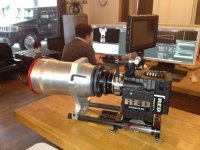
If you want a cheap solution I got something to sell to you... Personally don't like it but some love it.. gives a max FOV = 40mm to none anmorpics if Im not mistaken or if it was 35mm max.

Highest bid, sold as is.. pm your bid.
 

Attachments

  • IMG_0110.jpg
    IMG_0110.jpg
    90.3 KB · Views: 1
Back
Top