Welcome to our community

Be a part of something great, join today!

  • Hey all, just changed over the backend after 15 years I figured time to give it a bit of an update, its probably gonna be a bit weird for most of you and i am sure there is a few bugs to work out but it should kinda work the same as before... hopefully :)

WHY!!!! are people still using color baked DPX's F&%*@#%*#K!

The RED ROCKET is a must.... (unfortunately)

Once again... 4k or 2k - (REDCOLOR3/RELOGFILM) PRO RES or DnX from the EPIC body + R3D's (no modules) ... I'm willing to pay big for the upgrade. :))))

Just imagine how many of these Scarlets and EPICs you would sell if you had this as an option! - It's truly the only reason ARRI has survived so long with there Alexa camera.
If they didn't have LOGc- PRORES and only ARRI RAW. They would have sold about 100 cameras total... Remember the D21.

Thanks for jumping on ROB.
 
Rob, thanks for listening to this thread.

So if I understand what you are saying: The card is doing the 'heavy lifting' decompressing the r3d, and is also doing the debayer, since it has the image planes in memory anyway ?
I take it that it is not only doing the decompression, with the cpu doing debayer, as the results are 70% softer ( less high frequency content ) on the non-card version .
I hope to soon see a CPU RCX render look as detailed as, or better, than the card assisted version. It would be great if you allowed the user to select from several debayer methods that suits their needs. Something that other raw workflows have at this time.

Thanks again for looking at these important discussions, after all it is the final image quality that we are concerned with when using a camera of any type!

Good discussion. We are listening.

I want to correct a piece of wrong information. The reason we have a Rocket has nothing to do with the debayer/demosiac, it has everything to do with the decompression. Bruce: GPU can't do our decompression faster, trust me, I've tried. All those other cameras don't do compression + 4K/5K. ProRes 1080p ain't the same game.
 
Just imagine how many of these Scarlets and EPICs you would sell if you had this as an option! - It's truly the only reason ARRI has survived so long with there Alexa camera.
If they didn't have LOGc- PRORES and only ARRI RAW. They would have sold about 100 cameras total...


I think it's a bit of an exaggeration to claim that the embracing of on-board ProRes recording is the "only" reason for the Alexa's success. While that design decision was certainly significant, I think the quality of the images, the dynamic range, and the ergonomics also had an awful lot to do with it.

Besides, in my little corner of the world, ProRes has been something of a pain in the neck due to the large Linux infrastructure and the proprietary nature of the codec. Although this week, there was a new release of Baselight that incorporates ProRes support..... :emote_happyhappy:
 
Not really. It is only necessary for 4K monitors, HDRx or 3D. A mainstream Core i7 3930K which costs a fraction of a Rocket will do 1/2 res or 2.5K at real-time just fine.

But I got the Red camera for 4k, or 3k finish.
Plus, until they fix it, the rocket is the only way to get sharp images. I dare you to compare ( pixel peep ) the results. Want to make your $7K lens look like a $700 lens ? Use no card.
The results is what I care about, hence my previous posts.
 
I dare you to compare ( pixel peep ) the results. Want to make your $7K lens look like a $700 lens ? Use no card.
The results is what I care about, hence my previous posts.

I'll take you up on it. I haven't used RR once and have no intention of ever getting it. I'm very happy with strictly CPU debayer. Bring it on!!!
 
Do I? Because, as you know you can't grade RAW. First RAW has to be debayered, decompressed and finally gamma encoded, be it linear or log. Only then you can start grading it. And guess what happens in Resolve or for that matter in any other grading software? The same process, except some software, like Nucoda or Flame/Smoke does it explicitly in the background and actually writing DPX to the drive, while other, like Resolve or Baselight (instead of DPX, it uses uncompressed 16 bit RGB files) do it on the fly and keeps it in the RAM without writing it do disk. But it's the same process.
As far as I know, Jake is 100% correct -- the Resolve and Baselight are just decoding the R3D files on the fly and actually color-correcting in DPX. At least, I seem to recall this is what I was told by the factory engineers. I don't know exactly how the Pablo handles it; maybe Michael Cioni or Ian can comment further.

Me personally, I don't care what the files are as long as the exposure range is reasonable, nothing is clipped or crushed, and the overall RGB balance is good. I've had a few cases in the past (either with film scans or with digital camera files) where I requested that the conforming guys go back and give me the true RAW files and let me take a whack at it in color correction, but this typically was less than 50 shots out of, say, 3000. 90% of the time, it looks fine and everybody's happy. (The last time this happened to me, it was with a Arri D21 project, which was a while ago.)

BTW, this is all for HD TV delivery (home video, network, etc.), and not for theatrical. For theatrical, it would depend on the LUTs involved and the nature of the project.

Note that film starts out "raw," too, and many, many, many projects have been timed from those. In even more cases, files of the negative scans were somewhat timed, at least to even them out -- just a best light scan to get them in the ballpark. This has been standard practice in TV for at least two decades; Mike Most was one of the guys who pioneered this idea, in his days at Encore.

Mark Toia said:
I pretend that the R3D is film... and I make make propper tech grades or log scans to work from or grade from the film directly...
Exactly. That works fine, and that's exactly what I tell my clients: just use RCX to give us an overall tech grade to give us the latitude we need. A few tests of key scenes are usually enough to get in the ballpark.
 
But I got the Red camera for 4k, or 3k finish.
Plus, until they fix it, the rocket is the only way to get sharp images. I dare you to compare ( pixel peep ) the results. Want to make your $7K lens look like a $700 lens ? Use no card.
The results is what I care about, hence my previous posts.

I use RCX PRO beta 6, and works great with hardware and software decoding in full res. Both decodings are perfectly identical. I'm totaly dependat that the software decode works flawless, because of my workflow. If there is a differance, I becom out of a job same day.
 
But I got the Red camera for 4k, or 3k finish.
Plus, until they fix it, the rocket is the only way to get sharp images. I dare you to compare ( pixel peep ) the results. Want to make your $7K lens look like a $700 lens ? Use no card.
The results is what I care about, hence my previous posts.

You can get 5K (or any resolution) finish from a CPU, that's no problem. I was simply talking about monitoring, which cheap CPUs do upto 2.5K. If one were inclined to go for a Xeon E7 system, that might as well outperform the Rocket. The bottleneck for final renders may be the image processing rather than the decompression, so the Rocket doesn't necessarily cut the final render time by much. I haven't pixel peeped Rocket vs software decode, but Graeme has mentioned before that the reason Rocket is very slightly sharper because the software decode is too complex to run on Rocket. So Rocket uses a different algorithm which has the side effect of being slightly sharp. Some people prefer the software decode just as well, as it is smoother. Personally, I am not a fan of edge sharpness either. In any case, the difference is almost negligibly minor and from what I understand can only be noticed with unrealistic pixel peeping.
 
BTW, there's an interesting comment from Michael Cioni on the use of DPX files on Soderberg's recent Red project Haywire:

And while there are major benefits to the power working with R3Ds natively, there is a downside when faced with a tremendous amount of source footage in the conform (which can have an affect on GPU performance) as well as the cycles required to manage the complex arithmetic brought on by complex projects like Haywire. It is for this reason that we still favor the Quantel Pablo system, which is capable of working with native files such as R3Ds, but we choose to pre-debayer them into uncompressed files so that the load is lessened and the computer spreads the tasks of geometry, color, scaling, debayer, decode, etc., across more processors (pic-stores) which improves overall performance, speed and reliability. Unlike GPU-based systems like Resolve, pic-stores enable tasks to be farmed out to many dedicated parts of the machine, instead of a few. It is also why even on Haywire why we used the Pablo for the final mastering, titles and versioning outputs to different color spaces, resolutions and aspect ratios. It goes to show there will never be one way or “the best way” to do any task.

I agree 100% with this philosophy. They also did this on Girl with the Dragon Tattoo and Social Network, and those movies did just fine.

This is particularly a problem when you're dealing with a busy facility that's doing dozens of simultaneous projects, some of which might be hogging a dozen or more terabytes of space on the servers (even per reel). Sometimes, R3D is not the fastest or most efficient way to finish a project, not with current technology. I think it eventually will be, but as long as the files are not too "stepped on," any good colorist can still get you there. But the moment the original image is crushed, clipped, or slammed too far one way or the other, party's over.
 
What a great thread this has evolved into.

Going back to the original post and the DPX creation method.

The problem might really be that we have lost "the lab".

If you look at the R3d as replacing film negative then it would have been.

Shoot film
send it to the lab with instructions
attend a one light or finishing session.

Minus the lab we are kind of skipping a step and missing the dedicated skilled people who develope the footage correctly.

But the thread also helps me understand why REDs file format is closed (or tighlty kept, or how ever you want to put it).

It's their chemistry.
RCX pro is the chemistry at the lab. RED want some control over digital chemistry, just as Kodak or Fiji provides the chemistry for developing their images. I don't see that as such a bad thing.

The problem (or beauty) is that each download of RCX pro coupled with a computer is creating a new lab and every person in front of that machine is a "debayer lab techinician".

I see all the points of view in this thread, but it comes down to easy access to information and that should be in one place.

The other thing emerging from this thread is that while we all understand that the RED Rocket performs a decompression and demosiac that can not be done on gpu alone because the wavlet based file compression in the r3d needs separate hardware decompression tools.

I can see why post houses who invest heavily in hardware that works with eight other camera formats, might get miffed on principle, when some RED material come through the door, it's 5k to get it working in an optimal state you have to invest in a 5K card.

Also with all the scarlets coming on board half the price of a camera body is pretty steep for a PCI-E card.

When Post houses see what a KONA, DECLINK or GPU cards do for the money for some tasks, then that is what they compare it too.

RCX PRO is a great piece of software (one we have been needed for a long time)

The camera is FANTASTIC: the "hard to post" monkier still exists (in a general broad sense with producers).

Great thread.


David
 
It's not 'slightly more sharp' for me.
On RCX beta 10, I have to take the Rocket version and size it down to 70% , then back up to 100% to see about the same detail level.
So a 4K file has about 2.8K worth of detail. Sharpening the CPU version is not getting the detail back, no matter what de-convolution fancy/shmancy sharpen I tried.

Janne : Can you try beta 10 to see if you see something different ? Perhaps Beta10 broke something.... Thanks !
 
I think it's a bit of an exaggeration to claim that the embracing of on-board ProRes recording is the "only" reason for the Alexa's success. While that design decision was certainly significant, I think the quality of the images, the dynamic range, and the ergonomics also had an awful lot to do with it.

Besides, in my little corner of the world, ProRes has been something of a pain in the neck due to the large Linux infrastructure and the proprietary nature of the codec. Although this week, there was a new release of Baselight that incorporates ProRes support..... :emote_happyhappy:

Arri's image quality has never been in question for me or it's ergonomics... Lets not de-rail this thread with a camera war.

What I'm saying is this Mr Most.. , Easy work flow (for the people with less techno ability as others) The Camera makes things very very very easy.. PRO RES from the Arri Alexa drops directly into an FCP seconds after being shot and you are editing, NO TRANSCODING, just drag and drop and your away... grade in real time... etc etc etc... The LOG C files help you grade with ease as well. I'm saying that the ALEXA is wonderful in that respect. RED is just lucky Arri didnt sell the things for 50K for the lot.... because final decisions come down to money and ease for alot of people.

If the Alexa just shot ARRI RAW like the D21... I wouldn't be having this conversation with you.

I just wish RED took a one leaf out of there book, only one little page... And that would be the PRO RES LOG bit .. (with no module hanging of the back).. choice of 4k or 2k with a touch of a button would be even better. :)
 
Excuse my ignorance here, but once the SDI feeds fixes the slight black borders, could you not record REDLOG ProRes to an external recorder? At least at 1080 anyway...


Yes you can Bob. This is possible. for sure....


But...

The real bottleneck is and always will be in the

INTERNAL FILE COMPRESSION IN THE R3D.

TO get all that 5K data into an R3D RED has to compress the data file.
TO get it out it has to DECOMPRESS the data.

If you need a REDROCKET in a tower to get REALTIME debayering and decompression AND you want that IN CAMERA, then you have to come up with DECOMPRESSION power on the CAMERA to create what a REDROCKET does on the fly in a powerful computer.

The bottleneck will ALWAYS be DECOMPRESSION of WAVLET based compression in the R3D. It's not the fastest form of compression because it uses J-PEG 2000 compression.

To get "other file formats" (like DPX or PRORES) created at the SAME TIME AS THE R3D, you need something the equivellant of a REDROCKET in the camera or a module.

Those are the simple facts.

And you probably aint going to even get 2K by doing that, most likely not 4k or 5k. It's just the RAW computing horsepower needed to do all this math.


David
 
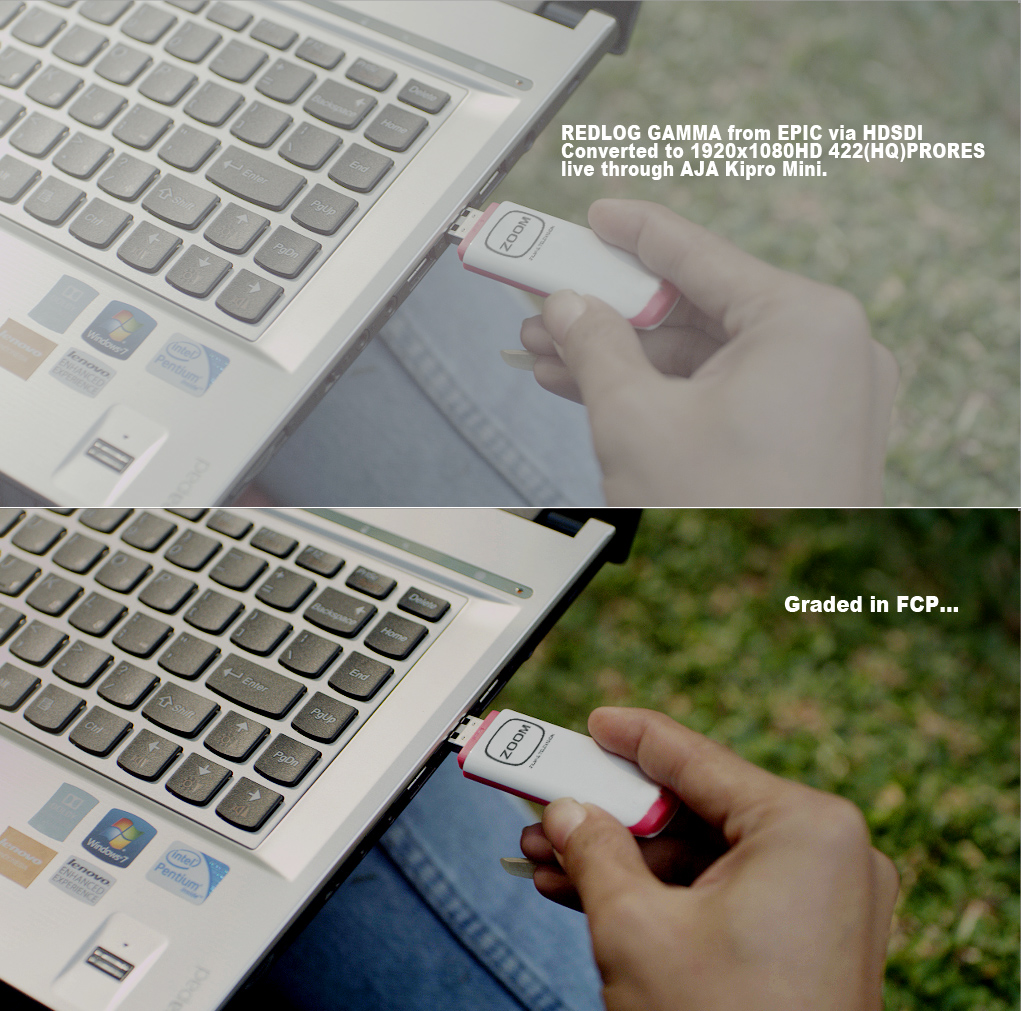
But that all said... you can set the EPIC camera to a REDLOG output from HDSDI and capture a LOG style PRORES on a PRO RES recorder.

I have done it, and it works. You can play back 300 FPS as well and record that.. same deal... this is probably the quickest way to work with a RED at the moment if you don't mind strapping another device to it.

Here is a still frame from the a PRORES file captured from a Kipro mini recorder via the RED HDSDI output from our EPIC, recording 422(HQ) Pro-res with the camera set on REDLOG.

I've tested them all. Only problem with this compared to what I get from making PRORES 4444 12bit full debayer from REDCINEX is that they are not as clean and the log space is quite bright... but still completely usable for any or all productions. Put them next to a Alexa PRO RES file.. they look the same until you really start pushing them around. but know body goes to those extremes anyway when grading.

Only other problem is you have to strap another device and battery to your camera... not an option for me because I like small rigs these days.
But at the end of the day, if you want instant PRORES and you don't own a RED ROCKET and have no time to transcode via your laptop... this is the best and fastest way to do it... Its a cheap way of making an ARRI Alexa... and you get RAW R3D's at the same time if you need them.

Just sharing...

redlog_from_EPIC.jpg
 
To get "other file formats" (like DPX or PRORES) created at the SAME TIME AS THE R3D, you need something the equivellant of a REDROCKET in the camera or a module.

But this implies that the ProRes/DPX has to be derived from a decoding of the compressed R3D. If it was recorded simultaneously it would surely bypass the REDCODE compression entirely, not pass through a compress/de-compress cycle.

On a separate note, please excuse the plug, but for working in FCP7 (and Color – and Resolve soon) with REDlogFilm ProRes material, people may find my plugin and LUTs useful – see my signature for details.
 
Nick,

Point taken,

So, as mark describes so well there are two recorders that will do this right now.

If RED were to do it they (IMO) would have to create a module takes the BRAIN HDSDI output and plug that into their own module solution. (what the two others already do) . Red would then have to pay codec licensing fees and would be basically creating a 1080P camera out of the EPIC. I think this goes "philosophically" against what the camera is made for (but I completely getit).

They would be making the EPIC and 5K EPIC and an ALEXA in one fell swoop.

Problem is this.

I don't think they care about 1080P.

That module would have to record 4K and that would have to include "additional processing" beyond a 1080P video tap.

That is where I was going with that Idea, but you helped me refine it.

Maybe from RED's perspective (i don't know) a prores module that records 1080P is a patchwork, temporary solution that can already be accomplished in many ways if that is what you want.


David
 
There is a different side to what Mark is saying and I am surprised that nobody mentioned it yet!

It will come down to OSX and WIN again but I am among many people who have never even touched PRORES once for a job. I never used it, I never needed it and I know MANY people who feel the exact same way. PRORES is presented as the ultimate solution in this thread when in reality R3Ds are much easier to deal with for people who work with PPro or SonyVegas on Windows.

I also would like to add that Arri's ProRes workflow is not as easy for everyone as people in this thread suggest. I actually KNOW and have discussed with DPs who are not RED camera owners like me and who actually prefer to shoot with RED just BECAUSE they don't want to have to deal with Prores!
 
Back
Top