Welcome to our community

Be a part of something great, join today!

  • Hey all, just changed over the backend after 15 years I figured time to give it a bit of an update, its probably gonna be a bit weird for most of you and i am sure there is a few bugs to work out but it should kinda work the same as before... hopefully :)

EPIC > ProRes via AJA KiPro Mini

I would love to see this functionality (rec start/stop and metadata capture) on the PIX240. Then you'd have an onboard monitor with it as well as the capability to record DNXHD for Avid systems instead of ProRes for the fading FCP. I think this is great for not just a playback solution, but also for editing. No waiting for transcodes is pretty awesome.
 
PIX 240 sitrep...

PIX 240 sitrep...

Thanks Mark for the skinny on the KiPro Mini being able to utilize metadata - slick.

That said, I am in love with the Sound Devices PIX 240 feature set. Would love to know if it will be able to read/write RP188 data. Anyone out there who is tight with or works for Sound Devices?

AJA gear has served me well over the years. That said, I love the idea that I can get Sound Devices 7 series audio quality AND image files formatted for editorial all in one box. Obviously having enough metadata support to make conforming a breeze is huge.

Anyone had much experience with the PIX 240 and Epic? Would love to know the nitty gritty details...

Cheers - #19
 
Thanks Mark for the skinny on the KiPro Mini being able to utilize metadata - slick.

That said, I am in love with the Sound Devices PIX 240 feature set. Would love to know if it will be able to read/write RP188 data. Anyone out there who is tight with or works for Sound Devices?

AJA gear has served me well over the years. That said, I love the idea that I can get Sound Devices 7 series audio quality AND image files formatted for editorial all in one box. Obviously having enough metadata support to make conforming a breeze is huge.

Anyone had much experience with the PIX 240 and Epic? Would love to know the nitty gritty details...

Cheers - #19
Just pinged them to see what the possibilities are. Let you know if I hear back.
 
Hi Mark,

I've tried to use AJA KiPro for automatic start and stop recording. I used armrecording on AJA KiPro and sent out edge code from
the EPIC. I starts automatically, but it doesn't stop. What's the way to get both?

Gerhard
 
I got this info directly from the folks at Sound Devices:
"The PIX will read and store the metadata from the Red Epic. This does include the filename and will allow you to create files for editing that can be replaced by the Red files. I believe there will be info released that expands on this in the days just prior to release. The PIX only has a slot for a single CF card and a single SSD. The PIX will only record to a single drive at a time but once a drive is full the PIX will instantly switch over to the other drive. The drive will need to be a 2.5in SATA SSD so any off the shelf drive that fit this will work. We will have drives available as well."
They also told me record triggering will be enabled through HD-SDI
 
New firmware for your AJA KiPro Mini.

One cable - SDI (or wireless w/ BOXX).

Auto start/stop.

Filenames & Timecode recorded same as R3D.

http://www.aja.com/support/ki-pro/ki-pro-mini.php

Thank you AJA - it's about time :)

Have you got this actually working Mark....
It's being a pain in the arse for us.

Whats the tips...

We can get it to roll, but not cut...
We have latest kipro mine firmware, latest EPIC build. ?
 
I got this info directly from the folks at Sound Devices:
"The PIX will read and store the metadata from the Red Epic. This does include the filename and will allow you to create files for editing that can be replaced by the Red files. I believe there will be info released that expands on this in the days just prior to release. The PIX only has a slot for a single CF card and a single SSD. The PIX will only record to a single drive at a time but once a drive is full the PIX will instantly switch over to the other drive. The drive will need to be a 2.5in SATA SSD so any off the shelf drive that fit this will work. We will have drives available as well."
They also told me record triggering will be enabled through HD-SDI

Awesome! Thank you so much for checking on this. PIX240 will be the way to go for me as I'm switching from FCP to Avid and will use the DNXHD.
 
Have you got this actually working Mark....
It's being a pain in the arse for us.

Whats the tips...

We can get it to roll, but not cut...
We have latest kipro mine firmware, latest EPIC build. ?

Works perfectly for us. I think you have an incorrect setting in the control panel. I'm at IBC right now - when I get back next week I'll post screen shots of the settings in the AJA control panel.
 
Works fine for us, too. Only thing we don't get to work is having a matching timecode. It's always off by 8 - 10 frames. Mark P., do you use a TC Cable? Which one?

Mark T.:
- 6.1 Genlock: Input
- 8.0 TC In: SDI RP188
- 8.2 TC Type: NDF
- 8.3 Arm Recording: TC/REC KEY
- 13.1 Camera Data: RED Epic
 
Works perfectly for us. I think you have an incorrect setting in the control panel. I'm at IBC right now - when I get back next week I'll post screen shots of the settings in the AJA control panel.

and hence why you are one of my Fav dudes on this forum....

I'm sure its something silly that we have missed.
 
In case you missed my TWEET - AJA announced today that DNxHD is coming to the KiPro mini - and .... I mean MXF wrapped! They working directly with AVID on this - so the code it will be tight. VERY exciting IMO.
 
So has anyone got frame-accurate timecode into the Ki Pro Mini?
If not, the main use of the Ki Pro Mini surely is playback, rather than as a substitute proxy/ offline module.
 
I think this little unit is awesome...

How to make a cheap ALEXA... just bolt the KIPRO onto the back of the EPIC and for half the price you get to shoot HD PRO RES live just like an ARRi does. ... and soon DNxHD.

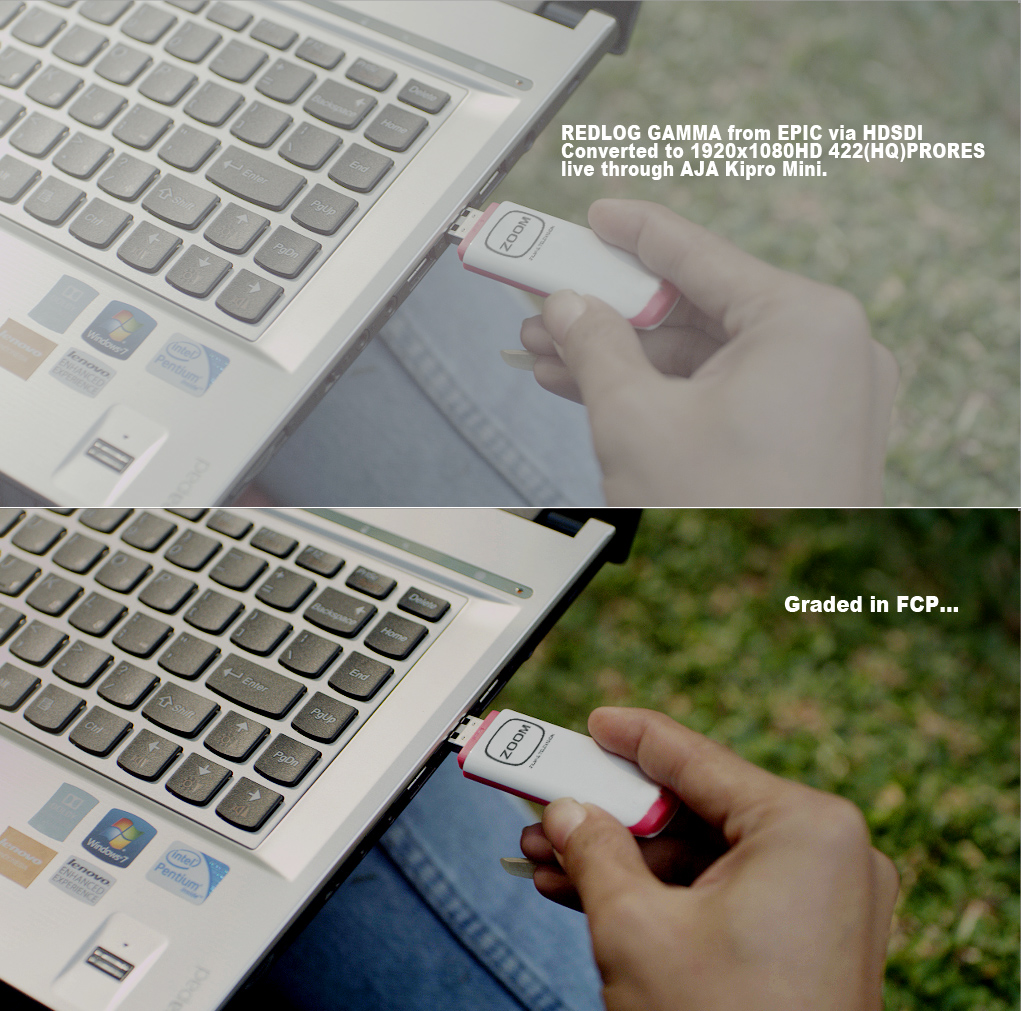
And to make it even better to grade those PRO RES files, turn the REDLOG output on via the camera and you get REDLOG output to the kipro.

I put one of those HD REDLOG PRO RES files from the KIPRO into FCP, grades up just like the ALEXA files...

But I'd rather work in 5k RAW... aren't we lucky we can now do both.

Thank you RED and AJA... :)))))
 
And to make it even better to grade those PRO RES files, turn the REDLOG output on via the camera and you get REDLOG output to the kipro.

I put one of those HD REDLOG PRO RES files from the KIPRO into FCP, grades up just like the ALEXA files...

But I'd rather work in 5k RAW... aren't we lucky we can now do both.

Woah...is that right? There is an option to turn on REDLogFilm in camera now on the Epic?
 
Most certainly is. :)))))

REDGAMMA2 or REDLOG out of the HDSDI port/plug in 10bit!\

works a treat..
redlog_from_EPIC.jpg
 
Back
Top