Welcome to our community

Be a part of something great, join today!

  • Hey all, just changed over the backend after 15 years I figured time to give it a bit of an update, its probably gonna be a bit weird for most of you and i am sure there is a few bugs to work out but it should kinda work the same as before... hopefully :)

120 fps Flicker HMI at 23.98 Time Base not at 24 Time Base - Rolling shutter

bjonsson

Well-known member
Joined
Oct 29, 2007
Messages
201
Reaction score
0
Points
16
Can someone at Red answer or comment on the following:

I have run into the following issue many times, and figured now was the time to ask.

When shooting at a 23.976 Time base, 120 fps, 180 shutter, and shooting under HMI's with Flicker free ballasts , I often see the light rolling through the frame. there is no solution to this problem by adjusting shutter angle.

This disappears when I shift the time base to 24 fps and shoot at 120fps, 180 degree shutter.

A similar effect is talked about here
http://reduser.net/forum/showthread.php?14371-Rolling-Shutter-Fluorescent

So here's my comment and question. I understand the math behind the problem when shooting 23.976 vs 24.00 under these types of lamps , but 120 FPS (180 degree shutter) is 120FPS - irrelevant of time base. It seems however they are different in the way the R! figures out the math. They are definitely different visually.

Why is this? Seems like this is an error.

As to fixes: Post doesn't appreciate shifting time bases during a project, not to mention that many playback systems do not accept 24 fps signals (only 23.98), nor to the IDX Wevi's accept that format. So shifting time base is not acceptable. Many other factors prohibit the 24.00 time base setting.

Any qualified responses are appreciated. Please, no speculation.
 
You're right that the timebase should not have an effect on the recorded footage. Are you talking about seeing/not seeing moving bands on the recorded footage, or just on the camera displays?

Also, have you tried using synchro and phase in the shutter menu - note you have to enable synchro mode or these controls have no effect, although you may kid yourself that they do!!
 
I believe that the off-speed frame rates on the Red are in fact "rounded up" if you have a fractional timebase like 23.98 or 29.97. The are "correct" when your timebase is whole like 24 or 25.
So 120 fps is actually 119.9 fps when your timebase is 23.98.
I cannot find the post, but someone on the Red Team commented on this (Deannan, Stuart, or Graeme)
This may, in fact, be the reason you see a difference when you switch the timebase to 24.
I apologize since you requested facts, not speculation, and I admit that this falls under speculation.
Can anyone on the Red Team comment?
Cheers,
Harry
 
So I contacted one of my DITs - Alex Carr (amazing DIT) and showed him my post.

He replied

Hey Bengt,

I found the problem, When I set the camera's shutter display to fractions instead of degrees I saw the real rate at which 'relative mode' adjusted the shutter at 120FPS. at 23.98 the rate is 1/240.2* VERY BAD, this is unacceptable because this is obviously not the correct rate. it should be exactly 1/240th. When I set the camera into 24.00FPS shutter speed aligned to 1/240th.

120 fps with a 180 shutter at 23.98 and 24.00 has to have a 1/240 sec exposure
-PERIOD.


So this needs to be changed.
 
I spoke with Red today about this problem. The only way the M-X Red One can properly record 180º at 120FPS with a 23.98 timebase is by using syncro mode, setting the shutter to 1/192 and adding +20 to the syncro. This will give you 1/240th. Without this syncro setting Red one cannot properly shoot 120FPS 180º. I honestly believe Red should take action to fix this problem with current RedOne Firmware. Epic camera has a manual shutter setting, allowing us to set 1/240th. I'll get a chance to test this tomorrow.

I also believe 'Relative mode' needs to be adjusted too, because the math is incorrect. Relative mode should never use the timebase as the factor to which the shutter is adjusted. This is why 120FPS doesn't work and the shutter you get is 1/240.2, which cannot be used under 60hz lighting... Even flicker free is subject to this as well. Either way, the RedOne desperately needs 1/240th Manual Shutter setting. Also 1/480 and 1/960. We have 1/250 and 1/200. But we are missing the rates for 180º 90º and 45º when shooting 120FPS at 23.98 timebase.
 
Interesting issue - not something I've ever had to deal with in 25fps 50Hz PAL UK!
 
Interesting issue - not something I've ever had to deal with in 25fps 50Hz PAL UK!

Exactly, all 25 or PAL rates have appropriate shutter speeds. In the states, we dont have all the rates available to us. So I'm hoping Red can change this. Glad its been resolved on Epic.
 
I also believe 'Relative mode' needs to be adjusted too, because the math is incorrect. Relative mode should never use the timebase as the factor to which the shutter is adjusted. This is why 120FPS doesn't work and the shutter you get is 1/240.2, which cannot be used under 60hz lighting... Even flicker free is subject to this as well. Either way, the RedOne desperately needs 1/240th Manual Shutter setting. Also 1/480 and 1/960. We have 1/250 and 1/200. But we are missing the rates for 180º 90º and 45º when shooting 120FPS at 23.98 timebase.

I have to disagree on this. The error is a rounding error and logic error, not a math error.

When in normal shooting mode with a 23.98 base rate, the camera displays "24" as the shooting rate. But thats actually technically incorrect - its 23.98. Otherwise there would be a whole lot of captured frames that the Red would have at the end of a recording, or the timecode would have to drift/skip. When shooting at any other frame rate with a 23.98 base, its 1% off. 48fps is not 48fps, but 47.96.

So your relative mode MUST be off the base shooting rate, because your shooting fps is also based off of it. It doesnt make sense to have relative mode be based on a rounded offset of the shooting fps, as thats not 180deg. In fact, in the manual it does say the relative mode is defined by the shutter speed, but modified by the capture (or shooting) fps.

For 99% of the shooting situations out there, the difference is minor, and certainly doesnt affect the shooting stop or perceived motion blur. In fact 23.98 and 24 are used interchangeably in general terms on most sets. "Are you shooting 24 or 30?" "Lets do this one at 48." Its up to the technician to understand that the really mean 23.98, 29.97, and 47.96, or if in doubt clarify. But when you have a specific circumstance when you need a specific rate (such as shooting @120fps in a 60Hz flicker environment), those 1%s matter.

If Red needs to fix anything, its to be specific on the shooting rate. Its not 24 in a 23.98 base rate, nor is it 120. Or add some "normal" mode presets, like 1/240.

Or when you need a precise exposure time use the Epic ("I need a 5ms exposure here, not 6ms").

Damn those 1960s NTSC guys - I wish we'd just drop it.
 
I have to disagree on this. The error is a rounding error and logic error, not a math error.

When in normal shooting mode with a 23.98 base rate, the camera displays "24" as the shooting rate. But thats actually technically incorrect - its 23.98. Otherwise there would be a whole lot of captured frames that the Red would have at the end of a recording, or the timecode would have to drift/skip. When shooting at any other frame rate with a 23.98 base, its 1% off. 48fps is not 48fps, but 47.96.

So your relative mode MUST be off the base shooting rate, because your shooting fps is also based off of it. It doesnt make sense to have relative mode be based on a rounded offset of the shooting fps, as thats not 180deg. In fact, in the manual it does say the relative mode is defined by the shutter speed, but modified by the capture (or shooting) fps.

For 99% of the shooting situations out there, the difference is minor, and certainly doesnt affect the shooting stop or perceived motion blur. In fact 23.98 and 24 are used interchangeably in general terms on most sets. "Are you shooting 24 or 30?" "Lets do this one at 48." Its up to the technician to understand that the really mean 23.98, 29.97, and 47.96, or if in doubt clarify. But when you have a specific circumstance when you need a specific rate (such as shooting @120fps in a 60Hz flicker environment), those 1%s matter.

If Red needs to fix anything, its to be specific on the shooting rate. Its not 24 in a 23.98 base rate, nor is it 120. Or add some "normal" mode presets, like 1/240.

Or when you need a precise exposure time use the Epic ("I need a 5ms exposure here, not 6ms").

Damn those 1960s NTSC guys - I wish we'd just drop it.

Well, the problem is that 1/240.2 produces a scan line under flicker free lighting, 1/240.0 does not. The only way to shoot 1/240th on a Red One is by changing timebase to 24.00(or by the syncro mode above). Because 'relative mode' adjusts the shutter to the whole number 240.0, while set in 23.98 the camera produces 1/240.2. Why I consider the math to be incorrect is that 1/240.2 is the only shutter speed that doesn't fall on a whole number. The whole number is what we are looking for. By Using increments of 24fps, ie: 24 48, 96, and 120. 120 is the only odd one.

Perhaps the math is correct, it just won't work for 120FPS
 
Well, the problem is that 1/240.2 produces a scan line under flicker free lighting, 1/240.0 does not. The only way to shoot 1/240th on a Red One is by changing timebase to 24.00(or by the syncro mode above). Because 'relative mode' adjusts the shutter to the whole number 240.0, while set in 23.98 the camera produces 1/240.2. Why I consider the math to be incorrect is that 1/240.2 is the only shutter speed that doesn't fall on a whole number. The whole number is what we are looking for. By Using increments of 24fps, ie: 24 48, 96, and 120. 120 is the only odd one.

Perhaps the math is correct, it just won't work for 120FPS

I understand the issue, and have seen it before on various projects. But the precise shutter speeds for any FPS in relative mode under a 23.98 base frame rate will always be 1% over the visually indicated speed. For example, at 24fps with 23.98 base frame rate, the precise shutter will not be 1/48. You wont see the problem you had because its multiple discharges/cycles per exposed frame at that frame rate. At 1/240th it is only hitting a partial discharge, so it needs to timed it correctly. Thats why at 1/240.2 it produces a phase disparity.

The math is correct, the display is rounded, and I agree that Red should add 1/240 as a preset for the normal mode which would easily solve this issue. Or dont use HMIs (yea right). :)
 
Use 360 degrees to shoot at 120fps

Use 360 degrees to shoot at 120fps

You need to shoot at 360 degrees if you shoot at 120fps under 60Hz lights since the half cycle is 1/120 second.

Even if you have the camera in sync (genlock) with the lights, there will be a phase error that will make about 1/2 stop variation in the exposure.

You cannot fix this with small shutter angle changes like you can with 60fps or less since the exposure window is too small.

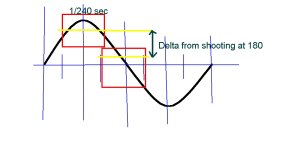
I made a drawing to show why this is so.

The two yellow lines show the exposure delta between having the exposure window at the cycle peak ad having it at the cycle crossing, since the light pulse is the absolute value I did not need to show the negative value since its about the same as the positive half cycle most of the time (but not in some vapor lamps that would need a full wave bridge to only be in the positive phase on their electrodes).

As you can see if there is phase drift the light the sensor reads at 180 degrees will vary between the two lines marking the high and low delta points.

If you use 1/120th second exposure then you get a full half cycle and the average is the same no matter what the phase of the exposure start is for the most part, so you need to use 360 degrees at 120fps to avoid the issue.

If you shoot at 120fps and 180 degrees, then your exposure may vary from one shot to another, or if you shoot 23.976 etc. NTSC speeds the phase will drift and you will see the light go up and down between the min and max delta points, see the attached drawing.

If you can genlock the camera to the AC then you can adjust the phase for maximum exposure and hold that using the PLL in the camera.

How large the delta is depends on the type of lamps being used and their high to low ratio, in other words they can have a "bias" of some light (like from a phosphor) all the time with more light at some times in their AC cycle. Lamps that have mercury arc plus phosphor not only vary in brightness but also in color over the AC cycle, so not only can you get a light pulse, but also a white balance shift.
 

Attachments

  • delta180.JPG
    delta180.JPG
    84.5 KB · Views: 0
I understand the issue, and have seen it before on various projects. But the precise shutter speeds for any FPS in relative mode under a 23.98 base frame rate will always be 1% over the visually indicated speed. For example, at 24fps with 23.98 base frame rate, the precise shutter will not be 1/48. You wont see the problem you had because its multiple discharges/cycles per exposed frame at that frame rate. At 1/240th it is only hitting a partial discharge, so it needs to timed it correctly. Thats why at 1/240.2 it produces a phase disparity.

The math is correct, the display is rounded, and I agree that Red should add 1/240 as a preset for the normal mode which would easily solve this issue. Or dont use HMIs (yea right). :)

I see where you are going with this, but it is silly (not your explanation, but the way the camera deals with this) . There is no need for this 1% tomfoolery outside of 23.98. 23.98 and 29.97 are "custom" frame rates for television, and are only necessary when rolling sound. Outside of these frame rates, fps should be accurate regardless of time base. Example when shooting with an Arri 435, 23.98 on the LCD means 23.98. 48 means 48, and 120 means 120. Can you give me an example where you would want a 47.96 fps shot vs a 48fps?
 
In terms of time, the relationship is always critical. One second should always be one second throughout the entire chain. Who is to say that a shot I did at 47.96fps the editor wont decide to now play it back in real time, dumping half the frames? While using a 23.98 timebase he can easily do this and sync sound. Not to mention in camera speed ramps, etc. And stereo, moco are considerations also. Its just easier to consider the shooting frame rate as an offset of the base frame rate.

BTW, I spent 3 months in the Ukraine with Alex - hes a good DIT. It was the best of times, and the worst of times..... :)
 
When you add up frequencies to what the offset would be it comes to 1/239.8 the real offset for 240, 119.9 for 120 and the same where 23.98x10 = 239.8. So the .2 is correct its just applied the wrong direction. I can't get 240.2 in any way, so still not sure exactly where that value comes from. It seems like an error, because the offset cannot be greater than the rate...

That was an adventure, I miss the electronics black market. I just went back to Ukraine,I Bought some more lite-ribbon, got my tools, and spent the week with Natalie.
 
I have the same problem but I cant really understand the solution... If I change the timebase to 24 will that fix the flicker??
Thanks
 
You need to shoot at 360 degrees if you shoot at 120fps under 60Hz lights since the half cycle is 1/120 second.

Even if you have the camera in sync (genlock) with the lights, there will be a phase error that will make about 1/2 stop variation in the exposure.

You cannot fix this with small shutter angle changes like you can with 60fps or less since the exposure window is too small.

Really? 360 degree shutter? I guess I've been it doing wrong all of these years.
You just need bigger lights and they should be tungsten. Preferably 5k and up. The larger globe doesn't get time to cool between cycles so you will not have flicker.
 
Can I set the shutter to any value to make 98fps flicker free in 50hz?

I guess an even 100fps would do the trick
 
Back
Top