Welcome to our community

Be a part of something great, join today!

  • Hey all, just changed over the backend after 15 years I figured time to give it a bit of an update, its probably gonna be a bit weird for most of you and i am sure there is a few bugs to work out but it should kinda work the same as before... hopefully :)

FCP to DaVinci (EDL & R3D)

craigjkharris

Well-known member
Joined
Sep 5, 2008
Messages
165
Reaction score
0
Points
0
Location
Vancouver, BC, Canada
I am having a bit of trouble getting an EDL to work in DaVinci that is sent from FCP. Has anyone been successful at Exporting an EDL from FCP and conforming with R3D files in DaVinci?

If so, can you share your EDL workflow?
 
Here is my current workflow....

a. Record 4K 16:9
b. Transcode - Pro Res Proxy (1920x1080 @ 23.976)
c. Offline Edit in FCP
d. Export EDL for DaVinci
e. Import R3D files into media pool in DaVinci Resolve
f. Import EDL from FCP into DaVinci Resolve

... This is where I keep getting an error message that says "FAILED TO COPY EDL EVENT LIST TO THE VIDEO-TRACK'S EVENT LIST"

I'm not sure why I get this error message.
 
Not sure,what's happening with your conform, but I had been successfully using Resolve for this purpose for the last couple of months.
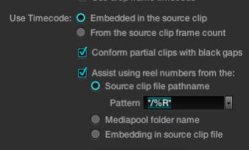
Incidentally, after some testing, found, that settings in "Timeline conform options" in the config menu is quite important, if you don't want to spend lot of time resolving conflicts manually. I found, for me, in "Assist using reel numbers from" best setting is "Embedding in source clip file". This way, I almost always get a good, conflict free. conform.
 
I tried again using a different folder of R3D files and got it to work perfectly. There must have been something corrupt with one of my R3D files.
 
Wow, is conforming from ProRes that simple? Just feed it an FCP EDL and R3Ds?

Maybe I need to get it!
 
Hey craigjkharris, are you using the gt120/fx4800 config that Resolve requires on the same machine you are using FCP ?
How is that for FCP ? any problems ?
 
Even Color is working quite well with the GTX 285, only 4% slower in rendering than the ATI 4870 – in case you still need it. But you'll have to change the monitor to the GTX.
 
Here is my current workflow....

b. Transcode - Pro Res Proxy (1920x1080 @ 23.976)

Craig,

Just curious, why do you transcode as oppose to use the already created proxies (M is what we use) to do your "offline"? That seems like an extra step that can introduce potential issues, let alone the time wasted on the transcoding proces?

Luis
 
Craig,

Just curious, why do you transcode as oppose to use the already created proxies (M is what we use) to do your "offline"? That seems like an extra step that can introduce potential issues, let alone the time wasted on the transcoding proces?

Luis
I spend way less time transcoding than I would having to render the M Proxies in FCP.
 
I spend way less time transcoding than I would having to render the M Proxies in FCP.

With the appropriate setting, no rendering needed at all.. I mean, we have done 4 features (from equipment rental, DIT, editing and all the way to DCP, plus the other minor stuff that always is following you, and no a single problem or delay due to use of proxies.
 
I'm about to grade a short film.

This is their method.
  • They transcoded to Prores 422 proxies and started editing.
  • Open the EDL I get from them in TextEdit and replace ".mov" with ".r3d."
  • Add r3d media in Resolve using "Add folders and subfolders using EDL".
  • Load EDL in the Conform page, and all is good.


I don't understand why they started editing with Prores proxies. So the way I'd do it is
  • Import _M.mov proxy files
  • Edit
  • Export EDL
  • Open EDL in TextEdit and replace "_M.mov" with ".r3d"
  • Add r3d media in Resolve using "Add folders and subfolders using EDL".
  • Load EDL in the Conform page, and all is good.


Either way, both ways work.
 
no need to go to textedit and change everything to .R3D
If you load into your media pool, DaVinci will select the r3d´s and not the proxy files.

Same with prores transcode, just point to the folder where the corresponding r3d´s are inside, no textedit needed.

Manuel
 
Really? Because if someone does editing on a _P, _M or _H proxy, the EDL is going to output the same... So I would need to remove the "_x" before I use the EDL in Resolve anyway.

If you have a clever solution for that, I'm all ears!


Also, it depends on how you have setup the "Assist using reel numbers from the source clip file pathname" in the config page..
After trial and error, and a bit of reading, I found this to work well, along with "Extract reel names from comments" switched ON.


The reason I have this set, is to be able to do mixed media stuff. It works like a charm. And it's no big deal going into the EDL and "replace all" really.
 

Attachments

  • iChat Image(523177905).jpg
    iChat Image(523177905).jpg
    9.2 KB · Views: 0
We NEVER transcode. That is like transferring (Red or any other format) footage to tape: old school. We are in a new path were available technology or new methods need to be embraced and move forward, not perpetuating methods just because that is the way we used to do it.

We have done many features, spots, shorts, etc and we always use the proxies, and they transfer without a major problem to Resolve. I do not have any time to spend on transcoding. Just have the proper setting on FC or Premiere, so we never need to render during the edit; only render at the final output stage.

We get R3D, and deliver uncompressed 10bit files and/or DCPs on HDD as requested and paid. If the client "needs" a tape, he can go to a lab that has all those 100 lbs decks, which BTW, they are getting old, with bunch of problems, so they are not replacing them, but evolving toward file based pipeline. They call us to consult how to do it, and they always response pleasantly surprised.

Just my 2 cents...
 
Back
Top