PaulClements
Well-known member
When I first heard of Storm I found it difficult to separate it from the other applications available to the DIT. But then I was given the opportunity to Alpha test Storm for an upcoming feature I'm involved in.
By no stretch of the imagination is this a storm in a teacup (Pun No.2), The Foundry's Storm is most definitely the real deal. This is the application that Reduser's have been crying out for since the release of the very first Red One. I say this because in it's current Alpha status it is the seed of an application that I myself as a DIT have been wanting for over two years. Whilst Red have stepped up with the introduction of RedCine-X I firmly believe that standardizing the process and evolving the capabilities of Red RAW within a single application by a third party has been begging to happen and to be done so by a company that has the reputation not just to do it well, but to exceed all expectations. The Foundry is that company. They obviously have big plans for where Storm is heading and it's not difficult to see within seconds of booting up the application just what their intentions are.
Before I go into details I wanted to quickly cover the question 'Who is Storm for?'. Obviously the main use for Storm is an application that can be used on-set, near to camera, more often than not by a Digital Imaging Technician (DIT). I firmly believe however that many post houses, editors and colorists will find the application more and more useful as it develops. Storm is going to become one of the most used tools wherever digital footage is being captured in my humble opinion. Storm is all about Red in its current guise and that's intelligent. Because with the release of Epic in the near future and the shear amount of Red Ones around the world... Well, Red rules. But it's my belief that future updates will cover more and more cameras, and this is important for Reduser's. If an application can only support Red cameras what happens, for example, when we also have 5D's being used onset as crash cams? Should we have another application as a DIT that does all the same things? Should we transcode both formats and load them into another application to see if they can be cut together, or should we look to have applications that supports more than one codec and more than one type of camera? For me, when this happens it will be the Perfect Storm (Pun No.3).
The GUI
I'm going to start with the User interface because it was the first thing that struck me about Storm. It's simply beautiful, not in a Zoe Saldana kind of way, just very functional as applications go! It's clean, it's obvious and it's customizable. It doesn't distract from the important stuff - the footage. You can layout the panes to reflect what's most important to you as a DIT. Perhaps your director likes to see whether shots cut together - Then we use the Edit workspace. Perhaps your DoP is constantly asking for you to do a quick grade to see if he or she has got the look they wanted - Then we switch to a Grading workspace that we've structured previously to how we want it. Or perhaps you're just wanting to check shots - Then we simply switch to our Reviewing workspace. All done at the press of a button. As storm grows I'm sure it'll become common to have an Effects workspace and Tagging workspace too. But the beauty is that you can tweak and shape the look and feel to how you feel comfortable and it does it far better than most applications I've ever used.
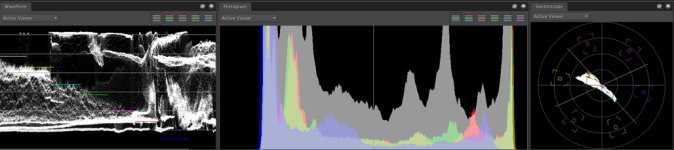
The Foundry also intend to support the ATI Radeon cards (5770 and 5870) given Apple's commitment too these cards on newer machines. And this is great news because if you didn't already realise these cards are supported on earlier Mac Pro's going all the way back to the 2006 Mac Pro 1,1 (5770 confirmed on all 2006 Mac Pro's, 5870 confirmed on some 2006 Mac Pro's). Present Alpha releases of Storm currently only support Nvidia. HOWEVER, I've literally just a few minutes ago installed a 5770 on an old Mac Pro (Circa 2006/07) booted up Storm and it's giving instant results and everything appears to work flawlessly. I'm getting live playback from the RedRocket as well as Live Histogram, Live Waveform AND Live Vector scope simultaneously from the graphics card. The card cost me £180 so it's a no-brainer if Storm is to become your application of choice. As I say, this is an old Intel Mac Pro fitted with RedRocket and a 5770 and I'm not sure where you could improve on quality!!!
The Basics
Storm naturally supports the RedRocket. Playback quality is essentially the same as RC-X. Storm does however include an Auto setting that will alter the video quality if the system is lagging for some reason (Perhaps you are backing up to the same location whilst trying to playback). More importantly Storm supports video out on the RedRocket. So you can do a grade and run it to the same HD-SDI monitor the DoP is using with the camera. Support for colour looks should hopefully appear in the near future allowing the DIT to create looks almost on the fly and mix and match to the live feed.
The Effects Panel
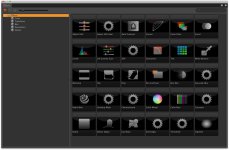
In the Alpha stage of Storm we already have a bunch of cool effects (See image) which include: Adjust HSV, Adjust HSV/Hue, Auto Contrast, Curves, Color Filter, Invert, Levels, Lift Gamma Gain, SOP, Saturation, Tint, White Balance, Blanking, Flip, Flop, Pan and Scan, Box Blur, Gaussian Blur, Radial Blur, Unsharp Mask, Checkerboard, Color Wheel, Color Bars, Constant, Ramp, Detect Edges, God Rays, Soft Edges, Threshold and Vignette.
The Effects Panel is just one of the things that sets Storm apart from RC-X, but it's also one of the things that will set Storm apart from a great many applications. Again, this is where Storm will grow over time. More and more effects will be added to it's library and you will be doing things in Storm that use to cost thousands upon thousands in the past. And more importantly you will be doing them directly to R3D footage in a non-destructive environment!
Tagging
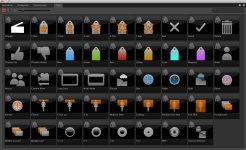
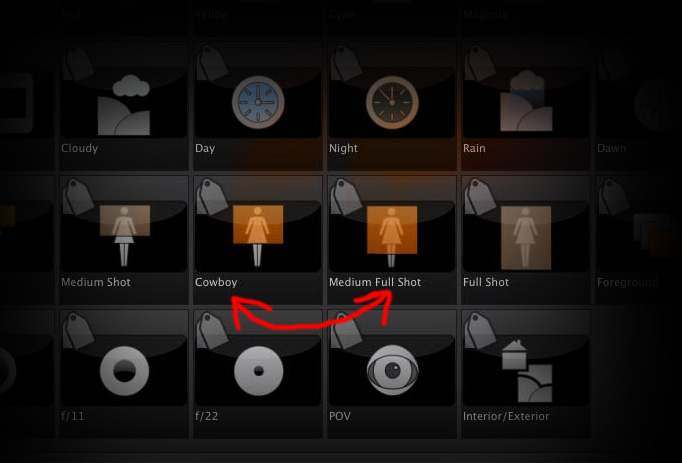
Tagging is so bloody simple it's a surprise it's never really been done before, at least not in such a simple and intuitive manner that I care to remember. Essentially you have a range of tags (See image) and you drag these tags onto the viewer or timeline, tagging all clips, the whole shot, that individual frame or the whole timeline. Those tags then stay with those shots in the project and are visible in the timeline. You can also create your own tags and there are more features on the way that will advance this functionality in Storm.
The Timeline
Storm features a timeline that is very familiar to the traditional timeline found in most NLE's these days. Which is of great importance. Why? Because this is what will undoubtedly become a thorough conform tool in the not-to-distant future. Already one can export an XML from Final Cut and drop it onto the timeline to have it relink to the original RAW footage instantly. You can cut together RAW footage right there in Storm if you wish so you can check that two shots are working well and comfort the director that it's going to work within seconds of having the drive or CF card off of the camera.
Euphonix Control Panel
The Euphonix MC Color Control Panel is a great little panel for those who haven't used it. For me it's quite a lot better than the Tangent Wave. The build quality, feel and usability belies it's pricetag (Compared to other panels!) but more importantly Storm uses it very well! I personally feel that the accuracy of the MC Color using Storm is ahead of that of RC-X. A spin of a wheel in Storm only changes the image slightly whereas a fraction of a movement in RC-X alters the image considerably. There are also more Pages. The first page on the MC Color when using Storm reports to the six dialogue boxes Kelvin, Tint, FLUT control, Shadow, DRX and Saturation. The second page has Contrast, Brightness, Exposure, Red, Green and Blue. RC-X by comparison only has the option of FLUT, Shadow, Saturation, Contrast, Brightness and Exposure
The values that are being changed are also reported on the control panel. So unlike RC-X you can be applying a grade to the RAW footage without having to have your Look Control panel visible on the screen, all the info is right there on your panel. Dragging the Look, Gamma and Gain effect onto your shot allows you to use the wheels and balls of the MC Color with a great deal of accuracy and fluidity (Currently you press shift and page on the panel to switch to LGG control).
Continued...
By no stretch of the imagination is this a storm in a teacup (Pun No.2), The Foundry's Storm is most definitely the real deal. This is the application that Reduser's have been crying out for since the release of the very first Red One. I say this because in it's current Alpha status it is the seed of an application that I myself as a DIT have been wanting for over two years. Whilst Red have stepped up with the introduction of RedCine-X I firmly believe that standardizing the process and evolving the capabilities of Red RAW within a single application by a third party has been begging to happen and to be done so by a company that has the reputation not just to do it well, but to exceed all expectations. The Foundry is that company. They obviously have big plans for where Storm is heading and it's not difficult to see within seconds of booting up the application just what their intentions are.
Before I go into details I wanted to quickly cover the question 'Who is Storm for?'. Obviously the main use for Storm is an application that can be used on-set, near to camera, more often than not by a Digital Imaging Technician (DIT). I firmly believe however that many post houses, editors and colorists will find the application more and more useful as it develops. Storm is going to become one of the most used tools wherever digital footage is being captured in my humble opinion. Storm is all about Red in its current guise and that's intelligent. Because with the release of Epic in the near future and the shear amount of Red Ones around the world... Well, Red rules. But it's my belief that future updates will cover more and more cameras, and this is important for Reduser's. If an application can only support Red cameras what happens, for example, when we also have 5D's being used onset as crash cams? Should we have another application as a DIT that does all the same things? Should we transcode both formats and load them into another application to see if they can be cut together, or should we look to have applications that supports more than one codec and more than one type of camera? For me, when this happens it will be the Perfect Storm (Pun No.3).
The GUI
I'm going to start with the User interface because it was the first thing that struck me about Storm. It's simply beautiful, not in a Zoe Saldana kind of way, just very functional as applications go! It's clean, it's obvious and it's customizable. It doesn't distract from the important stuff - the footage. You can layout the panes to reflect what's most important to you as a DIT. Perhaps your director likes to see whether shots cut together - Then we use the Edit workspace. Perhaps your DoP is constantly asking for you to do a quick grade to see if he or she has got the look they wanted - Then we switch to a Grading workspace that we've structured previously to how we want it. Or perhaps you're just wanting to check shots - Then we simply switch to our Reviewing workspace. All done at the press of a button. As storm grows I'm sure it'll become common to have an Effects workspace and Tagging workspace too. But the beauty is that you can tweak and shape the look and feel to how you feel comfortable and it does it far better than most applications I've ever used.
The Foundry also intend to support the ATI Radeon cards (5770 and 5870) given Apple's commitment too these cards on newer machines. And this is great news because if you didn't already realise these cards are supported on earlier Mac Pro's going all the way back to the 2006 Mac Pro 1,1 (5770 confirmed on all 2006 Mac Pro's, 5870 confirmed on some 2006 Mac Pro's). Present Alpha releases of Storm currently only support Nvidia. HOWEVER, I've literally just a few minutes ago installed a 5770 on an old Mac Pro (Circa 2006/07) booted up Storm and it's giving instant results and everything appears to work flawlessly. I'm getting live playback from the RedRocket as well as Live Histogram, Live Waveform AND Live Vector scope simultaneously from the graphics card. The card cost me £180 so it's a no-brainer if Storm is to become your application of choice. As I say, this is an old Intel Mac Pro fitted with RedRocket and a 5770 and I'm not sure where you could improve on quality!!!
The Basics
Storm naturally supports the RedRocket. Playback quality is essentially the same as RC-X. Storm does however include an Auto setting that will alter the video quality if the system is lagging for some reason (Perhaps you are backing up to the same location whilst trying to playback). More importantly Storm supports video out on the RedRocket. So you can do a grade and run it to the same HD-SDI monitor the DoP is using with the camera. Support for colour looks should hopefully appear in the near future allowing the DIT to create looks almost on the fly and mix and match to the live feed.
The Effects Panel
In the Alpha stage of Storm we already have a bunch of cool effects (See image) which include: Adjust HSV, Adjust HSV/Hue, Auto Contrast, Curves, Color Filter, Invert, Levels, Lift Gamma Gain, SOP, Saturation, Tint, White Balance, Blanking, Flip, Flop, Pan and Scan, Box Blur, Gaussian Blur, Radial Blur, Unsharp Mask, Checkerboard, Color Wheel, Color Bars, Constant, Ramp, Detect Edges, God Rays, Soft Edges, Threshold and Vignette.
The Effects Panel is just one of the things that sets Storm apart from RC-X, but it's also one of the things that will set Storm apart from a great many applications. Again, this is where Storm will grow over time. More and more effects will be added to it's library and you will be doing things in Storm that use to cost thousands upon thousands in the past. And more importantly you will be doing them directly to R3D footage in a non-destructive environment!
Tagging
Tagging is so bloody simple it's a surprise it's never really been done before, at least not in such a simple and intuitive manner that I care to remember. Essentially you have a range of tags (See image) and you drag these tags onto the viewer or timeline, tagging all clips, the whole shot, that individual frame or the whole timeline. Those tags then stay with those shots in the project and are visible in the timeline. You can also create your own tags and there are more features on the way that will advance this functionality in Storm.
The Timeline
Storm features a timeline that is very familiar to the traditional timeline found in most NLE's these days. Which is of great importance. Why? Because this is what will undoubtedly become a thorough conform tool in the not-to-distant future. Already one can export an XML from Final Cut and drop it onto the timeline to have it relink to the original RAW footage instantly. You can cut together RAW footage right there in Storm if you wish so you can check that two shots are working well and comfort the director that it's going to work within seconds of having the drive or CF card off of the camera.
Euphonix Control Panel
The Euphonix MC Color Control Panel is a great little panel for those who haven't used it. For me it's quite a lot better than the Tangent Wave. The build quality, feel and usability belies it's pricetag (Compared to other panels!) but more importantly Storm uses it very well! I personally feel that the accuracy of the MC Color using Storm is ahead of that of RC-X. A spin of a wheel in Storm only changes the image slightly whereas a fraction of a movement in RC-X alters the image considerably. There are also more Pages. The first page on the MC Color when using Storm reports to the six dialogue boxes Kelvin, Tint, FLUT control, Shadow, DRX and Saturation. The second page has Contrast, Brightness, Exposure, Red, Green and Blue. RC-X by comparison only has the option of FLUT, Shadow, Saturation, Contrast, Brightness and Exposure
The values that are being changed are also reported on the control panel. So unlike RC-X you can be applying a grade to the RAW footage without having to have your Look Control panel visible on the screen, all the info is right there on your panel. Dragging the Look, Gamma and Gain effect onto your shot allows you to use the wheels and balls of the MC Color with a great deal of accuracy and fluidity (Currently you press shift and page on the panel to switch to LGG control).
Continued...