Welcome to our community

Be a part of something great, join today!

  • Hey all, just changed over the backend after 15 years I figured time to give it a bit of an update, its probably gonna be a bit weird for most of you and i am sure there is a few bugs to work out but it should kinda work the same as before... hopefully :)

For the Love of GOD, can I please deliver my footage!

bobbystone

Well-known member
Joined
Mar 30, 2008
Messages
210
Reaction score
0
Points
0
Anybody want to tell me why my footage has a big black line at the bottom of the frame?

Shot 4KHD, rendered in RCX 261 1280x720

Oh, and when I switched to 1080 to see if it would still be there I get an error when the movie won't open that says "The File couldn't be found"

And, oh by the way, my rendered prores files STILL don't exactly match what I see in RCX.

I'm REALLLLLLLLLY getting weary of all this crap. Alexa is looking good to me.
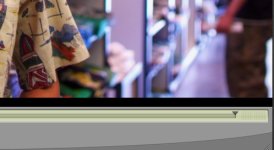
 

Attachments

  • red_failure.jpg
    red_failure.jpg
    39.9 KB · Views: 0
crop

crop

Nope. Actually I've just been playing with crop settings. When I render a clip out with any sort of crop applied I get...Wait for it... A black screen with about 30 lines of digital garbage. I LOVE THIS WORKFLOW!!!!!!!! Jeez, I think I was happier editing on Quad tape machines in the 70s... Any chance I get the 5D comes out now and the RED sits in the shop.... It's just STUPID to have a camera this fine and no damn way to easily get it into the edit.


You're losing me RED. Throw me a line, please.
 
Editing Red footage is a piece of cake...take QT proxies created in-camera and drop them into Final Cut timeline...start editing.

If you want help, try re-reading your first post and ask yourself how we should trouble shoot your problem. w/o detailed info its impossible to help.
 
FCP

FCP

Well, for one thing, I often need to deliver my footage to clients in ProRes files so THEY can edit the footage. I like to give the footage a quick grade and spit QTs out.

But another, have you tried editing with proxies? Thet generally look like CRAP! They're always dark and with no saturation. and they don't play worth a damn in any of my machines.

I hate to say it, but the Alexa stands a chance of kicking RED back in the dirt if they don't get a workflow worked out. I imagine a huge percentage of us are shooting for HD and not the big screen, so 1080 will be more than fine for us for a long time. And the ability to take a ProRes file out of the camera, throw it into a machine and start editing GOOD LOOKING footage is starting to sound VERY good to me.

I've been more than willing to put up with this mess to a point. But I'm Rapidly reaching that point. I'm spending way to much time trying to debug crappy software. Maybe I'm just steaming right now cause I'm in hawaii f'ng with this laptop instead of enjoying the sights, but I'm darned close to selling my RED and going back to rent better, more usable cameras. I can use the 5D just fine for a lot of pickup and lower-budget stuff.

And that sucks, because I think the CAMERA is excellent. But the workflow is absolutely abysmal and ignored by RED. My .02
 
Edit with proxies everyday...yes its slower than prores, but its an option.

Re prores, you are doing something wrong. If you list a step by step we might be able to help.

We render prores files every day and dont have any issues. Most of our jobs are rendered to prores on-set and are in editorial the next morning.
 
This original poster is speaking for many users. The post workflow is RED's greatest problem. We live, at this time, in a 1080 world. RED requires computer whizzes to create beautiful footage that the client can use in their workflow... and yet so many of the more creative, more capable DPs and directors are right brained, not interested in sitting behind a computer to massage footage to make it acceptable to the client. I, for one, don't understand how RED doesn't see how big a problem this is.
 
Last edited:
Just drank a beer

Just drank a beer

and I'm calmer now. As a test, I rendered the same clip, same settings out to JPEG sequences and there is no black line. so it's something between RCX and quicktime. I just rendered another quicktime again, this time uncompressed and the line is still there. So I assume it's not codec dependent.

I ALSO notice that part if the picture is missing, so it's like there is a very small letterbox bar across the bottom of the frame.

Any thoughts?
 
Last week I shout a weisscam HS2 spot all day. It was LOVELY to take the footage out, drop it into FCP and start . e d i t i n g. No BS, no crap, just the joy of working with pictures.
 
...If you want help, try re-reading your first post and ask yourself how we should trouble shoot your problem...

Valium? :beer:
 
Hmm, just what information do you need? Here's what I'd like to do.

1. Shoot footage on the RED
2. Open Footage in RCX, grade footage, and render to Apple Quicktime in ProRes
3. Open said quicktimes to find that they do NOT have a 30 pixel black bar across the bottom of the screen, and that they DO look somewhat like the grade I created.

That really doesn't seem like a lot to ask from a camera I've spent several thousand dollars on. As for details, I gave you what I considered the important facts, but I'll give them again.

RED #1313 wit MX Sensor, build 30.0.1
Redcine-X build 261
Apple Powerbook with 10.6.4

And yes, I will take the valium now.
 
Getting R3d's to prores has definitely been a struggle. And up until only recently have the transcodes from R3d to prores look remotely close to the original R3d's. Likely many factors, but with build 261 it's much better looking.

But that aside, do you have latest software installed along with FCS3 installer ? Ok....you MIGHT think you've installed it, but there is a file...."MIO" file within it that may not have been upgraded. And if i understand correctly, the latest QT codec is 4.2 and i believe installed with either FCS3 or RCX build 261.

I'll find the thread that has instructions on how to check if you are actually up to date....but basically you check on your working HDD then go to library, then to Application Support, then to proapps, then to MIO....check to see if the text file within that MIO folder ---i believe there are a few subfolders...but check if it mentions version 20. If so, you are to delete the entire MIO folder, then relaunch FCS installer version 30.1 and upon completion, check the same file to see if it actually upgraded. YOu'll see that there no longer is a text file that mentions version 20.

At any rate, after months of digging through reduser and testing various workflows it all seems to be working....or 85-90% close (in my case).
 
Here's info from Gavin at RED. I know most of this is COLOR specific, but it also has lates firmware/color science etc.... for FCP & COLOR


OK guys, let me try to address both situations.

The Apple installer doesn't always report problems. The ones we've seen tend to be on Leopard systems. Apple changed the way installations are logged ("receipts") between Leopard and SnowLeopard.

Also, the Mac OS has no uninstaller.

The following is what our package installs. You can manually delete these things in Finder or at the command line, and then run the installer. If everything is present after that, you know you have the right version.

You should update to the 30.1 installer, because the version 20 package does not support the latest color science and camera firmware.

INSTALLED ITEMS

Color support:

/Library/Frameworks/REDCODE.Color.framework


FCP Log & Transfer support:

/Library/Application Support/ProApps/MIO/RAD/PlugIns/RED.RADPlug


REDCODE QuickTime codec and preference pane:

/Library/QuickTime/REDCODE.QT.component
/Library/PreferencePanes/REDcode.prefPane
 
Thanks Johnny..

Thanks Johnny..

That was a helpful post. I just did another test and rendered out a clip in clipfinder. It re-produces the same problem. So that tells me it's a redline issue. I can open a quictime in QT player and render out a prores clip without the bar, but of course it looks like garbage. Now I'm really getting scared though, as I have a shoot next week, and currently now method for delivering the footage! I may actually have to rend an F900!!! How's that for your RED working for you. Jeez.
 
bobby,

Can you please re-run your scenario, gather the log files and email them to redcinex at red dot com.

You can find the relevant logs under ~/Library/Application Support/red/RedCineX/Logs. You are looking for two logs in particular, one prefixed with RCX and one with redexport.

Thanks,
David
 
Hmm, just what information do you need? Here's what I'd like to do.

1. Shoot footage on the RED
2. Open Footage in RCX, grade footage, and render to Apple Quicktime in ProRes
3. Open said quicktimes to find that they do NOT have a 30 pixel black bar across the bottom of the screen, and that they DO look somewhat like the grade I created.

That really doesn't seem like a lot to ask from a camera I've spent several thousand dollars on. As for details, I gave you what I considered the important facts, but I'll give them again.

RED #1313 wit MX Sensor, build 30.0.1
Redcine-X build 261
Apple Powerbook with 10.6.4

And yes, I will take the valium now.

not sure if this has anything to do with your problem, but why arent you on release build v30.5.0?

also try a reinstall of rcx
 
Have you tried rendering on a different system? IMO, this seems like a software issue on the system you are using.

Make sure your software is all up to date. That means the latest QuickTime version, not just the RED QT plugin. Which version of Final Cut Studio are you using? If you're not using the latest, then you're going to have issues there too.

Anyway, try to take a breath and give us more information. Many of us here are working with RED footage every day and I can say that I have never seen the problem you are having.

You may want to do some tests on another system and see if you can determine if it's the footage or the computer. Can you re-visit other older footage that worked fine in the past, or have you? Is it giving the same results? Also, you should definitely get your camera firmware up to date. 30.5.0 for sure, and perhaps even give 30.6.0 beta a run, it seems to have cleaned up some strange blue channel noise that some people were seeing. The version you mentioned 30.0.0 had a few glitches and was an earlier MX beta.
 
build

build

actually it is the latest release build
 
Since i'd like to know all my software and components are up to date....I'd put RCX in the garbage and then reinstall as was just suggested.

Then, as in my previous post. Delete EACH of those folders that was mentioned in my previous post and then reinstall FCS3 version 30.1.....for reference another quote in a string from Gavin related to the previous post i listed above:

You can, however, manually delete all the files I mentioned above and then run the 30.1 installer. After that, if all the files exist, you have the right versions. Before that, however, if you'd like to help us troubleshoot, I sent you a private message with some questions.

Then, try it all after you have confirmed you're running with good up to date software. I found out the long way that if you did not have up to date QT component etc....then transcodes can vary greatly.

**Here's the actual thread i am quoting:
http://reduser.net/forum/showthread.php?t=48297&highlight=log+transfer+problems


Good luck
 
FCS Installer for FCS 2

FCS Installer for FCS 2

Will the FCS installer work for FCS2? There was a beta on here a whiel back, but I can't find it.
 
Back
Top