Welcome to our community

Be a part of something great, join today!

  • Hey all, just changed over the backend after 15 years I figured time to give it a bit of an update, its probably gonna be a bit weird for most of you and i am sure there is a few bugs to work out but it should kinda work the same as before... hopefully :)

My redroket can not play full 4k in my mac

Nawaf AL-Wahaib

Well-known member
Joined
Apr 26, 2010
Messages
68
Reaction score
0
Points
0
hi

i try to play full 4k but My redroket can not play full 4k smoothly in my mac
why?????
if i play the 1/2 of 4k it play smoothly and fine


thanks
 

Attachments

  • 0.jpg
    0.jpg
    17.1 KB · Views: 0
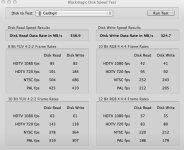
i did test and the result in attached photo
 

Attachments

  • na.jpg
    na.jpg
    89.5 KB · Views: 0
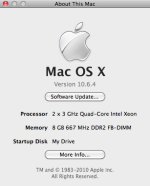
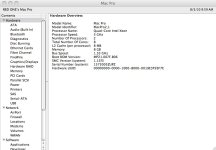
What Mac?
How much RAM?
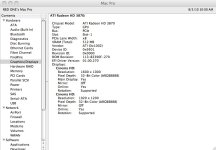
GPU?
Which system version?
What RR firmware?
Redcine X? What RCX?
RocketcineX? What Rocketcine X?

From what I can see. the disk is not the issue... -:)

Cheers!
 
What Mac?
How much RAM?
GPU?
Which system version?
What RR firmware?
Redcine X? What RCX?
RocketcineX? What Rocketcine X?

From what I can see. the disk is not the issue... -:)

Cheers!

i am using last redcine 258
firmware i the last one
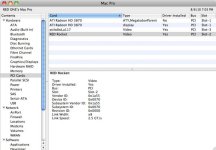
for more info. please see the attached photos
 

Attachments

  • 0444.jpg
    0444.jpg
    29 KB · Views: 0
  • 212.jpg
    212.jpg
    94.7 KB · Views: 0
  • 0000.jpg
    0000.jpg
    86.9 KB · Views: 0
Thanks.

The last page of interest is the PCI-cards page, to see which your RR is in.

That said, this is a 1st gen 8-core. I have seen people report some problems with that. I dunno which or why.

Have you tested playback directly from RocketcineX. If that works well, it probably is Redcine-X related.

On a 2nd gen 8-core, I get full playback only over SDI, while I have to be happy with half debayer for computer display... But this is for Rocketcine 1740
 
I would guess you should try 800mhz FB-DIMMS. I think thats the fastest you can use in that tower. I'll look at the service manual. I say that because I'm able to play back 4k from a single Drive over e-sata over HD/SDI, but I'm using a Quad i7 2.66, 1600mhz Sticks and 12GB worth. And the Rocket is in a x16 Slot.
 
My Rocket does full debayer over dvi and sdi and for rendering out. But on the computer monitor it says something that it is not supported on this monitor. I always understood that it was exceeding the maximum resolution of the graphics board or something. Never been a problem for me.
 
thanks for respond

does redroket support playing full 4k in computer monitor ??????
now i do not know what should i do ??? thinking too much...
red company ... i need solution !!!
 
Hello,

What slot is your Rocket in? Is it in Slot-2 next to the video card?

ATF
 
thanks for respond

does redroket support playing full 4k in computer monitor ??????
now i do not know what should i do ??? thinking too much...
red company ... i need solution !!!

It works but where it can hit bottlenecks is the generation mac, graphics card, and slot location/configuration.

What we use:
mac pro 4,1
2.66ghz 4 core
nvidia 120 GT or 285 or a recent ATI (nvidia is needed for 4.5k)
Graphics card should have at least 512MB of memory.


In your machine, you may need to rearrange the pcie config to have the graphics card in a x16 slot and rocket in a x8 slot.
 
It works but where it can hit bottlenecks is the generation mac, graphics card, and slot location/configuration.

What we use:
mac pro 4,1
2.66ghz 4 core
nvidia 120 GT or 285 or a recent ATI (nvidia is needed for 4.5k)
Graphics card should have at least 512MB of memory.


In your machine, you may need to rearrange the pcie config to have the graphics card in a x16 slot and rocket in a x8 slot.


please check with attached system details and tel me from where the problem
please read from the thread beginning you will find all system details.
thanks
 

Attachments

  • 0000.jpg
    0000.jpg
    47.5 KB · Views: 0
Hello,

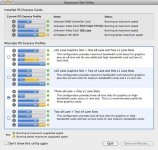
What card is in your slot-3? I noticed you had a "CalDigit" drive listed in the hard drive test (good choice! I use two of the HDOne's myself). That generation of Mac (the first one) may configure the default Slot-3 to a 1x lane speed. Can you run the Expansion Slot Utility.app (located in Macintosh HD/System/Library/CoreServices) and take a screen shot for us?

Also if you are streaming the video off a CalDigit HDOne or HDPro, what RAID configuration do you have the drive set to? If your system is in a stock config, that Slot-3 maybe be at 1x instead of at least 4x. The HDOne PCIe bridge card needs 4x (if you have the double card for two HDOne or HDPros - obviously it's 8x).

The fellow I work with, who primarily edits RED footage, had to bump his HDOne to RAID 5 from RAID 6 and disable Cache Synchronization (located in the CalDigit Raid Utility.app) as well as disabling Active Sustained Transfer Technology (also in the Raid Utility.app). Odd that CalDigit had him turn that off when having some drive speed issues.

Send us a screen shot of the Expansion Slot Utility so we can see how you have the lanes configured.

I just received our Rocket about two weeks ago. It has no problem playing footage at 4k from the HDOne but will hiccup on any internal SATA 7200rpm 32MB-64MB cache drives.

You definitely have to plan around hard drive speeds, video card, and memory.


My Mac Pro config;

Mac Pro (2008)
16GB OWC FB-DIMM 800MHz ECC Memory
ATI 3870 512mb Video Card (Slot 1 - 16x)
Red Rocket (Slot 2 - 8x)
CalDigit HDOne 8 TB RAID-6 HD Array (Slot 3 - 4x)
LSI SAS Controller (Slot 4 - 4x)
(4) 1 TB 7200rpm 64mb cache Western Digital Caviar Black HDs - Internal SATA


Best!

ATF
 
Hello,

What card is in your slot-3? I noticed you had a "CalDigit" drive listed in the hard drive test (good choice! I use two of the HDOne's myself). That generation of Mac (the first one) may configure the default Slot-3 to a 1x lane speed. Can you run the Expansion Slot Utility.app (located in Macintosh HD/System/Library/CoreServices) and take a screen shot for us?

Also if you are streaming the video off a CalDigit HDOne or HDPro, what RAID configuration do you have the drive set to? If your system is in a stock config, that Slot-3 maybe be at 1x instead of at least 4x. The HDOne PCIe bridge card needs 4x (if you have the double card for two HDOne or HDPros - obviously it's 8x).

The fellow I work with, who primarily edits RED footage, had to bump his HDOne to RAID 5 from RAID 6 and disable Cache Synchronization (located in the CalDigit Raid Utility.app) as well as disabling Active Sustained Transfer Technology (also in the Raid Utility.app). Odd that CalDigit had him turn that off when having some drive speed issues.

Send us a screen shot of the Expansion Slot Utility so we can see how you have the lanes configured.

I just received our Rocket about two weeks ago. It has no problem playing footage at 4k from the HDOne but will hiccup on any internal SATA 7200rpm 32MB-64MB cache drives.

You definitely have to plan around hard drive speeds, video card, and memory.


My Mac Pro config;

Mac Pro (2008)
16GB OWC FB-DIMM 800MHz ECC Memory
ATI 3870 512mb Video Card (Slot 1 - 16x)
Red Rocket (Slot 2 - 8x)
CalDigit HDOne 8 TB RAID-6 HD Array (Slot 3 - 4x)
LSI SAS Controller (Slot 4 - 4x)
(4) 1 TB 7200rpm 64mb cache Western Digital Caviar Black HDs - Internal SATA


Best!

ATF


please check with the attached details
 

Attachments

  • 21.jpg
    21.jpg
    78.9 KB · Views: 0
Hello,

Others should weigh in, but I would pick the option above the current option you are using.

Give your video card back it's full 16x lane in slot-1, move slot-2 down to a 8x speed for the Rocket, and the other two lanes at 4x.

ATF
 
Hello,

Others should weigh in, but I would pick the option above the current option you are using.

Give your video card back it's full 16x lane in slot-1, move slot-2 down to a 8x speed for the Rocket, and the other two lanes at 4x.

ATF

the option above is decreesing the slot-2 speed so how it will work at maximum speed it will be 1x ?
 
Hello,

Maybe I read the graph wrong. I was trying to see if you could get your slot 1 back to 16x, slot 2 to 8x and the other two to 4x.

What drive are you trying to play footage off? Your external Cal Digit or the internal SATA drives? What kind of drives are you
using internally? Which Cal Digit model is it?

Thanks!


ATF
 
Hello,

Maybe I read the graph wrong. I was trying to see if you could get your slot 1 back to 16x, slot 2 to 8x and the other two to 4x.

What drive are you trying to play footage off? Your external Cal Digit or the internal SATA drives? What kind of drives are you
using internally? Which Cal Digit model is it?

Thanks!


ATF

i tried caldigit hdpro and internal drives with mac raid
same problem...
 
Back
Top