Hey all, just changed over the backend after 15 years I figured time to give it a bit of an update, its probably gonna be a bit weird for most of you and i am sure there is a few bugs to work out but it should kinda work the same as before... hopefully :)
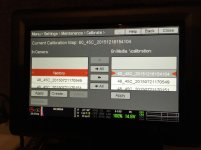
Anyone else noticing the Black Shade/Calibration menu has changed in the new build? I did what I think is a black shade but it was quick and seemed much different. Below is an image.
Anyone else noticing the Black Shade/Calibration menu has changed in the new build? I did what I think is a black shade but it was quick and seemed much different. Below is an image.
What did you do? If you pressed the "<-" / "<- All" button you imported a preset from the Media to your camera. If you pressed the "->" / "-> All" button you exported a preset from your camera to the media. If you pressed the "Apply" button you applied one of the presets from your camera or from media.
To create a new black shade you need to press the "Create..." button.