Welcome to our community

Be a part of something great, join today!

  • Hey all, just changed over the backend after 15 years I figured time to give it a bit of an update, its probably gonna be a bit weird for most of you and i am sure there is a few bugs to work out but it should kinda work the same as before... hopefully :)

Problem with black shading ?

Maeva Merour

New member
Joined
Feb 20, 2017
Messages
4
Reaction score
0
Points
0
Hi everybody !


I've got some problem on the last shooting with a Epic Mysterium-X with the 6.2.51 firmaware's version.
I have anormally noise on some shots. I guess this is because I've fucked up with the black shading because I never exceed 500 Iso and my exposure (even not perfect) is looking ok for me (finally maybe not ?) Even if the client side is missing some bounce light on face. That's true.
As soon as I color-grade with da vinci resolve of course it is getting worse. But what I don't understand is that's on some shots it is violent and other not. I tried to "play" on the FLUT instead of do it with the ISO in da vinci. But never mind, because I think I can not fix it. It's too late. I would like to understand and don't do it the same the next time.
I know I've fucked up somewhere but I don't know where. :emote_headwall:
Do you know some website where I can share r3d to you ? For most of them it is too heavy and show you noise on freeze frame...

Please let me know what you think about it. All your comments are welcome.

Thank you so much.

:thumbsup:
 

Attachments

  • metadata_01.jpg
    metadata_01.jpg
    75.5 KB · Views: 0
  • D003_C016_0107Q2.0000602.jpg
    D003_C016_0107Q2.0000602.jpg
    79 KB · Views: 0
  • D001_C005_0107PQ.0001794.jpg
    D001_C005_0107PQ.0001794.jpg
    85.6 KB · Views: 0
  • D001_C025_0107HO.0000704.jpg
    D001_C025_0107HO.0000704.jpg
    82.1 KB · Views: 0
  • D001_C053_0107E3.0000000.jpg
    D001_C053_0107E3.0000000.jpg
    88.8 KB · Views: 0
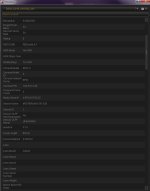
The following of metadata :)
 

Attachments

  • metadata_02.jpg
    metadata_02.jpg
    74.9 KB · Views: 0
  • metadata_03.jpg
    metadata_03.jpg
    76.3 KB · Views: 0
Hello Maeva, welcome to Reduser,

First, the images you attached are beautiful, and it's hard to see the noise in them because they are compressed, so it's best to share an R3D Frame,
Open each clip in Redcine-x, you'll see an R3D Snapshot button
Screen_Shot_2017_02_26_at_5_37_26_PM.png
Bottom left of the clip, click it to save a single R3D frame, and then share them here.
 
Hi Nawaf :)

Thank you for your support.
Please find it here on k-upload (safe):

 
Thanks Maeva,
I checked your files, the First, Third, and Fourth shot look great, nothing wrong with them, they are a bit dark, I would suggest raising the ISO to 600-800, then lowering the Shadow bar,
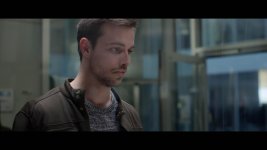
As for the Second Shot (single man), that doesn't seem like a blackshading error, but maybe the Lens wasn't clean? (the two lines on the right)

Remember that RED Cameras don't have Noise Reduction, so you can add a Spatial Threshold (under Star Logo) in Davinci Resolve to soften the image a bit, I used 6.0 in Luma only and it looks clean.

The attached images are compressed Jpg, so check these higher quality PNG files.
https://we.tl/D8QXVLC3ca
 

Attachments

  • Untitled00086400.jpg
    Untitled00086400.jpg
    79.6 KB · Views: 0
  • Untitled00086562.jpg
    Untitled00086562.jpg
    77.4 KB · Views: 0
  • Untitled00086697.jpg
    Untitled00086697.jpg
    86 KB · Views: 0
  • Untitled00086812.jpg
    Untitled00086812.jpg
    74.3 KB · Views: 0
Here are the settings I did so you can have an idea of how to do it in Davinci Resolve
 

Attachments

  • Screen Shot 2017-02-27 at 10.26.29 PM.jpg
    Screen Shot 2017-02-27 at 10.26.29 PM.jpg
    7.1 KB · Views: 0
  • Screen Shot 2017-02-27 at 10.27.08 PM.jpg
    Screen Shot 2017-02-27 at 10.27.08 PM.jpg
    12.2 KB · Views: 0
These Lines, in the Second shot, I think are maybe the lens wasn't clean, or maybe there was a glass between the Camera and the Subject
 

Attachments

  • Untitled00086563.jpg
    Untitled00086563.jpg
    6.9 KB · Views: 0
Yes, my apologies: there was a plexiglass between them... that's why we got troubles with set decoration. We wanted to get the plexiglass to have the reflection of clients coming.
Thank you for your settings but play with the threshold would not damage the sharpness of the focus ?
The shadow's settings of the red raw panel is like lift ? It plays on low lights ? What about the FLUT ? The denoise tool is not efficient ?
You're not disturbed by the noise in the background ? Because on the 4th one with the business man, it is "horrible" with animation.
Maybe you can't see it with one freeze picture. See in attachment with color-grading maybe it would be more obvious (but we see it without). I must precise my settings about the file with da vinci:
lift -0.04
gamma -0.00 0.01 -0.00 -0.00
gain 1.17 1.17 1.15 1.17
offset 24.75
Your advices are precious.
Thank you for your time and your feedback.


Back
Top