Welcome to our community

Be a part of something great, join today!

  • Hey all, just changed over the backend after 15 years I figured time to give it a bit of an update, its probably gonna be a bit weird for most of you and i am sure there is a few bugs to work out but it should kinda work the same as before... hopefully :)

Overlays and Gyro Info

Matt Choules

Well-known member
Joined
Nov 12, 2011
Messages
255
Reaction score
0
Points
0
Hi All,Got some studio work upcoming and apparently might need to give info from the gyros to the editor and guys that are dealing with the post. Is it possible to sow on the red LCD screen or output via SDI the gyro info? Specifically the inclinometer but possibly others.Thanks in advance.Matt.
 
Matt,

Is it something like this you are after?

cheers
 

Attachments

  • gss_gyro_bluesky.jpg
    gss_gyro_bluesky.jpg
    102.8 KB · Views: 0
Yeah, something like that would do nicely. How did you achieve this?
 
Hi All,Got some studio work upcoming and apparently might need to give info from the gyros to the editor and guys that are dealing with the post. Is it possible to sow on the red LCD screen or output via SDI the gyro info? Specifically the inclinometer but possibly others.Thanks in advance.Matt.

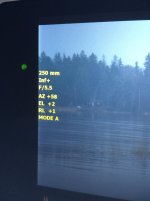
You can customize the overlays on your monitor to include the Pitch and Roll information from the gyro data:

1. Goto: Menu > Settings > Display > Monitor Control
2. Goto to the "Overlays" tab
3. Select an overlay to clone (e.g. "Standard (RED)")
4. Press the "Clone..." button
5. Press a location on the overlay you want the Gyro data (one of the buttons with a "+" on it)
6. Set the Item to "Motion: Gyro Data (GYRO)"
7. Set the Size to whatever size you prefer
8. Press the "Add" button
9. Give the new overlay a name (e.g. "My Overlay")
10. Press the "Create" button
11. Go back to the "Monitor" tab (of Menu > Settings > Display > Monitor Control)
12. Select your monitor
13. Set "Overlay" to your newly created overlay.


On the overlay you will see the Pitch and Roll in degrees.
 
Back
Top