Welcome to our community

Be a part of something great, join today!

  • Hey all, just changed over the backend after 15 years I figured time to give it a bit of an update, its probably gonna be a bit weird for most of you and i am sure there is a few bugs to work out but it should kinda work the same as before... hopefully :)

Mocha Pro and RED footage: Best Practices

Brandon J.F.

Well-known member
Joined
Sep 12, 2010
Messages
3,273
Reaction score
0
Points
0
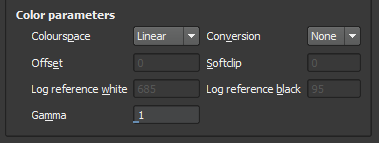
You can now import R3Ds into Mocha Pro. Does anyone know which color parameters are best to use? This is what the window looks like:

attachment.php


The options for "Colourspace" are Linear, Log or Panalog.

The options for Conversion are None, Float or 8 bit.

If you choose Linear or Log then you can change the Gamma. You can't if you choose Panalog.

If you choose Log you can also edit the Offset, Softclip, Log reference white and Log reference black. You can't edit these with any other colourspace.

What are the best settings for R3D footage?
 

Attachments

  • mocha pro color params.PNG
    mocha pro color params.PNG
    5.8 KB · Views: 0
It doesn't really matter what color space you use actually. In the end you are exporting data anyhow that you will use in your compositing software.

Actually, I'm using the new Remove tool (which is amazing) so I'll be rendering out a tiff sequence (or whatever) from Mocha Pro.
 
Linear works fine for me.
Yep, and "float". If your shooting at 4k at 6:1, you will have about 2 pixels slipping between frames, so depending on what math function your using and what your tracking keep that in mind (i.e. the real track resolution of 4k at 6:1 is 2.5k for the scarlet, so you will get often a better track at 2k then 4k - depending on the circumstance[if you do go to 2k, make sure you reduce with one of those quad averaging functions).
 
I don't see the point of Mocha being able to read R3D. VFX work, like the remove function is done at some later point in the workflow and not at the beginning. So, let say, the editor is finished the edit, exports XML, EDL or AAF, R3D is trimmed down and exported for Mocha. Mocha does it's thing and then what? You would need to export something like DPX, Prores, EXR or whatever for other type os work, like color grading. Regardless of the choice of codec, the RAW metadata is gone. Does anyone thinks, that the ability to read R3D in Mocha trumps the ability of color grading system to manipulate the RAW metadata, that now is irretrievably lost? I, for one, don't think so...
The only other type of export, that may work in this kind of environment, is to export from Mocha just the resulting mattes. in that case, it really doesn't matter the choice of Gamma, Linear or Log etc...
 
Jake, where do you suggest I put using the remove tool in my workflow?
 
I would suggest that it goes after the edit and at least the first color pass.

So, do the first color pass off the r3d file and render out to OpenEXR or DPX and import that into Mocha? Then render from Mocha to Open EXR, DPX or TIFF and do the final grade from those? Which do you think is best? Looks like the default is TIFF.

Also, is it good to limit the number of times you render a shot? I mean let's say you import a DPX made in REDCINE-X Pro and use the remove tool in Mocha, render out the results and import that into After Effects or Nuke for compositing, then render again and grade from that... You've rendered the shot out 3 times before you started grading. At what point do you have to worry about a loss in image quality? If you are grading mostly off r3d files, but intercutting with fx shots that have been rendered out several times how do you make it not noticeable? Is the quality of OpenEXR and DPX renders so good that it's just not an issue? Are there any issues if you grade from TIFF sequences?
 
So, do the first color pass off the r3d file and render out to OpenEXR or DPX and import that into Mocha? Then render from Mocha to Open EXR, DPX or TIFF and do the final grade from those? Which do you think is best? Looks like the default is TIFF.

Also, is it good to limit the number of times you render a shot? I mean let's say you import a DPX made in REDCINE-X Pro and use the remove tool in Mocha, render out the results and import that into After Effects or Nuke for compositing, then render again and grade from that... You've rendered the shot out 3 times before you started grading. At what point do you have to worry about a loss in image quality? If you are grading mostly off r3d files, but intercutting with fx shots that have been rendered out several times how do you make it not noticeable? Is the quality of OpenEXR and DPX renders so good that it's just not an issue? Are there any issues if you grade from TIFF sequences?
There are too many questions in your post. I will answer just couple.
If you read carefully my first post, my main point was, that is it much more important to preserve the metadata of RAW files for grading, rather than just get rid of it in the very first operation.
TIFF is always problematic, as it doesn't support time code. DPX or EXR are much better alternatives.
Yes, there is a problem with multiple renders, when operators are not familiar with proper file treatment. Taking R3D into Mocha and linerizing it will cause much grief later in the workflow, as usually grading is done with Log gamma. Same goes for filmout.
 
There are too many questions in your post. I will answer just couple.
If you read carefully my first post, my main point was, that is it much more important to preserve the metadata of RAW files for grading, rather than just get rid of it in the very first operation.

That's how I understood it when I read it, but does that mean you suggest grading a shot first and then importing the shot into Mocha to use the remove tool?

TIFF is always problematic, as it doesn't support time code. DPX or EXR are much better alternatives.

Good point. I hadn't even thought about timecode being an issue.

Yes, there is a problem with multiple renders, when operators are not familiar with proper file treatment. Taking R3D into Mocha and linerizing it will cause much grief later in the workflow, as usually grading is done with Log gamma. Same goes for filmout.

Yeah, I actually expected to be told to use log gamma when importing the footage not linear. Is the "grief" caused by linearizing the footage mean there needs to be a lin2log conversion done with a LUT (or something else?) to be able to properly grade the shot?

I really appreciate the advice Jake.

At this point I'm thinking to set the white balance in RCX using RC3/RLF and rendering out a 4k EXR. Then importing that into Mocha as a log file. Is it OK to leave the color params (offset, soft clip, ref white, ref black, gamma) all at the default settings when importing the shot into Mocha?
 
Actually when tracking...to get the best results from mocha it is best to use the color space that gives you the most detail in the track....at least initially for the tracking
Mocha doesn't do a conversion internally so what you see is what is sees to track....so sometimes you may have to play with gamma to bring out more surface details....you can always restore the origional gamma before performing the remove.

As for the remove first....there are a lot of situations where you have to leave native r3d and the metadata behind before color grading....
Any shot that has ever been comped in any way has moved out of r3d....with the final grade being done after...

As most of the shots I do have vfx....the metadata is always lost before the grade...this is the workflow every major vfx release has to deal with

But I do agree with keeping it in r3d as long as possible....and if you only have the one remove, and other less complex vfx shots....then do it after on the graded footage
 
Thanks for the advice Mike. I really appreciate it.
 
Back
Top