Welcome to our community

Be a part of something great, join today!

  • Hey all, just changed over the backend after 15 years I figured time to give it a bit of an update, its probably gonna be a bit weird for most of you and i am sure there is a few bugs to work out but it should kinda work the same as before... hopefully :)

Artefacts at ISO 1280

Manfred Baulig

Well-known member
Joined
Jun 25, 2008
Messages
285
Reaction score
0
Points
16
Location
Germany
Hi everyone,

after one year using 2 Scarlets I noticed smth strange in my footage. As soon as I use higher ISO than 1000 while recording I get those artefacts which many of you know...BUT...they always appear on different places in the clip. As soon as I eject and place the SSD back in camera or SSD-Cardreader they are on other places (including playback in Cam). I was always thinking, that those artefacts were problems from capturering. They didnt bothered me, cause I shoot mostly musicvideos under difficult situations and always change lenses. So some need more light than others and in few situations I need higher ISO, but usually use ISO 400 to 640.

Maybe I'm crazy, but it would be interesting if this happened to others. I have those problems on both Scarlets and own 4 64GB SSDs and one 128GB SSD. It doesnt matter which one I use. Happens also while using AC Adaptor. So it cant be a voltage problem.


Regards
 
Could you be more specific about those artifacts? Maybe post an image of it? Also what compression ratio were you shooting at?

Do you artifacts disappear when you load the clips into RCX and lower the ISO? Can you use a curve adjustment to raise midtones without bringing out these artifacts?
 
I am pretty sure he is talking about the corrupted data artifact that exhibits as a sort of a spongee color print over the image...

Two solutions (hope the first one works for you):

A. Before You start shooting try to pick the correct project settings - including the ISO (and do remember that ISO is just a metadata tag) - black-shade your camera AND THEN reformat all SSDs you will be using. If You need to change the brightness of the image - do so in the monitoring path - not the actual project setting... From my understanding this is caused by data corruption as it is written onto the SSD. Interestingly enough I have experienced this on the RED ONE as well - but only when recording to CF (solid state) card - never on the RED DRIVE...

B. If the problem persist You might need to send You camera back to get the Side SSD module, it's connection to the camera AND your SSD (REDMAG) media checked and fixed if necessary...

Peter

EDIT: Once a month I also slow-format the media on my laptop (on Mac use Disk Utility and Erase the media with "zero-out all data" option. Solid-state media does suffer from possible data corruption - especially if used frequently and it is only reformated as a quick format - which is what the camera does. I can not confirm this is 100% the case - but this always solves my problems...

EDIT2: Also make sure to ALWAYS properly eject the media from the menu before removing it from the camera. As much as I hate to admit - it frequently happens to me when run-and-gunning to "lose" the connection to the media (camera will display "no media attached" even thou the REDMAG is in the camera. Pulling it out and pushing it back always solves the issue - however this is exactly the type of behavior that corrupts solid-state media... If this happens to you - you should off-load the data at your earliest convenience and slow-format the media on a computer. If You can not off-load the media - make sure to double-check every take by playing it and checking the whole clip for any possible corrupted frames...
 
Thanks for the tips.

@Noah
Depending on project and situation I use 6:1 to 10:1, but the artefacts dont care about compression. In RCX they dont disappear after manipultaing metadata. Just when I eject and insert them back into the cardreader they appear on another place. I also have two different Cardreader. Always the same.


@Peter

A. I havent changed brightness through project settings till now and will avoid it even more in the future.

B. Do you think both Scarlets Side SSD modules are damaged?

EDIT1: if it would be a SSD problem shouldnt be the same "problem" always on the same place in the clip? This is what really botheres me.
EDIT2: I never pulled the SSD without the menu---but never say never :D And I will Slowly format the media more frquently from now on.
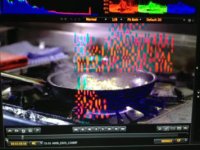

Just thinking about your points, A seems more the problem, since the artefacts are always on different places it has to be a project/codec problem---but I'm just guessing.


Thanks for your thoughts.
 

Attachments

  • image.jpg
    image.jpg
    19.9 KB · Views: 0
  • A014_C002_1212WN.0006068.jpg
    A014_C002_1212WN.0006068.jpg
    93.9 KB · Views: 0
Actually no - there is no "physical" damage to the SSD as there normally is with a conventional HDD. This is simply a data corruption that can occur at any place on the SSD - which is why it does happen all over at various places. As I have mentioned before I believe I might have been the first person to actually experience this back on the early RED ONE cameras when we have shoot at 15000+ feet above the sea level in freezing conditions. Back then it was confirmed a data corruption due to issues with the CF cards and the CF module. The CF module was replaced and all CF cards slow-formated and I have not seen that issue again... ...until recently on my Scarlet. Slow-formating the media solved this problem and I have not seen it since (and I keep slow-formating the SSDs at least once a month or every time the SSD is not properly ejected). This might be just an coincidence - but I doubt it. It is not clear what causes this corruption - but it certainly seems to have something to do with how the camera communicates with the SSD while writing the data...

Just my 2 yen...

Peter

EDIT: Just for the record - I have not heard of anyone having this issue on the conventional RED DRIVE - only solid-state media (CF and SSD)...
 
Thanks for your help Peter.

I'll do as you described and keep an eye for artefacts.

Thank you very much.
 
Back
Top