Welcome to our community

Be a part of something great, join today!

  • Hey all, just changed over the backend after 15 years I figured time to give it a bit of an update, its probably gonna be a bit weird for most of you and i am sure there is a few bugs to work out but it should kinda work the same as before... hopefully :)

23.976 Footage Plays in Slow Motion. Need a solution!

Zachary Frost

New member
Joined
Mar 17, 2014
Messages
4
Reaction score
0
Points
0
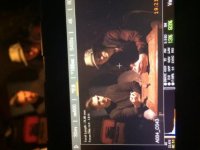
Hello, EveryoneI've just joined this site after going through the forum for a while I noticed that no one else has had this problem before. You guys seem like a great community of helpful people so I was hoping I could get a solution to my problem!I rented a Scarlet a couple weeks back to shoot a music video with some friends and I had the chance to mess around and get used to the settings a bit before but this was my first time with it so I might have done something wrong.I thought I was shooting at 30 FPS but my computer says 23.976. I attached a screenshot of the settings on the LCD and a video of my footage played at regular speed. I don't know why it plays in slow motion but it's a problem when trying to match lyrics to the videoAny help would be greatly appreciated. Thank you.Video Example: https://www.youtube.com/watch?v=G3Vt1CdZRAU
 

Attachments

  • image.jpg
    image.jpg
    14.7 KB · Views: 0
You shot 30 over 23,98, which means slomo/Varispeed (and no audio)

If you are mac-based you can export QT and re-time to right base framerate with cinematools.

Will not change the base framerate of the R3D, though...
 
your project baseline rate is 23.98 - SEE Lower left corner of the screen. Your frame rate is set for the 30p - see upper left corner of your screen - so yes - your are shooting a flight flow-motion. You would have need to make sure the project and the frame rates match - both set to 30p - you will have to render out the footage and convert to 29.97 - then re-sync and match up in your post workflow.
 
Oh wow I see that now... Amateur mistake I'm sure. What would be the best way to do this without losing a lot of quality/throwing the frame rates off?
 
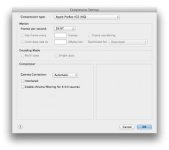
if your in RCX - you can setup an export mode that uses a new frame rate (ie 29.98 or 30p) - this is an option in your export settings - that way your working from the original r3d. The other way is take the original output at 23.98 and take it into After Effects and 're-time there - then output the new file.
 
It sounds like you had your FPS at 30(29.97) (the screenshot is blurry for me) and your project frame rate at 23.976. This is Varispeed mode and audio is not recorded in this mode, the monitor also says varispeed in the lower right corner. Also, when in Varispeed mode, the FPS number turns Yellow. This would explain your "slow footage" because the camera was essentially overcranked (shooting more frames than the project frame rate).

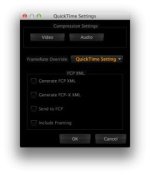
One thing you could try is to create an export preset in RCX where you set the Quicktime settings to 29.97 in the Quicktime setup, and then use the FrameRate Override option set to Quicktime Setting. By doing this, you'll be creating footage that should be correct. Next time, if you plan on shooting at 29.97 FPS for something, then change the project time base settings on the camera. Look in Settings>Project>Frame Rate screen then look for the advanced button.


Ha, everyone beat me to posting, I guess that is what happens when you start writing a post and then get distracted :)
 

Attachments

  • Screenshot 2014-03-17 10.33.02.jpg
    Screenshot 2014-03-17 10.33.02.jpg
    9.5 KB · Views: 0
  • Screenshot 2014-03-17 10.33.13.jpg
    Screenshot 2014-03-17 10.33.13.jpg
    7.9 KB · Views: 0
Thanks a lot, guys! I'll be sure to check the project settings next time too. Your quick responses are very much appreciated.
 
Back
Top