Welcome to our community

Be a part of something great, join today!

  • Hey all, just changed over the backend after 15 years I figured time to give it a bit of an update, its probably gonna be a bit weird for most of you and i am sure there is a few bugs to work out but it should kinda work the same as before... hopefully :)

Good Practice

PatC

Well-known member
Joined
Oct 16, 2008
Messages
474
Reaction score
0
Points
0
Location
NY
Hey Guys,

I thought it might be fun to have a thread about "good practices" if this is a repost than sorry, but if not might be a good read! Everyone add one...

here is an example-

Always eject drives before powering down the camera.
 
Shoot 1/2 less stop exposure that what the goalposts and/or common sense tell you, then bring back highs in post. This gives more precise post-control of falloff and better maintains highlight saturation.
 
And from a RED/IT point of view, whenever the budget allows redundancy is paramount, backup bodies, backup DIT stations, backup everything you can afford to.
 
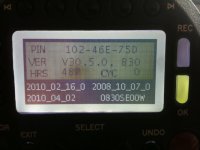
Always check what build your on- undo+joystick...

This is priceless Pat!
I always wondered how to determine the Build installed, when the camera is running. This helps a lot. GREAT!!!
 

Attachments

  • display_fw.jpg
    display_fw.jpg
    82.9 KB · Views: 0
Oh, and if you are a DIT you want to make sure, that you have a uninterrupted power supply unit. Because there is nothing worse than someone pulling the plug, when you are right in the middle of downloading some files :emote_hanged:
 
Delete the files after confirmed transfer, never format a magazine with files on it.

If you get rid of just the .profiles this will make the card unformatted in camera, but the media still readable on your machine. I do this as a safety in case for some reason I need to get back to a card before it is shot again...

Also, try to cycle your media appropriately, go through all your media before repeating.
 
When prepping for a shoot, always go to the maintenance menu and reset LOOK, USER, and SYSTEM.

If you don't know the cameras usage history and/or you just updated the software build, do a black balance as well.

Then go through your checklist of parameters and set them for the job.
 
"undo + system" goes right back to the last menu page you were at. This makes you work very fast (ie. when change the varispeed setting back and forth)
 
If you finish a job and you give back your media to the rental house, make sure you overwrite it with zeros, if you don´t want the next guy who picks up your drive to see all of your footage when he´s running redundead over it.

But only do so after you triple checked, that you have copied everything!
Once you overwrite your footage it can´t be retrieved!!!
 
Back
Top