

Hello everybody...
I'm preparing to cut a project on Avid Media Composer 4.0.5 on a Mac, it will be my first time using Red footage with Avid (I have a good amount of experience with Red and FCP). I've been testing out footage I have left over from an old Red project and running into an issue where upon import, my footage has a very unpleasant desaturated look. I've done a lot of searching through various forums and come across a few instances where people say it has to do with luminance issues between 601/709 and RGB on the source/timeline monitors.
Here's a couple of them:
http://community.avid.com/forums/p/67309/376951.aspx#376951
http://community.avid.com/forums/p/32334/179122.aspx#179
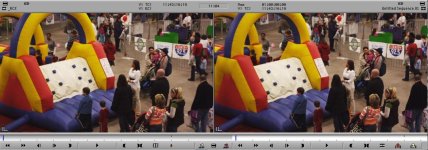
While this does fit my description to a degree, I think the problem I'm having goes beyond that. Just to be sure, on the same project with the same settings, I imported footage that I transcoded using Clipfinder at 1/4 res debayer 1080 DNxHD 36 codec. Then I imported a QT reference file (the M proxy) direct from the camera files. The reference file was what I would have expected the image to look like while the DNx was completely washed out. I'll post a comparison picture:
Here is the M proxy:

Here is the DNx wrapped QT

I also tried transcoding using RedRushes with the same result. I've played around with the color space and the gamma, I tried using a 10 bit DNxHD 175, I've imported RGB and 601/709, and done everything by the book as I understand it for Clipfinder and RedRushes workflows. Everything gives me these washed out files. Before this, I had never run into that problems with Avid.
Something I just noticed as I was posting these screenshots is that if I open up the M proxy and the DNx transcode in Quicktime, the transcode is obviously brighter, but not washed out. But then, when I compare them to the screenshot of the M Proxy imported by Avid, the image is almost identical to what my transcode looks like in Quicktime. I'm not sure exactly what that means, but maybe someone does?
Top left is M proxy in Quicktime Player, Bottom left is transcode in QT Player, middle right is the screenshot of the M proxy as imported by Avid.

Does anybody recognize this problem? I don't know if it's an issue with the way I'm transcoding or the way Avid is importing, but I'd like to figure this one out!
If it makes any difference, I believe the camera build for that footage is #17, it's 4k footage that I scaled down to 1920x1080 on the transcode. 23.98 fps. I'm on an iMac with a ATI Radeon HD 2600 Pro graphics card. I am current on all Red software and drivers.
Thanks in advance to anybody who has any insight on this, I don't really know what else to try...
I'm preparing to cut a project on Avid Media Composer 4.0.5 on a Mac, it will be my first time using Red footage with Avid (I have a good amount of experience with Red and FCP). I've been testing out footage I have left over from an old Red project and running into an issue where upon import, my footage has a very unpleasant desaturated look. I've done a lot of searching through various forums and come across a few instances where people say it has to do with luminance issues between 601/709 and RGB on the source/timeline monitors.
Here's a couple of them:
http://community.avid.com/forums/p/67309/376951.aspx#376951
http://community.avid.com/forums/p/32334/179122.aspx#179
While this does fit my description to a degree, I think the problem I'm having goes beyond that. Just to be sure, on the same project with the same settings, I imported footage that I transcoded using Clipfinder at 1/4 res debayer 1080 DNxHD 36 codec. Then I imported a QT reference file (the M proxy) direct from the camera files. The reference file was what I would have expected the image to look like while the DNx was completely washed out. I'll post a comparison picture:
Here is the M proxy:
Here is the DNx wrapped QT
I also tried transcoding using RedRushes with the same result. I've played around with the color space and the gamma, I tried using a 10 bit DNxHD 175, I've imported RGB and 601/709, and done everything by the book as I understand it for Clipfinder and RedRushes workflows. Everything gives me these washed out files. Before this, I had never run into that problems with Avid.
Something I just noticed as I was posting these screenshots is that if I open up the M proxy and the DNx transcode in Quicktime, the transcode is obviously brighter, but not washed out. But then, when I compare them to the screenshot of the M Proxy imported by Avid, the image is almost identical to what my transcode looks like in Quicktime. I'm not sure exactly what that means, but maybe someone does?
Top left is M proxy in Quicktime Player, Bottom left is transcode in QT Player, middle right is the screenshot of the M proxy as imported by Avid.
Does anybody recognize this problem? I don't know if it's an issue with the way I'm transcoding or the way Avid is importing, but I'd like to figure this one out!
If it makes any difference, I believe the camera build for that footage is #17, it's 4k footage that I scaled down to 1920x1080 on the transcode. 23.98 fps. I'm on an iMac with a ATI Radeon HD 2600 Pro graphics card. I am current on all Red software and drivers.
Thanks in advance to anybody who has any insight on this, I don't really know what else to try...


 never know when I might need it!