Tims Johnson
Well-known member
- Joined
- Apr 18, 2007
- Messages
- 45
- Reaction score
- 0
- Points
- 0
- Location
- Hollywood, CA
- Website
- www.blacklistdigital.com
Does anyone know a way to crop 16x9 center crop out of anamorphic footage directly out of ROCKETCINE-X?
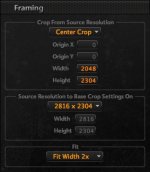
The anamorphic footage I have was shot in anamorphic mode with anamorphic lenses, so the files are 2816x2304 with anamorphic squeeze. I need to export a 16x9 center crop of the unsqueezed image, cutting off the image on the right and left side of frame.
ROCKETCINE-X appears to only have a 2x Fit Width setting to un-squeeze the anamorphic footage, and the crop tools seem to be applied prior to the unsqueezing of the anamorphic image.
Is there a way to crop into the image after the 2x unsqueeze? Or maybe something in REDCINE-X
The anamorphic footage I have was shot in anamorphic mode with anamorphic lenses, so the files are 2816x2304 with anamorphic squeeze. I need to export a 16x9 center crop of the unsqueezed image, cutting off the image on the right and left side of frame.
ROCKETCINE-X appears to only have a 2x Fit Width setting to un-squeeze the anamorphic footage, and the crop tools seem to be applied prior to the unsqueezing of the anamorphic image.
Is there a way to crop into the image after the 2x unsqueeze? Or maybe something in REDCINE-X