Welcome to our community

Be a part of something great, join today!

  • Hey all, just changed over the backend after 15 years I figured time to give it a bit of an update, its probably gonna be a bit weird for most of you and i am sure there is a few bugs to work out but it should kinda work the same as before... hopefully :)

Full vs. Half Debayer

Greg McDonald

Well-known member
Joined
Aug 31, 2007
Messages
298
Reaction score
0
Points
0
Location
Los Angeles
Website
gate5films.com
At Red day they really emphasized always doing a Full debayer. But not if you're going to 1080 correct? I'm asking because on all the tests I've ever done, the sharpest and best images always resulted when setting the debayer to "Half Standard" in RedRushes and now "Half Good" in RecCine-X - again, that is when going to 1080.

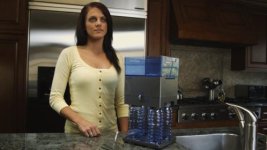
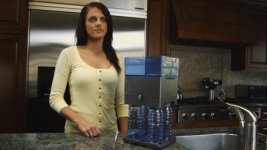
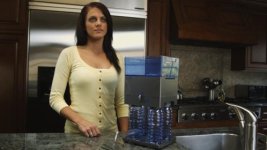
Here are 3 frames exported from the converted ProRes 4:4:4 1080 files using RedCine-X and you can see the one made with 'Full Good' debayer is by far sharper than the ones made with 'Full Premium' and 'Full' debayer, which are soft and mushy by comparison. (it's very apparent in her eyes and face)

I'm wondering if others get the same results or if there's something I'm not doing right when doing a Full debayer?

Frames here (attached them to the post but the forum makes them too small to tell) -

http://icorptv.com/media/Full.png

http://icorptv.com/media/Half-Premium.png

http://icorptv.com/media/Half-Good.png
 

Attachments

  • Full.jpg
    Full.jpg
    19.3 KB · Views: 0
  • Half-Premium.jpg
    Half-Premium.jpg
    19.1 KB · Views: 0
  • Half-Good.jpg
    Half-Good.jpg
    19.5 KB · Views: 0
icorptv.com/media/Half-Good.png appears the sharpest on my screen. It also appears slightly brighter allowing one to see more detail in the eyes
 
I did same test yesterday and 1/2 good was sharper than 1/2 premium and it was alo sharper than full debayer.

I did it in Redcine-X build 104 with build 21 footage, 16:9 Redcode 36 resized to 1920x1080 TIFF sequence
 
http://www.reduser.net/forum/showthread.php?t=39139

from Deanan's post:

"Both Half High and Full can benefit from a post sharpening at the end of the chain to bring out the perceptual sharpness from the inherent resolution. Think of it as not baking in the sharpness (different from resolution) so you can add the sharpening at the end of the chain and dependent on the output format."
 
http://www.reduser.net/forum/showthread.php?t=39139

from Deanan's post:

"Both Half High and Full can benefit from a post sharpening at the end of the chain to bring out the perceptual sharpness from the inherent resolution. Think of it as not baking in the sharpness (different from resolution) so you can add the sharpening at the end of the chain and dependent on the output format."

OK, but 1/4 is sharper than 1/8 and 1/2 is sharper than 1/4
Why full is not sharper than 1/2?
 
Because 1/2 has less downsampling to fit in a 1080 frame than a 4k size image. The computer first pulls out how much information you have asked it to (full, half, etc) and builds a RGB image at that size, then re sizes that information to whatever resolution settings you've given it. SOOOOO taking a 4k amount of image and packing it into a 1080 size picture a lot of subsampling happens to create a "smoother" image. This image can be sharpened in post to match the 1/2best if you'd like but you get the benefit of much better noise characteristics.
 
It's important not to confuse sharpness for resolution and detail.
Half good will "appear" a bit sharper because it's aliasing alot
and producing alot of false detail. Half Premium and Full
do proper sampling and will give you better resolution.

Full will give you the most resolution which at the end
after scaling and sharpening is the best way to go.
 
Ok, for those three frames I had the Sharpness set to zero. I just did a Full debayer to 1080 and set the Sharpness to 3 and it's a little sharper but not as sharp as using Half Good and still is too mushy for me.

Obviously you can add sharpening later but I'm just trying to figure out which settings result in a 1080 file that doesn't require any further sharpening. So far the only way I've found is by using 'Half Good'.
 
Deanan,

what exactly does sharpening do? and how much would you apply as a rule of thumb?

When I use RedRocket, which always does a full debayer - should I then apply sharpness? (must admit I think it looks very sharp already...:))
 
It's important not to confuse sharpness for resolution and detail.
Half good will "appear" a bit sharper because it's aliasing alot
and producing alot of false detail. Half Premium and Full
do proper sampling and will give you better resolution.

Full will give you the most resolution which at the end
after scaling and sharpening is the best way to go.

Deanan,

So what IS the difference between full and half-premium? This was a new one with the last build.

Mark
 
Also what's a good default for the unsharp mask setting? Where are you guys starting off?
 
I went over the Art Institute of Chicago today and saw a little display about followers of Caravaggio. What struck me, as a cinematographer, was that artificial sharpening -- i.e. edge enhancement -- is nothing new. This one painter, Cecco del Caravaggio (Francesco Buoneri) overdid the trick, painting a faint black line around bright edges and a faint white glow around black edges. His painting have a somewhat Photoshopped-look, even in real life:

http://en.wikipedia.org/wiki/Cecco_del_caravaggio
http://www.artnet.com/artwork/425994387/143920/follower-of-cecco-del-caravaggio-saint-jerome.html
 
Please trust us on this one... Offline anything you want. Do a full res debayer (default with Rocket) for every output to grade, including 1080P...

Jim
 
so sharpening is just edge enhancement?

I sometimes see a thin black line against faces that move in front of bright source of light - I have never applied any sharpening and only do full-debayer. would this suggest that there is some kind of sharpening applied anyways?
 
so sharpening is just edge enhancement?

I sometimes see a thin black line against faces that move in front of bright source of light - I have never applied any sharpening and only do full-debayer. would this suggest that there is some kind of sharpening applied anyways?

There is no in-camera sharpening and none in post unless you purposefully add it.

Jim
 
Why would anyone do less than a full debayer????
 
Took the full image and applied a quick sharpening in Photoshop. Works better than the "half-good" IMHO. There's a lot of detail in there to pull out, so always go with the full debayer and apply sharpening later if you have to.

Link: http://kinema.dk/linked/full-sharpened.png
 
Back
Top