Welcome to our community

Be a part of something great, join today!

  • Hey all, just changed over the backend after 15 years I figured time to give it a bit of an update, its probably gonna be a bit weird for most of you and i am sure there is a few bugs to work out but it should kinda work the same as before... hopefully :)

new REDCINE-X feedback

Is it possible that the media moved?
Can you email me the log files and your rcx project file?

Media was intact.

Done work>attempted export>no love>re-opened Redcine>opened .rcx>no timeline

I'll mail you the files first thing in the morning, don't have them here.


Other minor issues:
- pop art thumbnails on the timeline - turn to normal after ten seconds or so, tend to jump back to Andy Warhole mode after moving the timeline around
- one frame strobe inside a clip when put on a timeline (frame offset by few seconds) - this was one time only
- seizures when zooming the timeline - suggestion: allow turning off constant timeline scanning or thumbnail updating
- seizure when choosing different render folder
 
I too find RedCineX is a bit inconsistent as to whether it saves the time-line or not. Often if I save and close a project after working on the time-line, when I reopen I find it is in the state it was a few edits back.

I'm sticking to RocketCineX for real work for now. Not complaining though. I do realise it is still in alpha.
 
Thanks for the clear example. That'll help quite a bit to recreate.
Can you send the log file for that one also?

One more thing: if I load the project into RedCine-X build 54 and export, there is no scaling issue.

I am going to go through all of the builds and try to pinpoint when this happened.

Log file is attached.

The most recent log file is the last time I output the 3K image.

The other log file is:
- me trying various stretch options (even though no cropping was being done, I thought I'd try), with no difference
- in the middle of that I also try exporting the 4K image unscaled - which works

All of the render times are really short because I abort after a few frames.

Let me know if you want the original R3D or project file.

Bruce Allen
www.boacinema.com
 

Attachments

I am going to go through all of the builds and try to pinpoint when this happened.

Log file is attached.

The most recent log file is the last time I output the 3K image.

The other log file is:
- me trying various stretch options (even though no cropping was being done, I thought I'd try), with no difference
- in the middle of that I also try exporting the 4K image unscaled - which works

All of the render times are really short because I abort after a few frames.

Let me know if you want the original R3D or project file.

Bruce Allen
www.boacinema.com

Email me the logs instead. I can't always check reduser and it's the wrong place to try and debug a problem.
 
Tried again this morning. If I open .rcx using "open with" timeline is empty.

If I open project through Redcine, only one first clip is on the timeline, trimmed but without look applied. Since .rcx is a 552 KB file and the empty ones are around 40 KB, my brain is telling me that the data should be there.

Redcine file and log sent, Deanan.
 
Update:

I'm rendering out clips one by one. If I put more than one clip on the timeline nothing renders out on "Timeline (selected clips)" checked.
 
Hey, RedCineX is great, and the speed of the builds are great, but I'm curious about the amount of builds. The release on the support page is still on build 54 and still listed as early beta, we're now up to build 101 for the experimental build, and these experimental builds are coming at an amazing rate. What is the time frame and order of the new functions in the experimental to start appearing in a non-beta version, and which of the experimental builds is considered the most stable? I'm still using build 96. Not bitching, just curious
 
what are current and stable builds for REDCINE-X & REDROCKET-X ?

what are current and stable builds for REDCINE-X & REDROCKET-X ?

Hey, RedCineX is great, and the speed of the builds are great, but I'm curious about the amount of builds. The release on the support page is still on build 54 and still listed as early beta, we're now up to build 101 for the experimental build, and these experimental builds are coming at an amazing rate. What is the time frame and order of the new functions in the experimental to start appearing in a non-beta version, and which of the experimental builds is considered the most stable? I'm still using build 96. Not bitching, just curious

I had asked a similar question as well, since everything is moving so quickly and i'm trying out the new builds as well, but when we need to go back to a stable build for a job or project....what are the stable recommended builds?

I'm still using redcine v.20

Question: what are recommended stable builds for:
REDCINE-X
REDROCKET-X

Moderators?
 
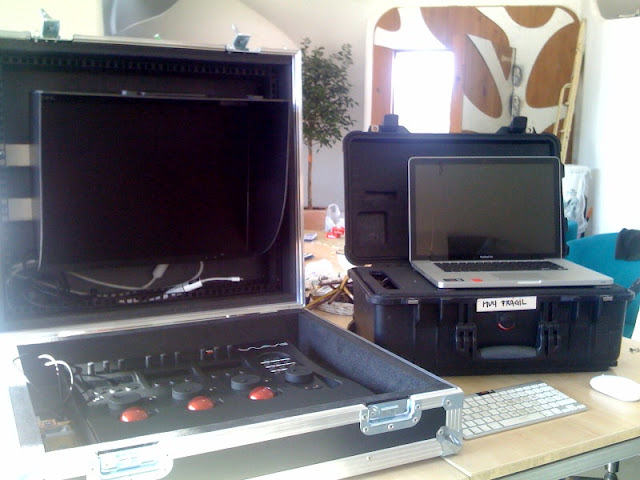
My RC-X station
foto-2.jpg

Nice!
 
I had asked a similar question as well, since everything is moving so quickly and i'm trying out the new builds as well, but when we need to go back to a stable build for a job or project....what are the stable recommended builds?

I'm still using redcine v.20

Question: what are recommended stable builds for:
REDCINE-X
REDROCKET-X

Moderators?

Right now the latest builds Jim has posted here are the ones I'd recommend using. They've had the most bug fixes. Once we push the next official release out, we'll probably start doing more agressive changes in an experimental/beta build in parallel with the release build.
 
Update:

I'm rendering out clips one by one. If I put more than one clip on the timeline nothing renders out on "Timeline (selected clips)" checked.

Thanks, the log helped. I didn't get a chance to reply to your email (got over 250 emails today).

The Timeline (selected clips) bug is fixed in build 104.
We haven't been able to replicate the rcx bug yet.

The new build has an verbose logging feature (under settings).
If you can try to recreate it with verbose logging on, that should help
us solve it faster.
 
Right now the latest builds Jim has posted here are the ones I'd recommend using. They've had the most bug fixes. Once we push the next official release out, we'll probably start doing more agressive changes in an experimental/beta build in parallel with the release build.

Got it! BUILD 104 it is then.
 
Timecode?

Timecode?

Any way to get Edgecode/Absolute timecode display in the next build. That one is killing me, unless I'm missing something.
 
I would personally love it if I could set the Color and Gamma Space once for a project and not have to change it everytime I open a new clip.
 
I would personally love it if I could set the Color and Gamma Space once for a project and not have to change it everytime I open a new clip.

YEAH! have to say that one little thing is quite annoying. I like it when you could set that in project on redcine and it stayed with EVERY clip. I see that maybe you want to grade one clip differently, but that is not very often i think. BUT, if you could put some radio button or other feature so that it would keep in place color and gamma for each and every clip then i'd be happier and able to drink more beer while editing.
 
ANOTHER REQUEST:
while working in the bins...I'd like to be able to put the cursor over the top of a clip, left click the mouse and drag down and have the cursor go down through all the clips in the bin.
Currently i find myself having to click on the clips only visible in the bin, right click and then highlight "remove from bin". if i want to get rid of ALL the clips in the bin or 85% of them....i want to scroll down through all of those and then right click and remove from bin.
 
So what are the M D letters on everything? It seems they reset back to default settings, but BOTH letters reset me to default. ??

This one is a banger for me.....so, i get a clip colored how i like it, then move it out of the timeline....then later go back to the same clip in the bin....and NONE of the color settings i applied are there. So all the work done to the clip is unsaved. I must be missing something?
 
Probably from the newly announced meta data file, a .rmd that can hold several looks, script notes, whatever we come up with, and sticks with the .r3d the whole way through.
 
Is there/can there be a button to toggle between raw metadata graded footage and color graded footage? (besides saving the current grade as a preset and switching between applying original metadata from the camera, then re-applying the preset to get color back) My apologies if this question has already been asked.
 
Back
Top